Bundle
@zhz8888/dsh-android-emulator-helper
Android SDK, emulator and device management plus Kotlin/Compose build-and-run tools for DeepSeek Harness, ported from the official ZCode android-emulator plugin, with a full in-app settings page.
- Source
- zhz8888
- stars
- 1 stars
- License
- MIT
- Updated
- Updated 3 days ago
Readme
# dsh-android-emulator-helper
**English** | [简体中文](README.zh-CN.md)
[](https://www.npmjs.com/package/@zhz8888/dsh-android-emulator-helper)
[](LICENSE)
[](https://github.com/awesome-dsh-plugin/awesome-dsh-plugin)
A DeepSeek Harness (DSH) native port of the official ZCode `android-emulator@0.1.0` plugin: all 23 original MCP tools preserved as native DSH tools, plus a full **settings page** (Settings → Android emulator) that edits the SDK, emulator, system-image, build and output parameters in-app instead of through environment variables.
- Tool and argument names are identical to the original, so workflows written for its `android_emulator` MCP server keep working; the port adds no tool and drops none.
- 17 settings fields in 5 groups, all live-editable; the seven fields the original exposed still fall back to their `ANDROID_PLUGIN_*` variable, then to the built-in default.
- `android_preflight` and the settings page's **Run diagnostic** button run the same checks — SDK, `adb`, `emulator`, AVDs, JDK, Gradle — and print a fix for each failure.
- Published as `@zhz8888/dsh-android-emulator-helper`; the plugin page shows **Android Emulator Helper** / **Android 模拟器助手** from `locale/` rather than the raw package name, and both descriptions say the plugin is unofficial and not affiliated with Google.
## Quick start
On a machine with an Android SDK, a JDK and DSH installed:
1. **Install the plugin**
```bash
dsh plugin --profile <profile> add @zhz8888/dsh-android-emulator-helper
```
In DSH Desktop, open **Plugins** and add the same package name there. Reload or restart DSH afterwards.
2. **Check the machine** — open **Settings → Android emulator** and press **Run diagnostic**. It runs exactly the checks `android_preflight` runs, and prints a fix for anything missing.
3. **Use it** — ask for what you want ("build and run this project on the emulator", "screenshot the running app"), or call the 23 `android_*` tools directly. Everything the tools need is editable on that settings page.
## Contents
- [Quick start](#quick-start)
- [Requirements](#requirements)
- [Install](#install)
- [Settings page](#settings-page)
- [Screenshots](#screenshots)
- [Tools](#tools)
- [Skill and slash command](#skill-and-slash-command)
- [Differences from the original](#differences-from-the-original)
- [Known limitations](#known-limitations)
- [Releases](#releases)
- [Contributing](#contributing)
- [License](#license)
## Requirements
| Dependency | Notes |
|---|---|
| Android SDK | `sdkPath` on the settings page, else `ANDROID_HOME`, `ANDROID_SDK_ROOT`, then the common install paths. |
| Platform tools, emulator and a system image | `adb` and `emulator` come from the SDK; an AVD needs a system image for the API level you target. |
| JDK | `jdkMajor` (`17` by default) selects the JDK a build runs on; the generated project's JVM target is derived from it and clamped to [17, 21]. |
| Gradle | `android_build_app` uses the project's `./gradlew` when it has one and `gradle` from `PATH` otherwise, and can generate the wrapper with that `gradle`. The project `android_create_app` writes ships no wrapper. |
| A device or an AVD | An attached device, or an AVD to boot; `autoStartEmulator` decides whether the tools may boot one themselves. |
| Node.js ≥ 22 | The DSH host runtime. |
`android_preflight` checks every item above and prints a fix for each failure; the settings page's **Run diagnostic** button runs the same checks.
## Install
```bash
dsh plugin --profile <profile> add @zhz8888/dsh-android-emulator-helper
```
**DSH Desktop**: the `desktop` profile belongs to the Electron app — open **Plugins**, add `@zhz8888/dsh-android-emulator-helper` there, and enable the row it creates. After a reload or restart the page is at **Settings → Android emulator**; it only appears while the host half actually serves this plugin's settings namespace.
The published tarball contains everything the plugin needs — the host half, the browser bundle, the bundled skill and the `locale/` entries — and nothing is compiled at install time, so no build approval step is involved. `@deepseek-ai/cordis`, `@deepseek-ai/dsh-tools` and `@deepseek-ai/schemastery` are **peer dependencies** provided by the harness, so the plugin pulls in no second copy and has **no runtime dependencies** of its own; DSH's compatibility gate compares the `@deepseek-ai/dsh*` peer ranges against the running version and refuses to install on a mismatch.
> Mount the package exactly once. `dsh plugin add` records the row in `dsh.profile.bundles`; adding a second row for the same package in the profile's own `cordis.patch.yml` registers every tool name twice and fails at the loader.
### Upgrade and uninstall
```bash
dsh plugin --profile <profile> add @zhz8888/dsh-android-emulator-helper@latest # upgrade
dsh plugin --profile <profile> remove @zhz8888/dsh-android-emulator-helper # uninstall
```
Settings live in the profile, not in the package, so both commands leave them in place. The data directory (by default `$DSH_HOME/android-emulator-helper`, then `~/.dsh/android-emulator-helper`) holds screenshots and build logs; it is yours to delete, and uninstalling does not touch it.
### Version gate
The DSH compatibility range is **`>=0.2.0-rc.2`, a lower bound only**, declared identically in `peerDependencies`, `engines.dsh` and `dsh.compatibility.dsh`: a runtime below it is refused at install time, and no future harness release is excluded.
One node-semver detail survives — a **new tuple's** prerelease such as `0.2.1-alpha.1` is not admitted by npm's and pnpm's default rules, so that install fails until either the range gains a branch for the tuple (`">=0.2.0-rc.2 <0.2.1-0 || >=0.2.1-0"`) or the peer check is skipped:
```bash
dsh plugin --profile <profile> add @zhz8888/dsh-android-emulator-helper \
--config.strict-peer-dependencies=false
```
Stable releases (`0.2.0`, `0.2.1`, `0.3.0`, `1.0.0`, …) are unaffected and always admitted.
## Settings page
The settings namespace equals the profile patch row id equals `android-emulator-helper` (also `dsh.name`). The page reads and writes through `ctx.configForms`, so staged edits, dirty detection, inline validation, optimistic concurrency (revisions) and "overridden / reset to default" all come from the harness. It draws its own title, one card per category — the card outline is what separates them — and saves from a sticky action bar at the bottom that appears only while there is something to act on: a staged edit, a write in flight, or a failure worth retrying.
| Group | Field | Kind | Default | Legacy env fallback |
|---|---|---|---|---|
| SDK and toolchain | `sdkPath` | text | empty (auto-detect) | `ANDROID_PLUGIN_SDK_PATH` |
| | `jdkMajor` | text, suggestions from this machine | `17` | `ANDROID_PLUGIN_JDK_MAJOR` |
| | `buildToolsVersion` | text, suggestions | `35.0.0` | `ANDROID_PLUGIN_BUILD_TOOLS_VERSION` |
| Emulator and devices | `defaultAvd` | text, suggestions | `medium_phone` | `ANDROID_PLUGIN_DEFAULT_AVD` |
| | `defaultSerial` | text, suggestions | empty | — |
| | `autoStartEmulator` | switch | on | — |
| | `emulatorArgs` | multiline, one argument per line | empty | — |
| | `bootTimeoutSeconds` | integer | `180` | — |
| API and system image | `apiLevel` | text, suggestions | `35` | `ANDROID_PLUGIN_API_LEVEL` |
| | `systemImageVariant` | select | `default` | `ANDROID_PLUGIN_SYSTEM_IMAGE_VARIANT` |
| | `systemImageAbi` | select (empty = host architecture) | auto | `ANDROID_PLUGIN_SYSTEM_IMAGE_ABI` |
| | `minSdk` | integer | `23` | — |
| Build | `buildTimeoutSeconds` | integer | `600` | — |
| | `gradleExtraArgs` | multiline | empty | — |
| Output and logs | `dataDir` | text | `$DSH_HOME/android-emulator-helper` | — |
| | `screenshotDir` | text | `<data dir>/screenshots` | — |
| | `logTailLines` | integer | `500` | — |
Two buttons back the page with exact Fetch routes on the host half:
- **Run diagnostic** → `GET /api/android-emulator-helper/status`, the same checks as `android_preflight`, each with its detail and fix hint.
- **Refresh devices and AVDs** → `GET /api/android-emulator-helper/inventory`, detecting the SDK root, AVDs, connected devices, installed JDKs, system images, platforms and build-tools to populate the fields' suggestions.
### Legacy configuration
The original plugin's `userConfig` — the seven variables in the last column above — still works as a fallback (last column above), so an existing ZCode or CI setup needs no change: the resolution order is settings page → environment variable → declared default. The original also read `ANDROID_PLUGIN_DATA` for its data directory; here that directory is the page's `dataDir` field.
## Screenshots
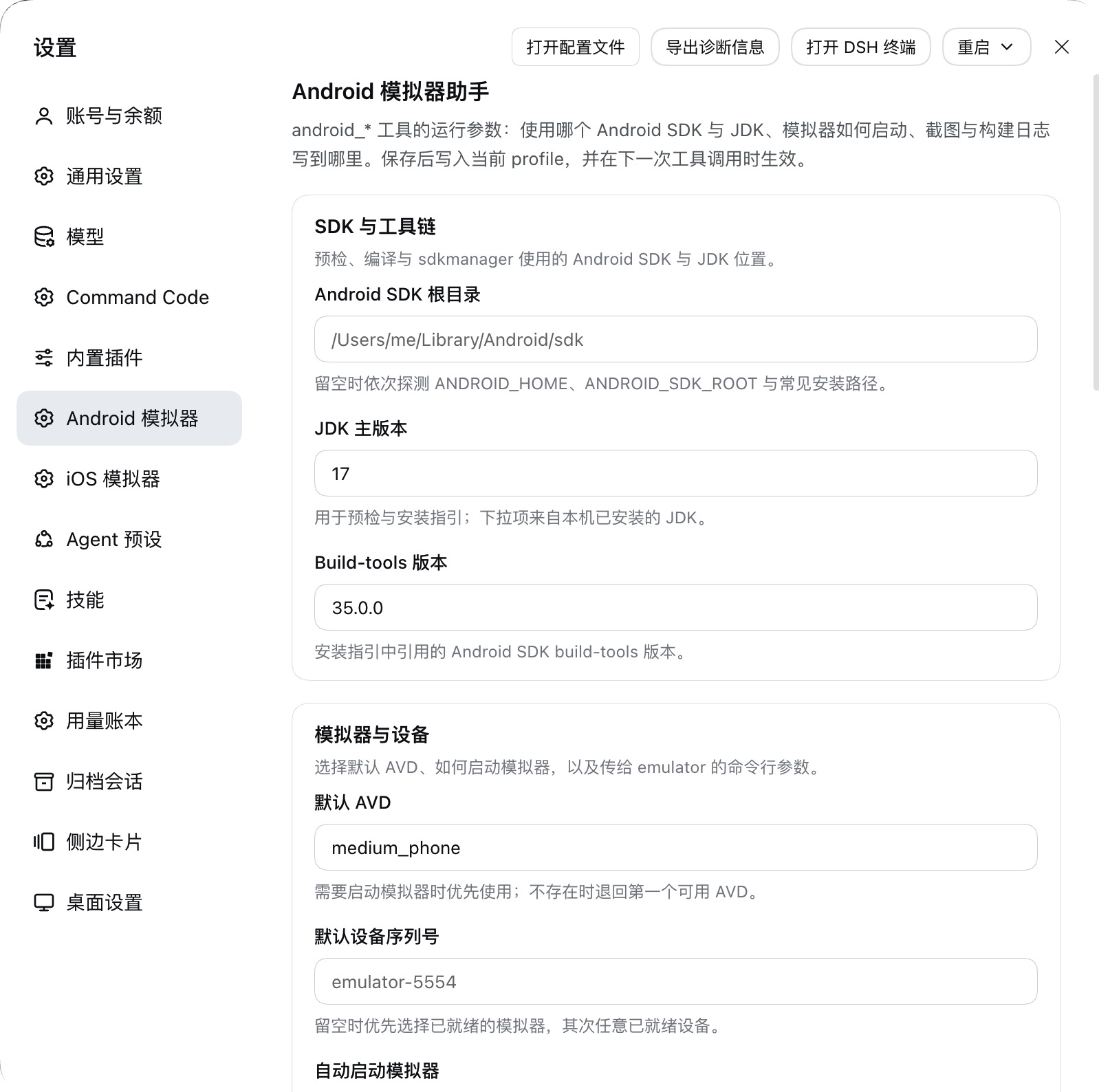
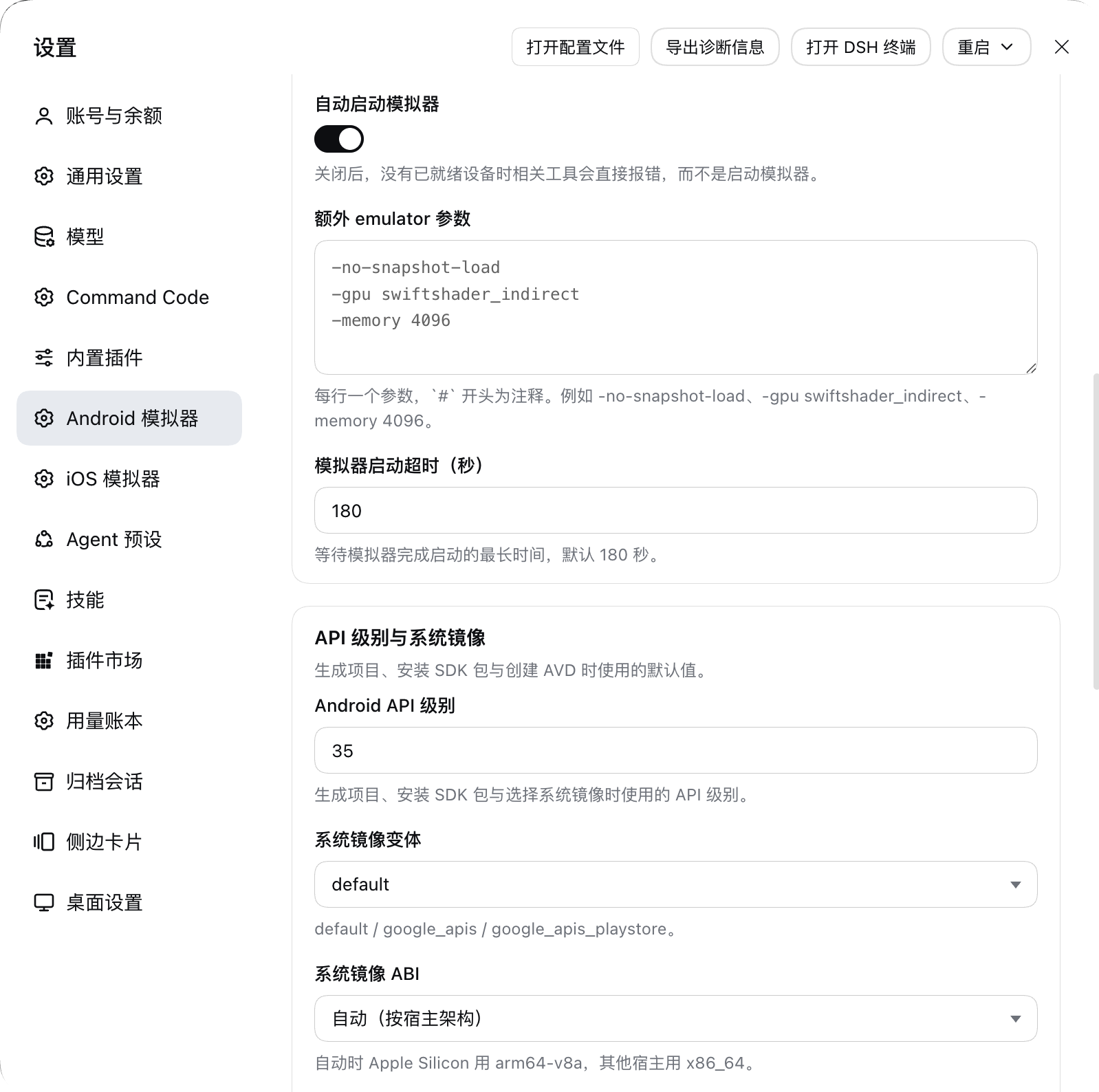
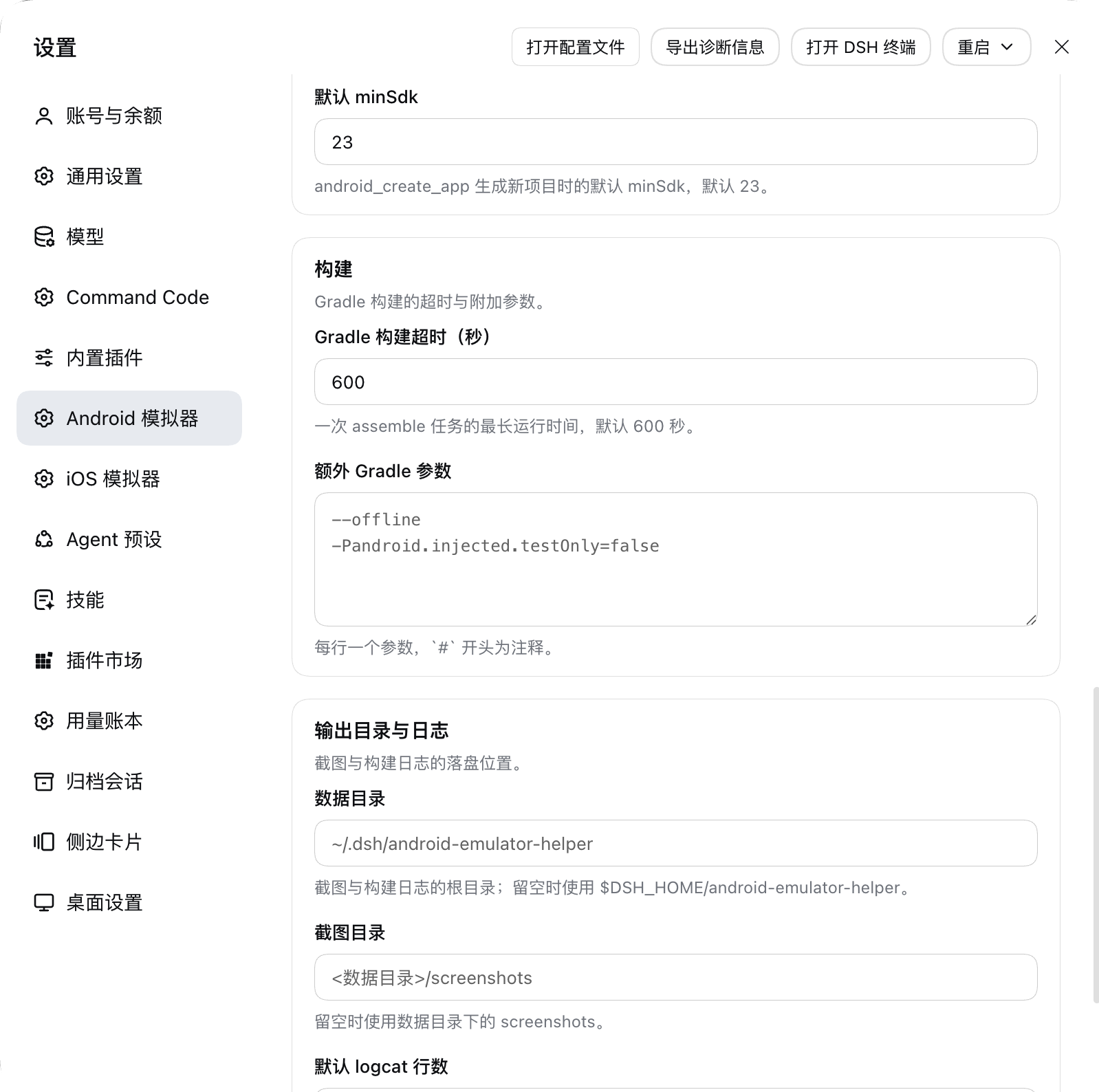
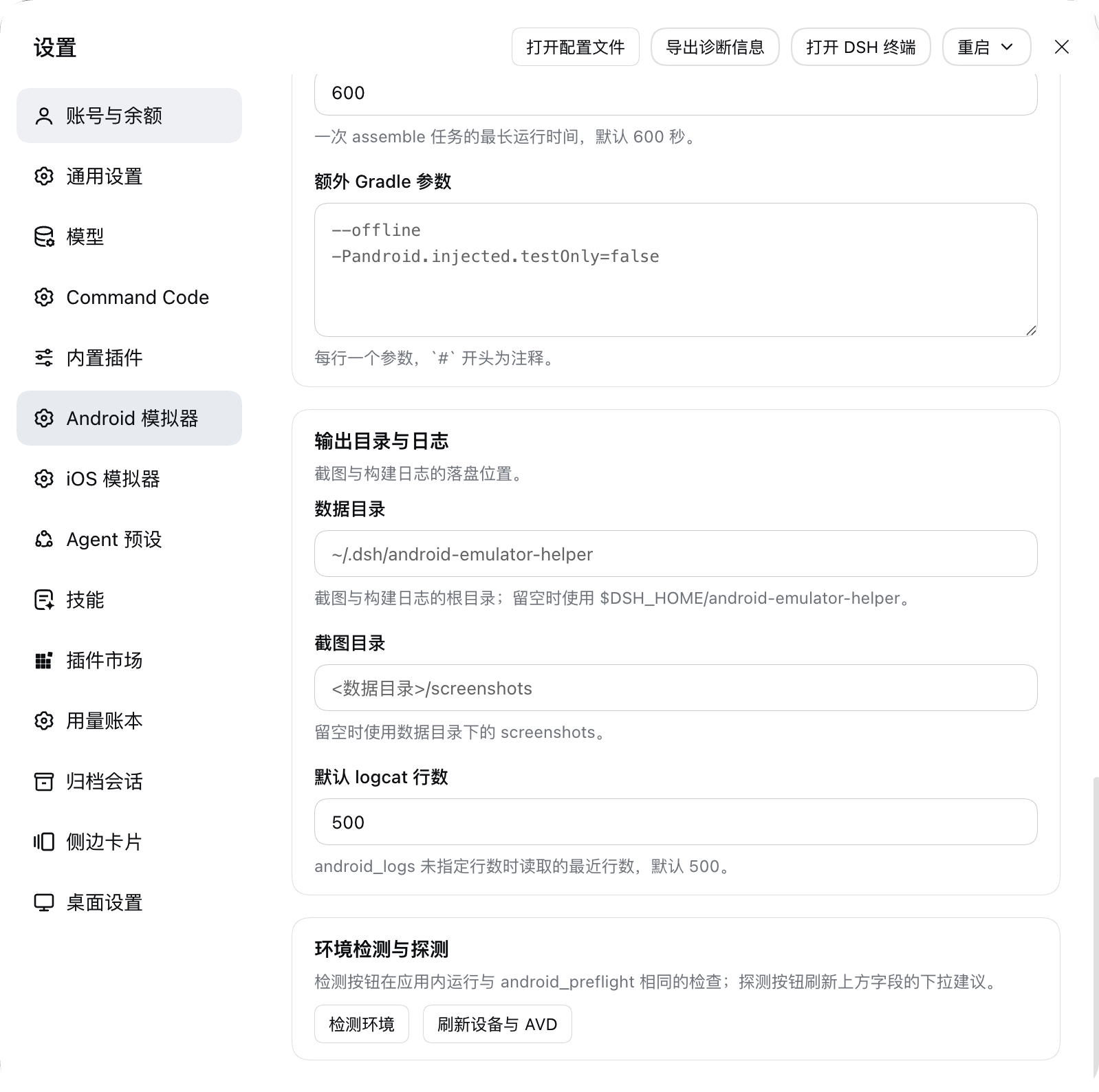
All four are the live page in DSH Desktop, in the order you scroll it — nothing
is mocked up. They are 1598 × 1588 PNGs of the tightened card rhythm (7px above
and below a field, a `12px 16px` card, 16px between cards), captured in the
Chinese locale, so the card headings and field labels read Chinese while the
field keys in the table above are the same in either language. Grey text is a
placeholder standing in for a field left empty, and the sticky save bar appears
only while an edit is staged, so it is not in these shots.
**1. SDK and toolchain** — the SDK root, JDK major version and build-tools
version every `android_*` call resolves first, then the top of the emulator card
with its default AVD:
**2. Emulator and devices** — which device a call talks to and how an emulator is
started: the default serial, the auto-start switch, the extra `emulator`
arguments and the boot timeout, then the top of the API-level card:
**3. API level and build** — what a generated project and an installed system
image target, then the `gradle` timeout and extra arguments:
**4. Output and diagnostics** — where screenshots and build logs land, then the
two buttons backing the page, next to the Fetch routes above:
`screenshots.json` lists these four files in this order next to `package.json` in
the repository, which is how a plugin market finds them.
## Tools
23 tools, identical names and arguments to the original MCP server.
| Tool | Purpose |
|---|---|
| `android_preflight` | Check the SDK, `adb`, `emulator`, AVDs, Java, the Gradle project state and the UI backend, and echo the current settings. |
| `android_discover_project` | Find Gradle roots, modules, variants, application ids, manifests and APK outputs. |
| `android_create_app` | Generate a minimal Kotlin + Jetpack Compose project. |
| `android_build_app` | Build one module and variant with Gradle. |
| `android_build_and_run` | Build → reuse or start a device → install → launch. |
| `android_list_devices` / `android_list_avds` | List the devices adb sees / the AVDs on this machine. |
| `android_start_emulator` / `android_stop_emulator` | Start a new GUI emulator / stop one by serial. |
| `android_create_avd` | Create an AVD with `avdmanager`. |
| `android_install_app` / `android_launch_app` / `android_terminate_app` | Install an APK / launch by application id / force-stop. |
| `android_open_url` | Open a URL on the device. |
| `android_screenshot` | Capture a PNG to disk, and return it as an image when the model accepts image input. |
| `android_logs` | Read the logcat tail, optionally filtered by application id. |
| `android_ui_status` | Report what UI automation is available. |
| `android_ui_describe` / `android_ui_resolve` | The UI Automator element tree / resolve a text, description, resource id or class to coordinates. |
| `android_ui_tap` / `android_ui_swipe` / `android_ui_type_text` / `android_ui_keyevent` | adb-backed tap, swipe, typing and key events. |
`android_screenshot` deserves its own note: it always writes the PNG to disk
(under `<data dir>/screenshots/` by default) and additionally submits it to the
host's attachment service for a canonical image block. When the current model
declares no image input, or the deployment stores no attachments, the result
degrades to text plus the file path instead of failing the call.
## Skill and slash command
- **`android-dev` skill** — shipped in `skills/android-dev/` and registered by the host half through `ctx.skills.register()` as an embedded skill with the skill directory as its `resourceBase`, so `INSTALL_ENVIRONMENT.md` keeps resolving. Rewritten for DSH: no `mcp__…` prefix, and environment configuration points at the settings page rather than at environment variables.
- **`/android-dev [goal]` command** — registered through `ctx.commands.register()`. DSH user commands deliberately never create a model message, so this command does the one thing that is useful without the model: it runs the environment diagnostic and prints the verdict, the failing checks and their fixes.
## Differences from the original
| Aspect | Original (ZCode) | This plugin (DSH) |
|---|---|---|
| Tool exposure | stdio MCP server `android-emulator`; the model sees `mcp__android_emulator__*` | Native `ctx.tools.register()`; the model sees `android_*` |
| User configuration | `plugin.json` `userConfig` (7 items), injected as environment variables | Settings page with 17 fields on a schemastery `Config`, all `.volatile()`; the old environment variables remain as fallbacks |
| Working directory | `process.cwd()` | `exec.agent.session.header.cwd` (the session workspace) |
| Data directory | `ANDROID_PLUGIN_DATA` / temp | `$DSH_HOME/android-emulator-helper`, configurable on the settings page |
| Screenshot result | MCP image content (base64) | An image block built from a host attachment reference, degraded to text plus a disk path on refusal |
| Result normalisation | Providers return objects containing `undefined` | Every result passes through `toLosslessJson()` (the registry rejects `undefined`) |
| Slash command | Injects a prompt into the model's conversation | Runs the diagnostic and prints the verdict |
| Process invocation | `node:child_process` spawn | Unchanged |
The direct spawn is a deliberate trade-off: `gradlew`, `adb` and `emulator` behave byte-for-byte as they did in the original, and `adb exec-out` needs no binary-stream adapter; the cost is bypassing DSH's subprocess seam, so every call carries its own timeout and `SIGTERM` instead. The plugin reads and forwards no credential-bearing environment variables.
## Known limitations
- **Linux is unsupported**, exactly as in the original; `android_preflight` reports it.
- `android_start_emulator` always starts a new emulator and never reuses one. Pass `serial` to the other tools to reuse a target.
- `android_create_avd` always answers `no` to `avdmanager`'s confirmation, so it can never silently trigger a multi-gigabyte image download; install the image with `sdkmanager` first.
- UI automation depends on the device-side `uiautomator`. When it is unavailable `android_ui_status` reports that, and the build, run and screenshot paths are unaffected.
- The settings page's installed-image list comes from scanning the SDK directory, not from `sdkmanager --list_installed`, which fails in restricted environments and prefixes its output with deprecation notices.
- The settings page's two routes are served by the plugin and are mounted in a real profile, but their HTTP responses cannot be exercised outside the GUI: the desktop app authenticates every request, so a bare `curl` to `/api/android-emulator-helper/status` answers `403 forbidden` before the handler runs. The page's spacing, dark theme and narrow-width wrapping still deserve a human look in the GUI.
- No credential handling: the plugin never reads or forwards key/token/secret environment variables.
## Releases
Every release is one commit in two places: tagged `vX.Y.Z` on `main` and published to npm from that tag, whose SHA npm records as `gitHead`. The list is at [Releases](https://github.com/zhz8888/dsh-android-emulator-helper/releases) — [`v1.1.2`](https://github.com/zhz8888/dsh-android-emulator-helper/releases/tag/v1.1.2) is the latest, after [`v1.1.1`](https://github.com/zhz8888/dsh-android-emulator-helper/releases/tag/v1.1.1), [`v1.1.0`](https://github.com/zhz8888/dsh-android-emulator-helper/releases/tag/v1.1.0) and [`v1.0.0`](https://github.com/zhz8888/dsh-android-emulator-helper/releases/tag/v1.0.0).
**Restart the DSH host process after upgrading.** The package is mounted as a `link:` symlink and Node caches ESM modules for the life of the process, so a change under `lib/` does not take effect until the host restarts — until then the tools keep serving the old code.
## Contributing
Issues and pull requests are welcome at [github.com/zhz8888/dsh-android-emulator-helper](https://github.com/zhz8888/dsh-android-emulator-helper/issues). Every change has to keep `pnpm check` green — unit tests, a host/client consistency gate and a mount on a real Cordis host — and there is no CLA or form to fill in: a focused pull request that says what it changes and why is enough.
The package is shaped for the [awesome-dsh-plugin](https://github.com/awesome-dsh-plugin/awesome-dsh-plugin) market. Development conventions — commands, repository map, invariants, testing, commit and release rules — live in [AGENTS.md](AGENTS.md).
## License
[MIT](LICENSE), copyright (c) 2026 zhz8888. Tool definitions, provider logic and the generated Kotlin/Compose project template are ported from the ZCode official `android-emulator` plugin, distributed under the MIT License by Z.ai; the template sources are kept verbatim. See the attribution at the end of [LICENSE](LICENSE).
Install
dsh plugin --profile web add github:zhz8888/dsh-android-emulator-helper
Profile: web
With the hub plugin installed, ask your agent to install it by name — it resolves the same plan shown here.
dsh plugin --profile web add github:stvlynn/dsh.fish#path:packages/dsh-plugin-hub
install zhz8888-dsh-android-emulator-helper from the hub
- This source has no pinned commit, so a later push upstream changes what installs. Prefer pinning a commit.