Bundle
@lengduan/dsh-client-ui-skin-815
1945 终战皮肤:陈坚《公元一九四五年九月九日九时》作为 DeepSeek Harness Web 背景
- Source
- lengduan
- stars
- 1 stars
- License
- MIT
- Updated
- Updated 4 days ago
Readme
# 一九四五年八月十五日 · dsh-815-skin 这个懂的都懂,不懂的先欣赏世界名画 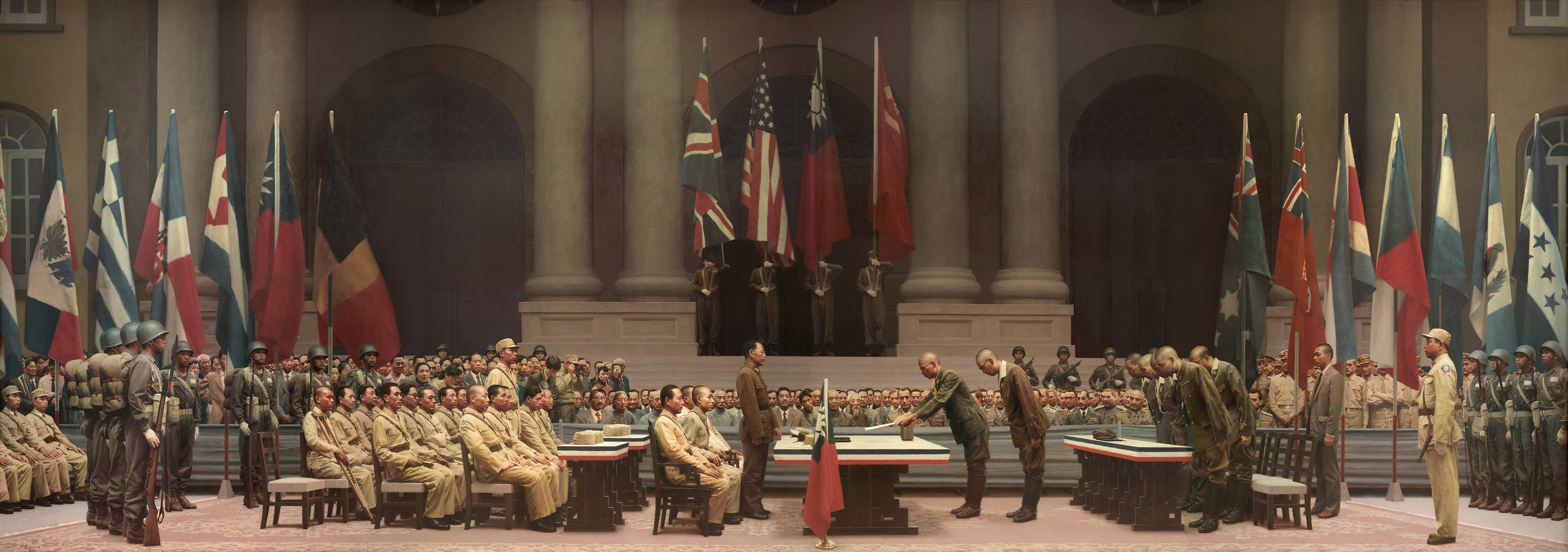 DeepSeek Harness **Web GUI** 史料皮肤。对话区底图是陈坚油画《公元一九四五年九月九日九时》:1945-09-09 南京受降,日军代表弯腰递交投降书。 加载即生效,卸载即还原 DOM / CSS / `document.title`。不改会话、不调模型、不访问网络。 | | | |---|---| | 包名 | `@lengduan/dsh-client-ui-skin-815` | | 插件 id | `ui-skin-815` | | 平台 | `web`(`dsh.client.platform`) | | 许可证 | MIT(代码);油画著作权见 [NOTICE](NOTICE) | 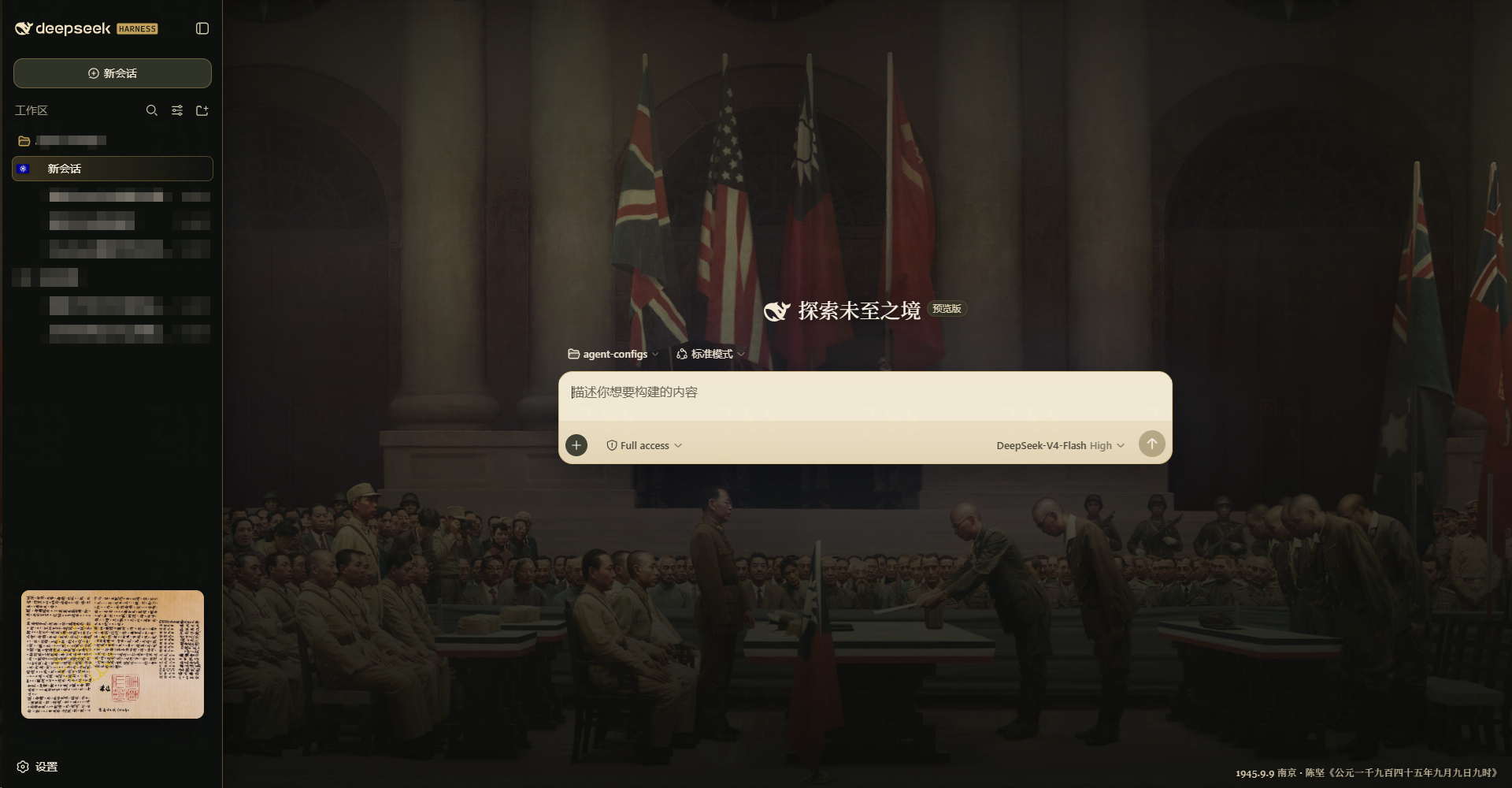 文档结构对齐 [awesome-dsh-plugins](https://github.com/AdamPlatin123/awesome-dsh-plugins)「给插件开发者」对合格 README 的最低要求。 ## Overview **解决什么:** Web UI 默认浅色/默认底换成 1945 终战史料外观(油画底、选中会话青天白日小旗、标题栏品牌)。 **适合谁:** 本机跑 `dsh web` / `--profile web`、只想换皮的人。 **不适合:** TUI / headless;要改 agent 行为、工具权限或主题引擎配置的场景。宿主 `apply()` 为空,效果全在 client bundle。 ## Compatibility | 项 | 声明 | |---|---| | 运行时 peer | `@deepseek-ai/cordis` `^4.0.1` | | DSH 形态 | Web GUI profile(`dsh web`) | | 最后本机验证 | 2026-08-15,Windows,加载后对话区油画可见、卸载后还原 | | 静态检查 | `pnpm test`(jsdom:body 属性、背景、owned 节点撤回) | | 未声称 | 未对照 awesome-dsh-plugins 某日 mainline SHA 做四维雷达;收录 ≠ 兼容 | DSH mainline 几乎每日变。DOM class / token 漂移会导致皮失效或叠层。升级 DSH 后请再看一眼对话列是否被主题底色盖住。 ## Install / Uninstall 装进 **web** profile(从 npm 拉已构建包,不必 clone): ```sh dsh plugin --profile web add @lengduan/dsh-client-ui-skin-815 ``` `dsh plugin` 把参数转给 profile 目录里的 pnpm,成功后把带 `dsh.bundle` 的包写进 `dsh.profile.bundles`。本包 patch 插入 id `ui-skin-815`。 升级: ```sh dsh plugin --profile web update @lengduan/dsh-client-ui-skin-815 ``` 从源码开发:clone 后 `pnpm install`、`pnpm build`,再 `dsh plugin --profile web add .`。相对路径相对你执行命令时的当前目录。本地 `link:` / `file:` 安装时,改源码后重新 `pnpm build`;HMR 是否立刻刷皮取决于宿主 client 热更新。 **禁用(不删依赖):** 在 web profile 的 `cordis.patch.yml`(或能盖过 bundle 层的 patch)把 `ui-skin-815` 设 `disabled: true`。effect 会整份撤回。 **彻底移除:** ```sh dsh plugin --profile web remove @lengduan/dsh-client-ui-skin-815 ``` 依赖和 `dsh.profile.bundles` 层一并拿掉。重启 `dsh web` 后不应再有 `data-dsh-815`、内嵌油画。 固定版本:用 commit / tag,不要依赖会漂移的未钉死分支。建议先在隔离 profile 试加载,再进日常 web profile。 ## Quick start 1. `pnpm build` 且 `dsh plugin --profile web add .` 成功。 2. `dsh web`,打开 GUI。 3. 最小验收:`document.body` 有 `data-dsh-815`;对话区能看见南京受降油画;侧栏不出现诏书缩略;点卸载/禁用后上述全部消失。 无需额外配置文件、无需环境变量。 ## Configuration 无配置项、无环境变量、无密钥。外观写死在 client CSS / `skin.json`。 `skin.json` 只描述元数据(名称、作者、`bodyAttr`、`wiring.id`),运行时不读用户覆盖。 ## Permissions & data | 面 | 行为 | |---|---| | 网络 | 无。底图在构建期 embed 进 client bundle(data URL) | | 文件系统 | 运行时不读用户文件;构建读本仓 `assets/` | | 凭据 / 会话 | 不读 token、密钥、聊天内容 | | DOM | 写 `body` 样式与 `data-dsh-815`;插入标题栏品牌、宽度 stylesheet;给选中会话行打 `data-vj-session*` | | 权限模型 | `dsh.client.inject` 为空;不申请宿主服务 | 卸载走 Cordis `ctx.effect` 销毁器:断 observer、还原 style、删 `data-skin-owner="815"` 节点、清会话标记。 ## Troubleshooting | 现象 | 处理 | |---|---| | 装了没皮 | 确认装的是 **web** profile,且已 `pnpm build`(`lib/client.js` 存在)。`headless` 不会出这层 UI | | 对话区一条水平线 / 油画被切 | 主题 token `--dsw-alias-bg-base` 盖住底图。确认本仓 CSS 已把 `[data-phase='active']` 设透明;升级 DSH 后 class 名变了就要改选择器 | | 禁用后还留着 | 硬刷新;查是否还有别的皮肤插件也在写 body 背景 | | 加载报错缺 `@deepseek-ai/cordis` | peer 未满足。对齐 DSH 自带 cordis `^4.0.1` | | 回滚 | `remove` 包或 `disabled: true`,保留 profile 原 `package.json` / lockfile 再装 | 日志:浏览器控制台 + 启动 `dsh web` 的终端。本插件不写独立日志文件。 ## Development ```sh pnpm install pnpm build pnpm test ``` `pnpm build` 先 `embed-art` 再 tsdown。底图来自 `assets/`,生成 `src/client/art.generated.ts`(gitignore,勿手改)。 贡献:最小 diff;皮肤选择器跟着 Web GUI DOM 走。Issue / PR 请写清 DSH 版本或 mainline commit、本插件 commit、操作系统。 公开收录:仓库加 topic `dsh-plugin`;包名 `@lengduan/*`,不要占 `@deepseek-ai/*`。目录侧流程见 [awesome-dsh-plugins 给插件开发者](https://github.com/AdamPlatin123/awesome-dsh-plugins#给插件开发者)。 ## License & security - 代码:[MIT](LICENSE) - 素材:[NOTICE](NOTICE)。陈坚油画著作权归原作者,本仓仅作本机皮肤底图,不构成对外再授权。《终战诏书》印刷件为公有领域。 - 安全问题:不要在公开 issue 贴密钥或会话。用 GitHub **Private vulnerability reporting**(若已开)或只描述复现步骤的私密渠道联系维护者。 - 本插件不处理用户密钥;若发现 bundle 被塞进外链或凭证,视为供应链问题,按上面私下报。
Install
dsh plugin --profile web add github:lengduan/dsh-815-skin#82fba2dfca4586e6c29ad39816f228b066619946
Profile: web
With the hub plugin installed, ask your agent to install it by name — it resolves the same plan shown here.
dsh plugin --profile web add github:stvlynn/dsh.fish#path:packages/dsh-plugin-hub
install lengduan-dsh-client-ui-skin-815 from the hub
- This package builds from source on install. pnpm will ask you to allow its build script — that is permission to run the package’s code on your machine, outside the agent sandbox. Only allow sources you trust.