Bundle
dsh-upload-file
Workspace file upload with a paperclip dock: upload multiple files into <workspace>/.uploaded_files/<sessionId>/ (per-session isolation), and insert @UPLOAD: references into the composer.
- Source
- seeingrain
- License
- MIT
- Updated
- Updated 9 hours ago
Readme
# dsh-upload-file
[](https://github.com/seeingrain/dsh-upload-file/actions/workflows/ci.yml)
[](LICENSE)
> 🇬🇧 English: [README.en.md](README.en.md)
这个插件允许你将任意文件上传给 DSH,上传后的文件是工作区+会话隔离的。
**尤其适合**:DSH 运行在单独服务器上的用户——聊天里直接上传文件到服务器,后续直接 @ 引用。
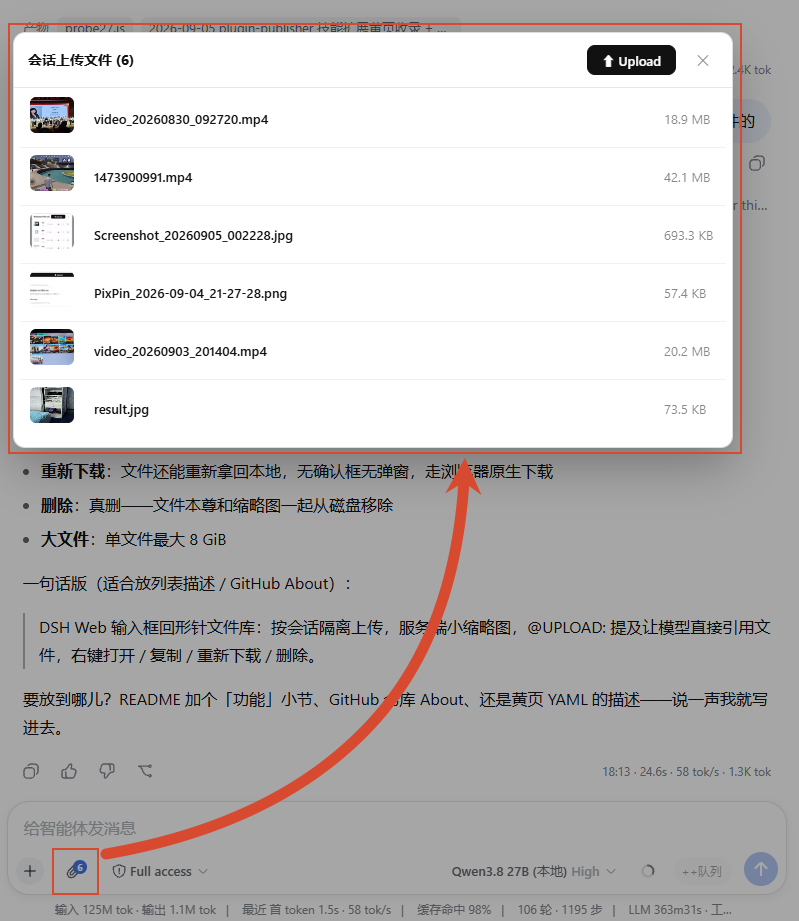
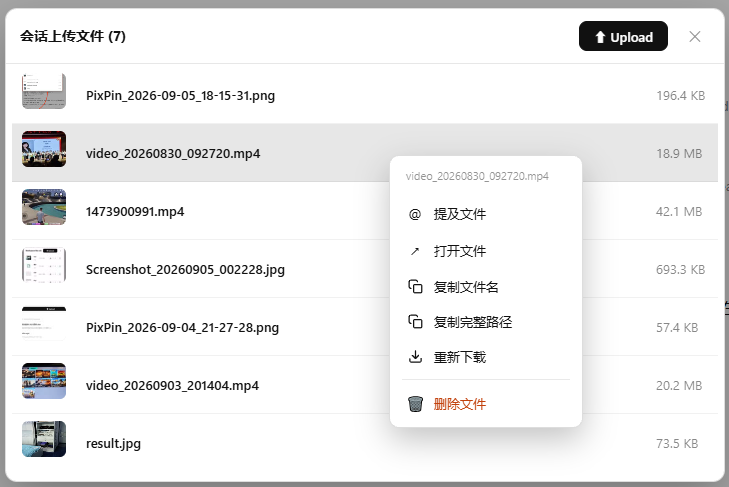
| 文件库弹层(上传 / 列表 / 行内动作) | 右键操作菜单(6 个动作) |
| :---: | :---: |
|  |  |
## 功能
- 输入框工具行(加号旁)多了个 **📎** 按钮,角标显示本会话文件数,点开就是本会话的文件库
- **上传**:一次可以选多个文件,上传中有进度条
- **列表**:一个文件一行——缩略图(图片 / 视频 / PDF)或类型图标 + 名字 + 大小,最新上传的在最上面
- **@ 文件**:在输入框里提及这个文件,模型就能直接用它,不用你报路径
- **右键**一个文件(手机上长按)做 6 件事:
- @ 提及文件
- 用系统默认程序打开(装了 Better Sidebar 就在侧栏打开)
- 复制文件名 / 复制完整路径
- 重新下载一份到本地
- 删除文件(确认后真删,没有回收站)
- **隔离**:每个会话各存各的,互不干扰;同会话重传同名文件自动加数字后缀,不会覆盖
## 存储(文件系统即注册表,无 JSON 索引)
- 每个会话一个子目录:`<会话工作区>/.uploaded_files/<sessionId>/`(隐藏目录)
- **文件名就是唯一身份**(无 displayName 间接层);同会话重传同名文件自动加 `_1`/`_2` 数字后缀,`@UPLOAD:` 引用名 = 目录内实际文件名
- 会话间完全隔离:同名文件在不同会话目录互不冲突
- 列表 = `readdir` + `stat`(按 mtime 降序,最新上传在最顶上)
- system prompt 按会话注入指向本会话目录的约定文本(目录为空时不注入)
## 缩略图(服务端抽帧,图片 / 视频 / PDF)
- 图片(png/jpg/gif/webp/bmp/ico)取原图、视频(mp4/webm/mov/mkv/avi)取 5% 处帧(避开片头黑场,上限 60s)、PDF 取首页,统一缩放到最长边 160px 的 JPEG,质量阶梯递减压到 **≤10KB**
- 存在会话目录的隐藏子目录 `.thumbs/<原文件名>.jpg`;列表接口天然跳过点开头目录,不污染文件库
- 原文件名在会话内唯一且永不被覆盖 → 缩略图生成一次即终态,响应带 `immutable` 长期缓存
- **懒生成 + 并发去重**:首次请求缩略图时按需生成(上传 commit 时也会尽力预生成,失败无碍,取图时兜底);同一文件并发请求只生成一次
- **降级友好**:依赖系统 `ffmpeg`(图片/视频)与 `pdftoppm`(PDF,poppler);缺失或失败时该文件回落为原图(图片)或类型徽章(视频/PDF),不影响上传与列表
- 办公文档(docx/xlsx/pptx)在生成器注册表中**预留接口**(当前不生成,回类型徽章),后续接 LibreOffice 无头转 PDF 链路即可启用;SVG 为矢量、体积天然小,浏览器原生渲染,不生成
## 安全
- 上传全程 SHA-256 校验(客户端摘要 → 提交时服务端比对)
- 所有文件路径操作做目录穿越防护(`normalize(join())` 必须仍在本会话目录内)
- `sessionId` 严格校验(UUID 格式),工作区从会话自身 `header.cwd` 解析,不信任客户端传入的路径
## HTTP 接口(前缀 /dsh-upload-file/v1)
- `POST /uploads/prepare` `{sessionId, name, size}` → `{uploadId, putUrl, commitUrl, deleteUrl}`
- `PUT /uploads/<id>` 流式上传(application/octet-stream,inline sha256)
- `POST /uploads/<id>/commit` `{expectedSha256}` → `{name, displayName, absolutePath, size, createdAt}`
- `DELETE /uploads/<id>` 取消(已 commit 的 id 返回 404,客户端吞掉)
- `GET /sessions/<sessionId>/attachments` 目录列表
- `GET /attachments/content?sessionId&name` 下载 / 打开(防路径穿越)
- `GET /attachments/thumbnail?sessionId&name` 服务端缩略图(懒生成,`image/jpeg` + `immutable` 缓存;不支持的类型 404,客户端回落)
- `DELETE /sessions/<sessionId>/attachments?name=` 删除已提交文件(连带删除缩略图)
## 构建
```bash
pnpm install
pnpm run build
```
## 安装
```sh
dsh plugin --profile web add github:seeingrain/dsh-upload-file
# host 半边需要重启 web;client 半边下次刷新页面即加载
```
本地开发链接方式:在 `profiles/web/package.json` 的 dependencies 里加
`"dsh-upload-file": "link:<本仓库路径>"`,并在 bundles 列表追加 `dsh-upload-file`,然后 `pnpm install`。
## License
MIT — 见 [LICENSE](LICENSE)。
Install
dsh plugin --profile web add github:seeingrain/dsh-upload-file
Profile: web
With the hub plugin installed, ask your agent to install it by name — it resolves the same plan shown here.
dsh plugin --profile web add github:stvlynn/dsh.fish#path:packages/dsh-plugin-hub
install dsh-upload-file from the hub
- This package builds from source on install. pnpm will ask you to allow its build script — that is permission to run the package’s code on your machine, outside the agent sandbox. Only allow sources you trust.
- This source has no pinned commit, so a later push upstream changes what installs. Prefer pinning a commit.