Bundle
dsh-todo-checklist
DeepSeek Harness 待办插件:划词加入待办、对话自动捕获、左侧栏面板汇总与到期提醒(应用内弹窗或机器人推送),数据跨重启持久保存。Todo sidecar for DeepSeek Harness: selection-to-todo, chat-captured todos, a left sidebar panel and due reminders (in-app popup or IM bot push), persisted across restarts.
- Source
- qgd1850890306-rgb
- stars
- 1 stars
- License
- MIT
- Updated
- Updated 2 days ago
Readme
<div align="center">
# ✅ dsh-todo-checklist
**Todos that come out of the conversation — not another app you have to remember to open.**
*Selection to todo · chat-captured todos · left sidebar panel · due reminders · one-click export*
[](https://github.com/qgd1850890306-rgb/dsh-todo-checklist/releases)
[](LICENSE)
[](#)
[](https://github.com/topics/dsh-plugin)
[](#)
[简体中文](./README-zh.md) · **English**
</div>
---
## 🎯 What it does · 它能做什么
Most todo lists fail for the same reason: **the thought appears while you are working, not while you are in a todo app.** You are mid-conversation with the model, it says "you should also check the RoHS report expiry", you nod — and it is gone.
This plugin removes that gap. It lives inside DeepSeek Harness and captures the todo **at the moment the sentence appears**, in four ways:
| You do this | The todo appears |
|---|---|
| Select any sentence in a reply → click **+ Todo** | Opens a card where AI fills in title / content / reminder, or you type it yourself |
| Say "**note this down: …**" / "**remind me Friday**" in chat | The model calls the built-in `todo_add` tool and writes it directly |
| Finish a conversation | Unfinished intents in the exchange are captured automatically |
| Ask "**what's on my list?**" | The model calls `todo_list` and answers from the same data you see |
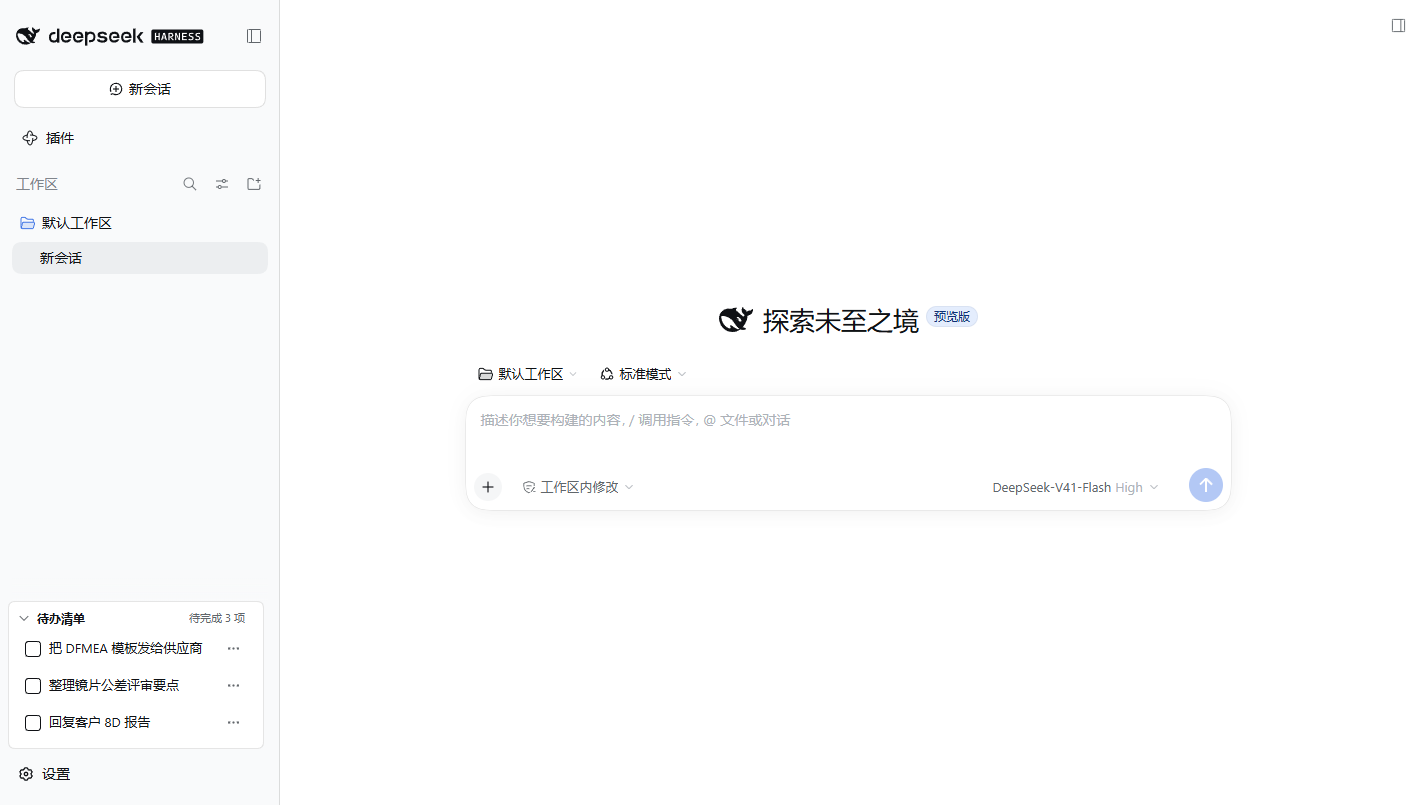
Everything lands in **one sidebar panel** on the left edge — the same place every session, so reviewing costs a glance instead of an app switch.
---
## 📸 Screenshots · 界面截图
**The panel: always there, collapsed to a single line until you need it**
**Select text → a small bubble appears → AI turns the sentence into a structured todo**
<table>
<tr>
<td width="50%"><img src="https://raw.githubusercontent.com/qgd1850890306-rgb/dsh-todo-checklist/main/docs/screenshots/bubble.png" alt="Selection bubble"><br><sub><b>① Select any sentence</b> — the <code>+ Todo</code> bubble follows the selection</sub></td>
<td width="50%"><img src="https://raw.githubusercontent.com/qgd1850890306-rgb/dsh-todo-checklist/main/docs/screenshots/capture.png" alt="AI capture card"><br><sub><b>② The capture card</b> — AI prefills title, content and reminder; every field stays editable</sub></td>
</tr>
</table>
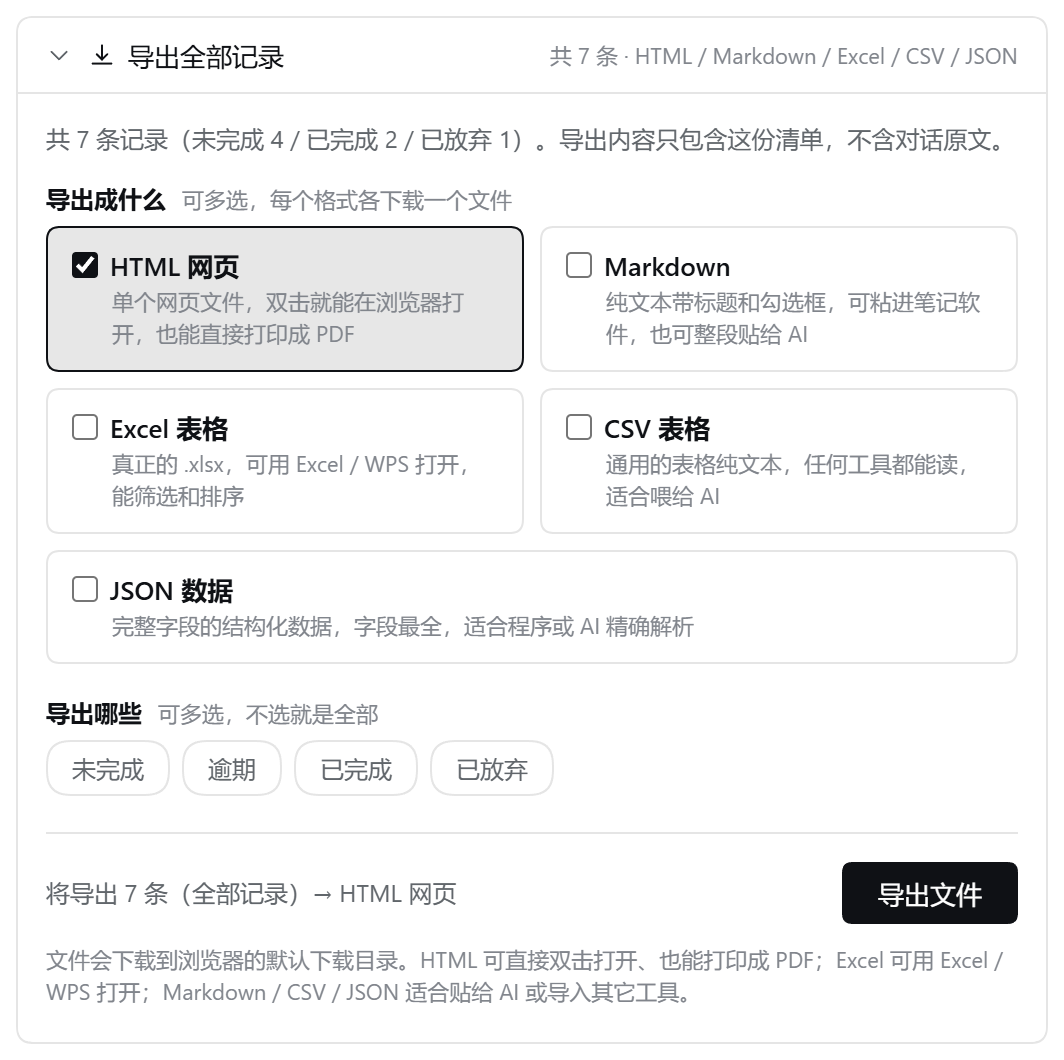
**Export: a collapsible section on the settings page — eight records in, one self-contained file out, pick the format by who reads it**
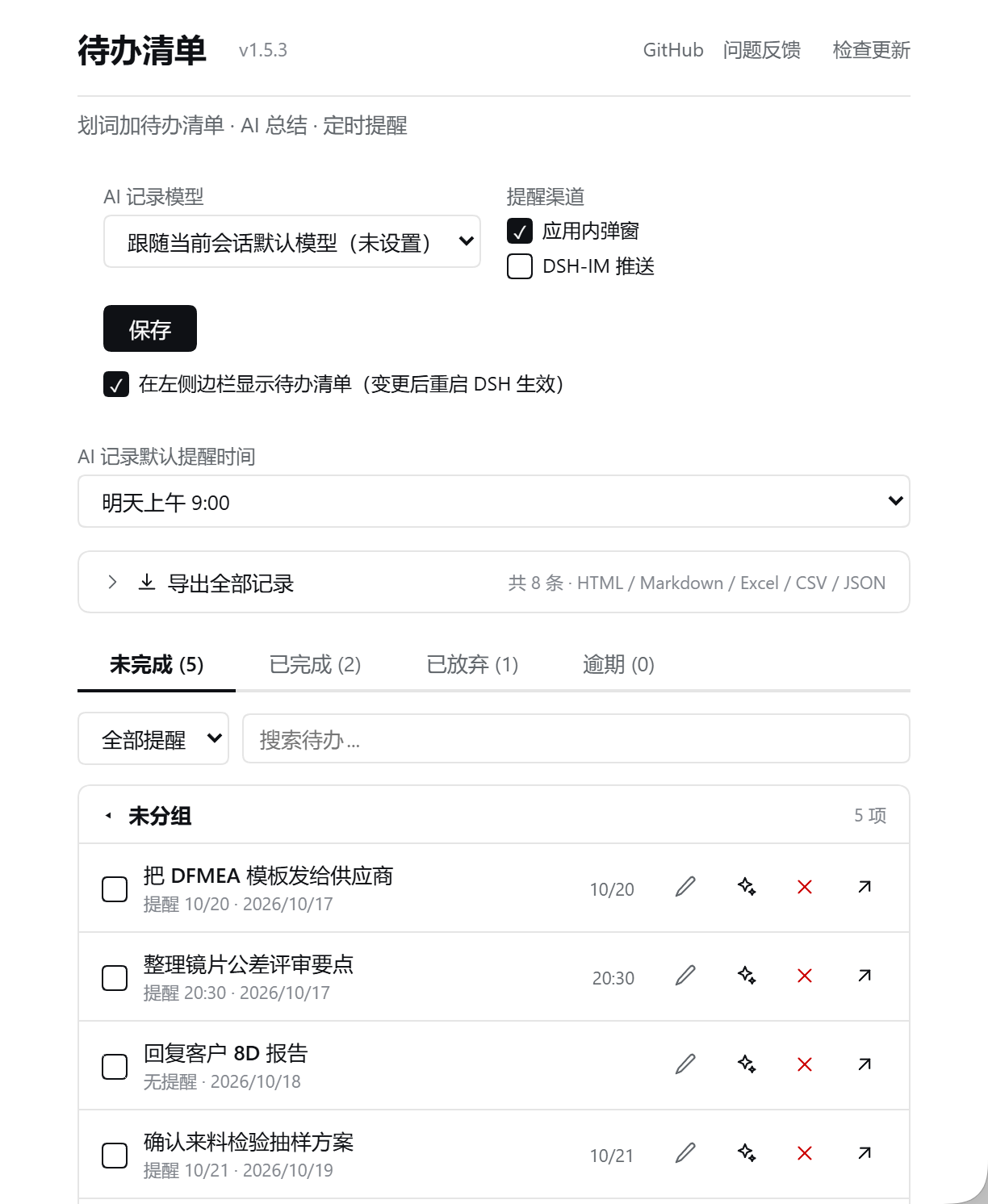
**Settings page: model, reminder channel, sidebar toggle, and the full record list with four tabs**
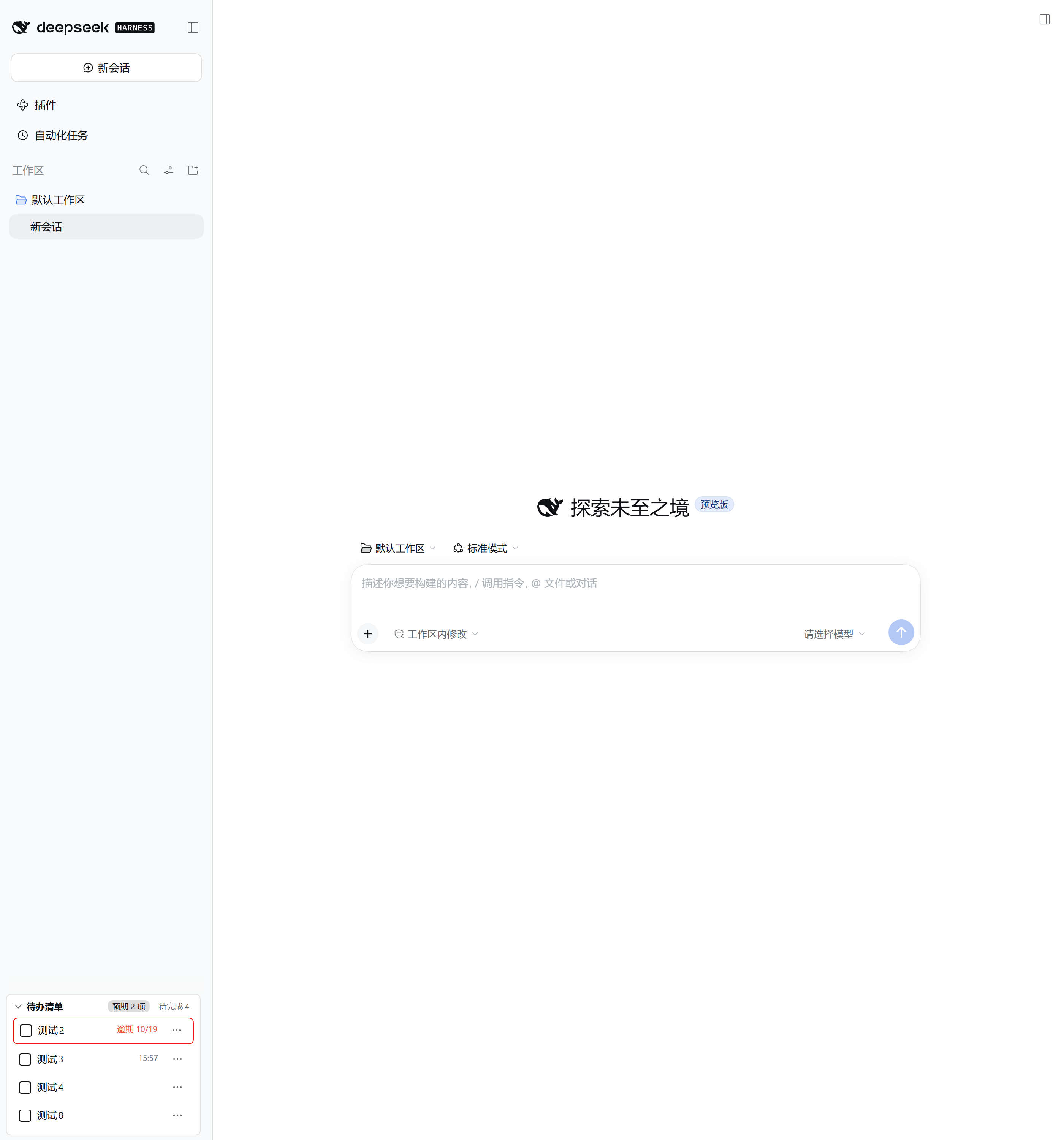
**The whole window, for context**
---
## 🚀 Quick start · 快速上手
1. **Install** — open DSH → sidebar → **Plugins** → **Add plugin** → enter `dsh-todo-checklist` → **fully quit and restart DSH**.
2. **Capture one** — in any conversation, select a sentence → click **+ Todo** → let AI fill it, or type it yourself → **Save**.
3. **Review it** — click **Todo checklist** at the bottom of the left icon rail. Tick it off, double-click to jump back to the original sentence, or let the reminder fire.
That is the whole loop. Nothing to sign up for, no separate server.
---
## ✨ Features · 功能一览
| Feature | What it actually does |
|---|---|
| **Selection → todo** | Select text in any reply → `+ Todo` bubble → modal with **AI capture** (model rewrites the passage into title / content / reminder) or manual entry |
| **Chat-captured todos** | Say "note this down" and the model calls `todo_add` with `source: "model"`; `todo_list` answers list questions from the same store |
| **Left sidebar panel** | Docked at the bottom of the official icon rail. Collapsed it shows `Todo checklist · expected N · pending N`; expanded it is a full list with search, due-filter, and four tabs (Pending / Completed / Abandoned / Overdue) |
| **Due reminders** | Scans every 30 s. Fires an **in-app popup** (Acknowledge / View / Complete — View jumps back to the source session and highlights the original sentence) or pushes through your **DSH-IM bot** (global default, overridable per todo) |
| **Export** | HTML · Markdown · Excel (.xlsx) · CSV · JSON, each over all records or a filtered scope — see [below](#-export--导出) |
| **Editing & deferring** | Edit title, content, reminder time (**segmented year / month / day / hour / minute input** — click a segment, then ± steps that segment only; minutes ±30, others ±1, auto carry); defer by +1 day, next Monday 09:00, or a custom time |
| **AI re-summarise** | Hand an existing todo back to the model to be rewritten as structured content, replacing the entry in place |
| **Convert to scheduled task** | Turn a todo into a recurring task (needs the `dsh-tasks` plugin; falls back to the built-in scheduler, or tells you clearly when neither is available) |
| **Follow-up session** | Double-click a title or click ↗ to open a new session with the todo content prefilled, inheriting the **workspace and model of the session the todo came from**; the todo completes itself once you send |
| **Persistence** | Personal storage domain `dsh_todo_sidecar_items`, survives restarts. A single corrupted record is salvaged/dropped on its own — it never takes the whole plugin down |
---
## 📤 Export · 导出
Version 1.5.0 added export. The design goal was simple: **the same records must be readable by a human and by an AI, and you should not have to convert anything by hand.**
Open **设置 → 待办清单** (Settings → Todo Checklist), expand **导出全部记录**, then pick a format and a scope.
**Formats**:
| Format | Notes |
|---|---|
| **HTML** | One self-contained `.html` file. Double-click to open, print to PDF, no internet needed. Escapes all content (XSS-safe), follows dark mode, has a print stylesheet |
| **Markdown** | Plain text with headings and checkboxes. Paste into any notes app, or feed whole to an AI |
| **Excel (.xlsx)** | A real `.xlsx` (OOXML, 14 columns, frozen header row) — opens in Excel / WPS / Numbers and supports filter and sort. **No third-party library**: the ZIP container is written by hand, so the plugin stays dependency-free |
| **CSV** | Universal plain text. UTF-8 **with BOM**, so Excel opens Chinese correctly; RFC-style quoting for commas, quotes and newlines |
| **JSON** | Complete structured records, every field present — the best shape for precise machine parsing |
**Scopes are multi-select**: pick any combination of pending / overdue / completed / abandoned; the export unions them, and selecting nothing means all records. The chosen scopes go into the filename and the summary line, e.g. `dsh-todo-20261019-0140-pending-overdue.md`.
**Two things worth knowing:**
- The export **only contains the list itself** — titles, contents, times, statuses, AI summaries, source sessions. It does **not** contain the original conversation text. Nothing leaves your machine.
- The formatting logic lives in one shared module (`shared/export-core.js`) used by **both** the UI and the host tool. So the file you download and the text an AI gets from `todo_export` are produced by exactly the same code — no drift between the two.
**For AI agents**, there is a matching host tool:
```
todo_export({ format: "md" | "csv" | "json" | "html", scope: "all" | "pending" | "done" | "abandoned" | "overdue" })
```
Ask the model to "export all my todos as Markdown" and it returns the text directly in the conversation. (`.xlsx` is binary, so the tool returns a hint to use the UI button instead — a deliberate boundary, not a missing feature.)
---
## 🧩 Requirements · 环境要求
- **DSH** `>= 0.2.0-rc.1`. Tested on `0.2.0-rc.1`, `0.2.0-rc.2`, **`0.2.1-rc.2`**.
- **Node.js** `^22.19.0 || >=24.0.0` (declared in `engines`; the desktop runtime ships Node 24).
- Desktop or Web — the client face declares `platform: web`.
- **Zero runtime dependencies.** The host face is pre-bundled into self-contained files (`lib/host.js`, `lib/typert.js`, zod inlined). There is nothing to download at install time, so `link:`, offline and tarball installs all behave identically.
---
## 📦 Install · 安装
**Option 1 — npm (recommended, one line)**
```bash
dsh plugin --profile desktop add dsh-todo-checklist
```
It is published on the public npm registry (`https://www.npmjs.com/package/dsh-todo-checklist`). Omit the version to get the latest; pin one with `dsh-todo-checklist@<version>`.
**Option 2 — GitHub**
```bash
dsh plugin --profile desktop add https://github.com/qgd1850890306-rgb/dsh-todo-checklist.git
```
The built `lib/` is committed, so neither route compiles anything at install time — no `allowBuilds` prompt, no toolchain needed.
**Option 3 — Local directory or tarball** (offline / intranet)
```bash
dsh plugin --profile desktop add <absolute path to directory or .tgz>
```
**Via the UI**: **Plugins** → **Add plugin** → enter `dsh-todo-checklist`, or paste the GitHub URL above.
**Via the official Discover page**: the repository root carries an `index.json` written as a DSH **format 1 plugin market index** (`source.type = git`, pinned to the release commit). Add it as an index source:
1. **Settings** → **Plugins** → **Discover** → **Add index source**
2. Paste this address (a CDN mirror with CORS, reachable here):
```
https://cdn.jsdelivr.net/gh/qgd1850890306-rgb/dsh-todo-checklist@main/index.json
```
> The community catalog `awesome-dsh-plugin` picks up plugins published to npm into its format 1 index (refreshed once a day), so roughly a day after landing on npm this plugin shows up in Discover on its own — no manual index source needed. The self-hosted index above is an immediately usable fallback.
**Upgrade** (npm route):
```bash
dsh plugin --profile desktop add dsh-todo-checklist
```
**Uninstall**:
```bash
dsh plugin --profile desktop remove dsh-todo-checklist
```
> Client-side UI changes only take effect after a **restart of DSH**.
> **Success looks like:** the left icon rail gains a **Todo checklist** entry.
---
## 🕹 Usage · 使用
- **Add** — select text → `+ Todo` → **AI capture** or fill in title / content / reminder.
- **Set a reminder** — in single-shot mode, **click the year / month / day / hour / minute segment you want, then press − / +**: only that segment steps (minutes ±30, everything else ±1). Keyboard ↑ / ↓ steps, ← / → switches segments. Or use a preset: in 1 hour / tomorrow 09:00 / tomorrow 17:00 / weekday 09:00 / next Monday 09:00.
- **Repeat** — switch to **Daily** or **Weekly** and pick the weekday and time.
- **Review & act** — click **Todo checklist** to expand; tick to complete; ✎ edit, ✦ re-summarise with AI, ✕ delete; the `⋯` menu holds edit / delete.
- **Jump back** — double-click a title (or ↗) to open a follow-up session; the new session inherits the original workspace and model, and the todo completes itself after you send.
- **Export** — click **导出 / Export** in the panel header or on the settings page.
- **Notification channel** — defaults to the in-app popup; tick **DSH-IM push** on the settings page to also push to a bot (requires `dsh-im` installed and a bot configured).
---
## 🔒 Data, privacy & permissions · 数据、隐私与权限
- **Where the data lives** — `<DSH_HOME>/storages/dsh_todo_sidecar_items.json` (`<DSH_HOME>` defaults to `~/.dsh`). Uninstalling the plugin does **not** delete this file; delete it manually to wipe.
- **Network** — the plugin makes **no external network requests of its own**. Only when you enable DSH-IM push does it hand a reminder to your local DSH-IM service for a bot you configured.
- **Logs** — nothing is written by default. For support, set `DSH_TODO_DEBUG=1` and logs go to `<DSH_HOME>/dsh-todo/diag.jsonl` (directory overridable via `DSH_TODO_STATE_DIR`).
- **Capabilities used** — read session events (for reminders and auto-complete), create sessions on demand (AI capture / follow-up), list workspaces, call the model (AI capture and AI summarise), send via DSH-IM.
- **Export** — files are generated in your browser and saved through the normal download path. Nothing is uploaded.
---
## ⚠️ Known limitations · 已知限制
- **Reminders need DSH running.** There is no background daemon; reminders that come due while DSH is closed are delivered on the next start.
- **Bot push needs `dsh-im`.** Without it (or without a configured bot) push is unavailable; the in-app popup is unaffected.
- **Convert-to-scheduled-task needs `dsh-tasks`**, falling back to the built-in scheduler when available.
- **AI capture and AI summarise each cost one model call** (billed to whatever model you configured).
- When several DSH instances run at once, a bot push for the same todo is sent only once (cross-process atomic claim).
- **Not yet in the plugin marketplace index** — install by package name, GitHub URL, or the plugin manager as above.
---
## 🩺 Troubleshooting · 故障排查
Open **F12 → Console**:
- `__DSH_TODO_FOLLOWUP_TRACE__` — step-by-step trace of the last "open follow-up session" chain (workspace resolution, RPC, session open).
- `__DSH_TODO_ENTRY_ERROR__` — records any slot render failure.
Common messages:
| Message | Meaning |
|---|---|
| 「存储不可用」 | The todo data file cannot be parsed — check that `<DSH_HOME>/storages/dsh_todo_sidecar_items.json` is valid JSON |
| 「插件刚更新过:请重启 DSH 桌面端后重试」 | Host and client method lists disagree — restart DSH |
| Sidebar toggle had no effect | The "show in left sidebar" switch needs a DSH restart |
---
## 🛠 Development · 开发
```
dsh-todo-checklist/
├── package.json # dsh.bundle / dsh.client / dshhub metadata / compatibility
├── cordis.patch.yml # profile config layer: inserts the todo-sidecar host plugin
├── icon.svg # plugin icon (also exported as ./icon)
├── locale/ # display metadata: en.json, zh.json (meta.title / meta.description)
├── typert.js # host-side Typert manifest source (strict codecs, auto-discovered)
├── host/
│ ├── index.js # todos service, AI capture, reminder engine, todo_add / todo_list / todo_export
│ └── store.js # storage domain + tolerant parsing/salvage
├── shared/
│ └── export-core.js # format builders shared by client and host (markdown/html/csv/json/xlsx)
├── client-src/
│ ├── index.js # client source (hand-written h(), no JSX)
│ ├── export.js # thin client shell: re-exports core + browser download
│ └── segment-due-input.js
├── scripts/
│ ├── build-client.mjs # esbuild → lib/client.js factory bundle
│ ├── build-host.mjs # esbuild → lib/host.js, lib/typert.js (zod inlined, zero deps)
│ └── release-pack.mjs # publish packaging: rename + rebuild + self-check
└── lib/
├── client.js # window.__ModuleLoader__.load({ id, factory }) output
├── host.js # host entry (package.json "main")
└── typert.js # Typert manifest output (exports["./typert"])
```
- Build everything: `node scripts/build-host.mjs && node scripts/build-client.mjs` (or `npm run build`). The module id always equals the package name, matching official plugins.
- **Host changes require `build-host.mjs`** — the runtime loads `lib/host.js`, never `host/index.js`.
- `dependencies` is deliberately empty (zod is needed only at build time and sits in `devDependencies`), so `link:` and offline installs cannot fail on a missing dependency.
- Package for release (rename + rebuild + self-check): `node scripts/release-pack.mjs --name <npm package name>`.
- Official checks: `dsh-plugin-dev check` (static, 16 rules) and `dsh-plugin-dev verify` (pack → install into a clean profile → smoke → uninstall).
---
## 📝 Changelog · 更新日志
See [CHANGELOG.md](./CHANGELOG.md). Recent: **1.5.10** splits the settings page into two tabs (settings / todo list), closes settings before jumping to a todo source, and drops the redundant "default target" dropdown; **1.5.9** fixes the target message not being highlighted when a paged-out session is opened from a todo; **1.5.8** regroups the settings page by purpose and makes export formats multi-select; **1.5.7** fixes clicking a todo jumping to the session without highlighting; **1.5.6** stops the install note from hard-coding a version number, so a release can no longer ship a README that names a different version; **1.5.5** fixes the self-contradicting "not on npm yet" install note that shipped inside the 1.5.4 tarball; **1.5.4** lets you pick several export scopes at once (pending / overdue / completed / abandoned, unioned) and drops the redundant "for humans / for AI" caption; **1.5.3** moves export out of the sidebar into a collapsible section on the settings page; **1.5.2** stops abandoned records from showing up as unchecked pending items in `todo_list`; **1.5.1** fixes the todo list becoming unreadable after a plugin reload (storage domain `already-open`); **1.5.0** adds export (HTML / Markdown / Excel / CSV / JSON) plus the `todo_export` tool.
---
## 📄 License · 许可
MIT
Install
dsh plugin --profile web add github:qgd1850890306-rgb/dsh-todo-checklist
Profile: web
With the hub plugin installed, ask your agent to install it by name — it resolves the same plan shown here.
dsh plugin --profile web add github:stvlynn/dsh.fish#path:packages/dsh-plugin-hub
install dsh-todo-checklist from the hub
- This package builds from source on install. pnpm will ask you to allow its build script — that is permission to run the package’s code on your machine, outside the agent sandbox. Only allow sources you trust.
- This source has no pinned commit, so a later push upstream changes what installs. Prefer pinning a commit.