Bundle
dsh-todo-board
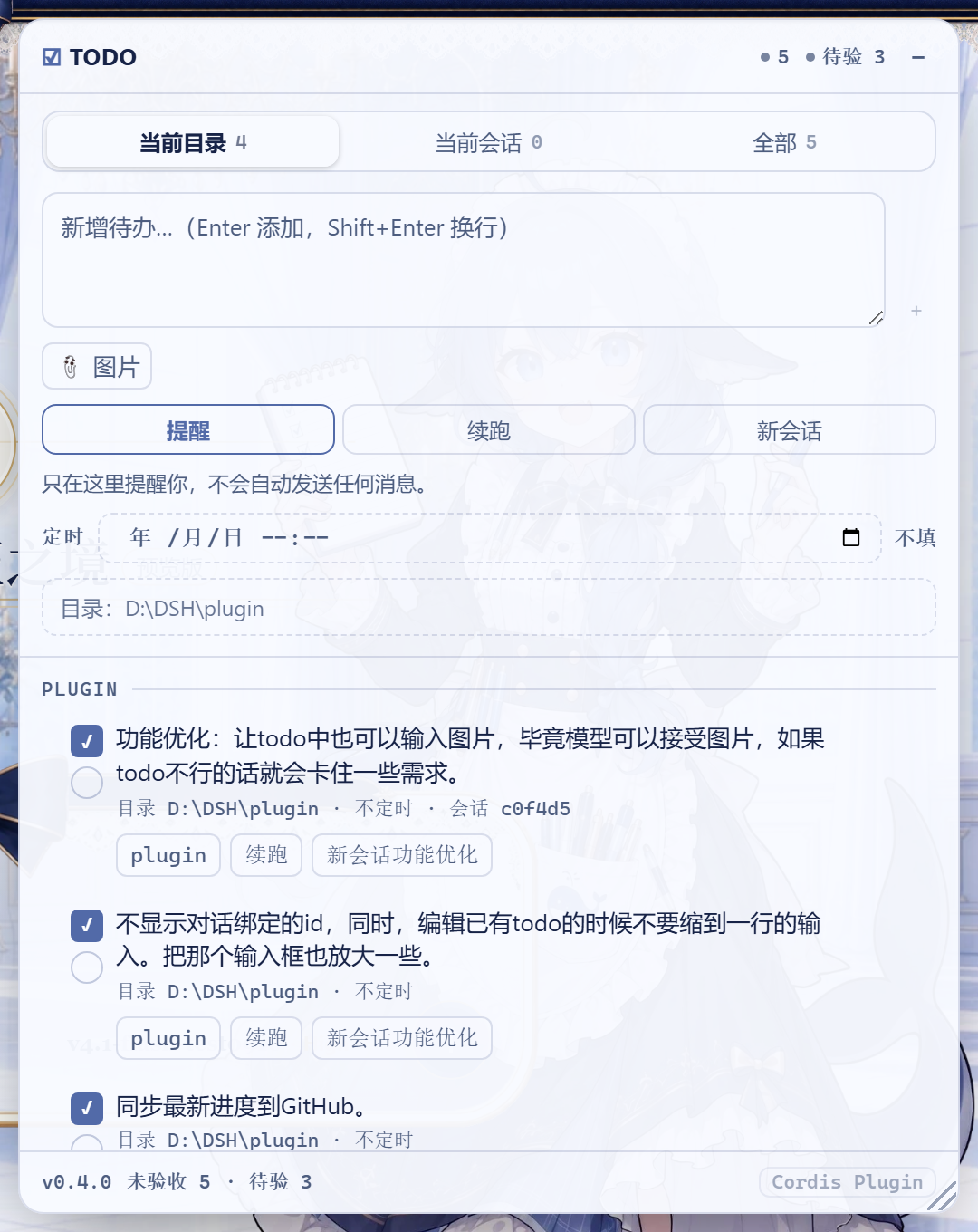
跨会话 TODO 板:右上角浮窗、按工作目录分组、可拖动排序;每条待办可选「提醒 / 自动续跑 / 自动新开会话」三档执行模式,可附图片(派发时作为真正的图片发给模型),可设定本地时间到点才执行,双勾选(AI 完成 / 用户验收)。AI 完成一项后自动查找同目录下一条未完成待办并继续执行。
- Source
- sueqet
- License
- MIT
- Updated
- Updated yesterday
Readme
# dsh-todo-board
**A cross-session TODO board for DeepSeek Harness — hand the agent one task at a time, and it picks up the next one by itself.**
**DeepSeek Harness(DSH)的跨会话 TODO 板 —— 一次只派一件事,干完它自己去拿下一件。**
[](https://github.com/topics/dsh-plugin)
[](LICENSE)
[](package.json)
---
## 它解决什么 / Why
让 AI 干完一件事之后,自己去待办板里找同一目录下还没做完的下一件继续干 —— 不用你盯着逐个验收,也不用一次性把一堆任务塞给它、结果每件都做得半吊子。
Let the agent finish one thing, then look up the next unfinished task **in the same working directory** and keep going. No babysitting each step, no dumping a pile of tasks on it at once and getting five half-done jobs back.
## 安装 / Install
```sh
dsh plugin --profile web add dsh-todo-board # 发布到 npm 之后 / once published to npm
dsh plugin --profile web add <git-url-or-path> # 或直接从仓库/目录安装 / or from a repo or local path
```
安装后**重启 Profile**(重新执行 `dsh web`)才会装载 —— 本插件是 host 组合里的一行,不是运行时热加载。
Restart the profile afterwards (`dsh web` again): the plugin is a row in the host composition, not a runtime hot-load.
卸载 / Uninstall:
```sh
dsh plugin --profile web remove dsh-todo-board
```
## 快速上手 / Quick start
1. 右上角出现浮窗,输入一条待办,选执行模式,点「添加」。
2. 让 AI 去做这件事。它做完会调用 `todo_board action=done` 给自己打左勾,然后查同目录下一条。
3. 你验收后点右勾;底部「清理已验收」批量清掉。
1. Type a task into the floating panel, pick a run mode, hit add.
2. Let the agent work. When it finishes it calls `todo_board action=done` to tick its own box, then looks for the next task in the same directory.
3. After you verify, tick the right-hand box; "清理已验收" clears the verified ones.
## 三档执行模式 / Run modes
每条待办在新增时必须选一档(默认「提醒」)。Each task carries exactly one mode, chosen when you add it.
| 模式 | 行为 | Behaviour |
| --- | --- | --- |
| 提醒 | 不自动做任何事,等你在浮窗里点 ▶ | Nothing automatic; you press ▶ when you want it |
| 自动续跑 | AI 回合结束时,把同目录下一条待办注入**当前会话**继续跑 | At turn end, inject the next task in the same directory into the **current session** |
| 自动新会话 | AI 回合结束时,新建一个同目录会话并执行该待办 | At turn end, create a **new session** in the same directory and run the task there |
派发顺序 = 面板里**从上到下**的顺序。拖动行首 `⠿` 调整,顺序持久化。
Dispatch order is the panel's **top-to-bottom** order. Drag the `⠿` handle to change it; the order is persisted.
「自动新会话」第一次派发时创建会话,并把它**绑定**到这条待办上:之后 ▶ 或回合结束自动接续都复用同一个会话,不会一次运行开一个会话。绑定会话已不在(比如你把它删了)时,下一次派发才会再开一个新的;想手动换一个新会话,点行上的 `会话 … ✕` 解绑即可。
A `自动新会话` task opens its session once and **binds** it to the row: later ▶ presses and turn-end handoffs reuse that same session instead of opening another. Only a dead binding (the session was removed) — or clicking the `会话 … ✕` chip to unbind — makes the next dispatch open a fresh one.
新会话会被登记进待办目录所属的**工作区**,侧栏里和手动开的会话一样归组(不是「未分组」)。
## 图片附件 / Attached images
待办可以带图片(最多 4 张,PNG / JPG / WebP / GIF)。图片存进 DSH 的**附件库**,派发时作为**真正的图片**和提示词一起发给模型——不是把文件名写进文字里。
A task may carry images (up to 4; PNG / JPG / WebP / GIF). They are stored in DSH's **attachment store** and dispatched as **real images** alongside the prompt — not as filenames written into text.
- 新增框里点「📎 图片」选图,带缩略图预览,可逐张移除;行上显示缩略图,点击放大,✕ 移除单张。
- 上限、媒体类型与归一化都用 harness 自己那套(同一条 `attachments.saveImage` 通路),不是本插件自己定的规则。
- 图片字节由本插件自己的 `GET /dsh-todo-board/image?id=…` 提供:harness 自带的图片读取是**会话作用域**的(只认会话日志里引用过的附件),而待办的附件存在板上,所以板自己当权威——没被任何待办引用的 id 一律 404。
- **目标模型必须支持图片**:派发前会查模型是否声明了 `image`。文本模型(如 `deepseek-v4-flash`)会直接提示「目标会话的模型不接受图片输入」,而不是让适配器抛 `UNSUPPORTED_CONTENT`。这是 DSH 的模型声明问题,不是插件的限制。
- Pick images with the composer's 📎 button; the row shows thumbnails, click to enlarge, ✕ to drop one.
- Limits, media types and normalization come from the harness' own attachment admission.
- Bytes are served by this plugin's `GET /dsh-todo-board/image?id=…`, because the shipped image route is **session-scoped** and would refuse an attachment no session log references. The board is the authority instead: an unreferenced id is a 404.
- **The target model must accept images.** Dispatch checks the model's declared modalities first and reports a clear message for a text-only model. That is a DSH model-declaration matter, not a plugin limit.
## 定时执行 / Scheduled execution
每条待办都可以带一个**本地时间**(`YYYY-MM-DDTHH:mm`,分钟精度)。到点之前这条待办不会被派发;到点之后 DSH 按它自己的模式执行它 —— 就像你此刻按了 ▶ 一样。
Any task may carry a **local time** (`YYYY-MM-DDTHH:mm`, minute precision). Before that minute the task is not dispatched; when it arrives, DSH runs it in its own mode, exactly as if you had pressed ▶ at that moment.
- 新增框里的「定时」一行用浏览器的时间选择器挑时间;留空 = 立即可执行。
- 行上的定时标签显示时间,**已到点**会变黄;点它即取消定时。
- `提醒` 模式到点只弹一条桌面通知(需要浏览器通知权限),不会自动给模型发消息;`自动续跑` / `自动新会话` 到点才真正派发。
- 定时只判一次:派发过(或被提醒过)就不再重复触发。错过的时间(DSH 当时没运行)会在下次启动后立刻补上。
- 时间用**主机本地时区**解释;面板存的就是你选的那一刻。
- The composer's 定时 row uses the browser's own picker; empty means "runnable now".
- The row chip shows the time and turns yellow once due; click it to clear the schedule.
- `提醒` mode only raises a desktop notification at that minute (browser permission required); `自动续跑` / `自动新会话` dispatch for real.
- A time fires once: a dispatched or reminded row never fires again. A time missed while DSH was not running fires on the next start.
- Times are interpreted in the **host machine's local zone** — the board stores the instant you picked.
## 双勾选 / Two checkboxes
| 勾 | 谁勾 | 含义 |
| --- | --- | --- |
| 左(方框) | 模型自己调 `todo_board action=done`,也可手点 | AI 已完成,等你验收 |
| 右(圆框) | 只有用户 | 已验收,真正了结 |
只有**右勾**才把待办从未完成列表里移除。系统提示段落明确禁止模型代勾右勾。
Only the right-hand box closes a task. The prompt section explicitly forbids the model from ticking it.
## 面板操作 / Panel
- **拖动 / 缩放**:拖标题栏移动,右下角 `◢` 缩放;位置与尺寸存进 `localStorage`,刷新保留;双击标题栏或拖柄还原。
- **筛选**:当前目录 / 当前会话 / 全部,每段带未完成计数。
- **行内编辑**:双击标题改名;点模式标签在 提醒 → 续跑 → 新会话 之间循环切换。
- **多行输入**:新增框自动增高(3 行起步,最高 180px),`Enter` 添加、`Shift+Enter` 换行。
- **Cordis 入口**:侧边栏底部的 `Cordis Plugin` 按钮折起,入口移到本面板底部;点它打开原面板,面板出现在**本面板正下方**(右对齐、互不覆盖),拖动或缩放本面板时它会跟着走。找不到入口时按钮会变灰并给出提示。
## 模型工具 / The `todo_board` tool
| action | 作用 |
| --- | --- |
| `list` | 列出当前工作目录下未验收的待办(`all: true` 列全部目录),带 id、执行顺序与定时时间 |
| `add` | 新增一条(追加到列表底部),可带 `schedule` |
| `done` | 打左勾「AI 已完成」 |
| `reopen` | 撤销左勾 |
| `note` | 追加备注 |
| `schedule` | 设置或取消某条待办的定时时间(`schedule` 传空字符串即取消) |
工具输出 schema 是 `additionalProperties: false` 的严格 JSON Schema,返回值只含声明过的字段。
## 数据 / Data
`${DSH_HOME}/todo-board/board.json`(默认 `~/.dsh/todo-board/board.json`),原子写入(临时文件 + rename)。文件缺失时自动创建;读坏或写失败会在浮窗底部红字提示。待办板是全局的,面板内按目录分组。
## 会话生命周期 / Session lifecycle
「自动新会话」创建的会话走 `ctx.root` + `agentPresets.mount()`:
- 归属**应用根上下文**而不是本插件行,因此停用 / 更新 / 卸载本插件不会连带拆掉这些会话;
- `setup` 里挂载 agent preset,与 api-proxy 创建会话的方式一致 —— 少了这一步新会话会没有工具和提示词;
- 模型优先沿用来源会话的 provider/model,否则取 `agentDefaultModel` 的当前选择。
## 结构 / Layout
```
package.json dsh.bundle.patch → cordis.patch.yml;dsh.client.platform = web
cordis.patch.yml 向 profile 树 insert 一行 todo-board
lib/index.js Host:板文件、todo_board 工具、回合结束钩子、提示词段落、/dsh-todo-board/api
client/client.js Browser:shell.overlay 浮窗,走 fetch 访问上面的路由
tools/smoke.mjs Host 半边自检(stub ctx + 临时 DSH_HOME)
```
Host 半刻意不 import 任何 `@deepseek-ai/*`:profile 安装的插件从自身目录解析模块,harness 包在那里不可达,一切通过 `ctx`。
## 开发 / Development
```sh
npm run check # node --check 两个入口
npm test # host 半边 smoke 自检
```
改完客户端只需刷新页面;改 Host 半边需要重启 Profile。
## 已知限制 / Limitations
- 浮窗每 2.5s 轮询一次 `/dsh-todo-board/api`,不是推送。
- 待办板是全局单文件,不按目录分文件。
- 「自动新会话」需要待办上的目录路径可创建。
- 定时只支持**单次**的绝对时间,没有 cron / 周期规则;到点后「自动续跑」需要来源会话当时还在运行,否则按「没有可接续的活动会话」处理(改「自动新会话」可脱离会话存活)。
- Cordis 入口是 DOM 桥接:按该插件自己渲染的 `data-cordis-badge` 属性定位,用带 `!important` 的规则覆盖它计算出的位置。DSH 升级若改了这套实现,桥接会失效——那时按钮会变灰并提示,不会静默失灵。
## License
[MIT](LICENSE)
Install
dsh plugin --profile web add github:sueqet/dsh-todo-board
Profile: web
With the hub plugin installed, ask your agent to install it by name — it resolves the same plan shown here.
dsh plugin --profile web add github:stvlynn/dsh.fish#path:packages/dsh-plugin-hub
install dsh-todo-board from the hub
- This source has no pinned commit, so a later push upstream changes what installs. Prefer pinning a commit.