Bundle
dsh-search-enhance
Bounded search, documentation, extraction, progressively disclosed site mapping/research planning, and read-only diagnostics for DeepSeek Harness
- Source
- KKKneko
- stars
- 2 stars
- Updated
- Updated 7 days ago
Readme
# Search Enhance for DeepSeek Harness English | [简体中文](README.zh.md) `dsh-search-enhance` is a search extension for DeepSeek Harness. It uses a Grok-compatible Search API for primary web answers and can optionally use Context7, Exa, Tavily, and Firecrawl for documentation lookup, supplementary discovery, page extraction, and site mapping. The plugin handles search, source retention, and page retrieval as separate steps. `web_search` and `docs_search` return an answer or documentation snippets with visible sources; the complete source record can be stored under a `source_ref` and paged later. Important pages can then be retrieved with `web_extract`, so search snippets remain distinct from fetched page content. > Bring your own endpoints and credentials. The plugin ships no API keys. A Grok-compatible endpoint is required for `web_search`; Context7, Exa, Tavily, and Firecrawl are optional. 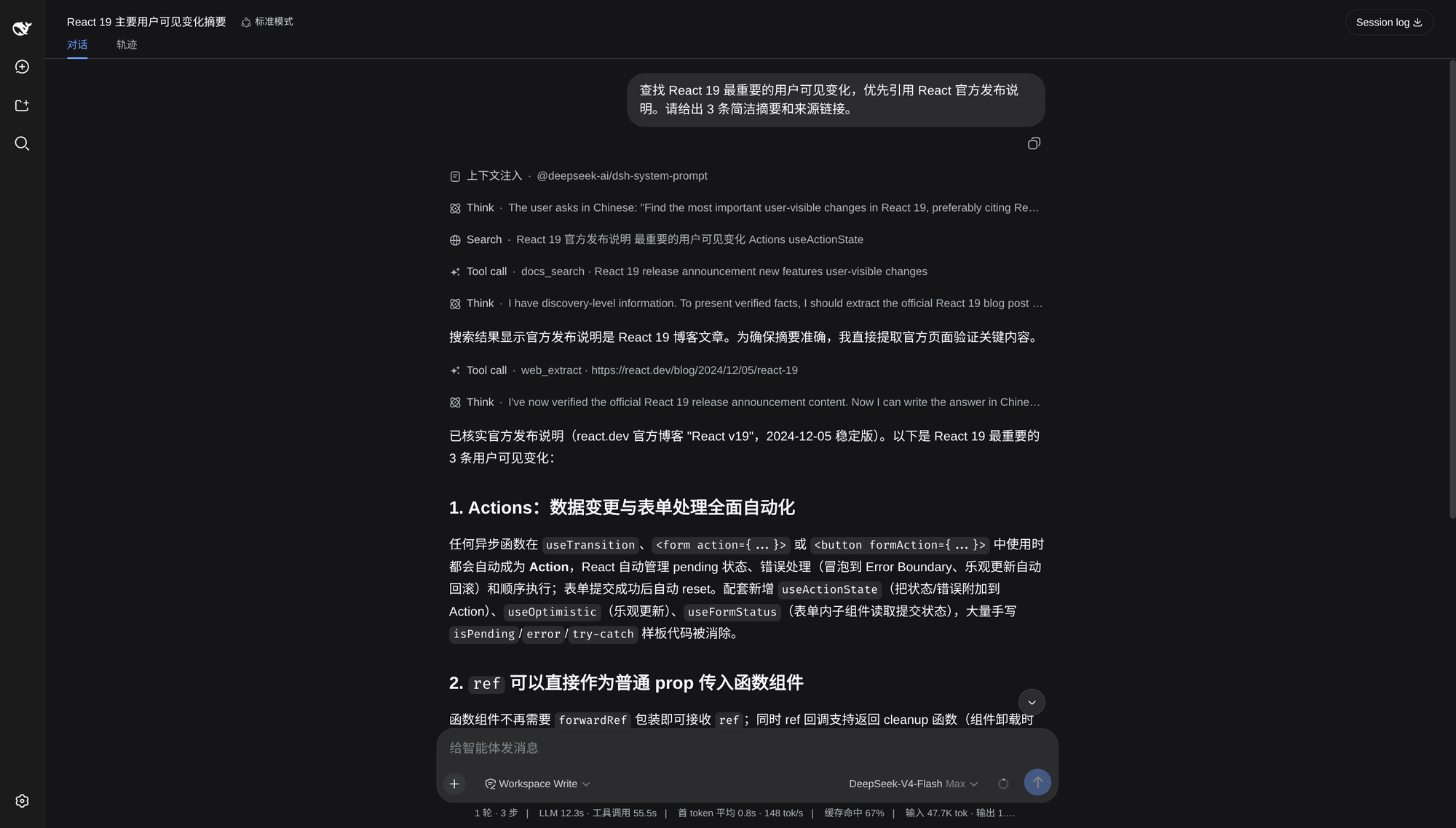 ## Key characteristics - `web_search` uses the Grok-compatible endpoint for the main answer, adds Exa for documentation-oriented queries, and uses Tavily or Firecrawl within the configured supplementary budget. - Sources are normalized, de-duplicated, and reordered using source category, requested version, and publication-time signals before they are shown. - `source_ref` keeps the complete source record in private durable storage, allowing the Agent to paginate beyond the links included in the initial result. - `docs_search` uses Context7 only with an explicit `library_name` or `library_id`; requests without a library identity use Exa discovery. - `web_extract` follows the fixed Tavily → Firecrawl → `smart_direct` → `direct` route and reports the retrieval route, evidence level, and available page metadata. - Source pagination, Context7 detail operations, site mapping, research planning, and diagnostics are disclosed on demand through `search_tools` and `search_call`. - Native Tool Mode and Code Mode use the same fixed tool surface and canonical outputs. DSH Settings, Credentials, Agent Presets, guards, and lifecycle cleanup continue to apply. - Optional Providers are skipped when unconfigured. Tavily and Firecrawl supplementary-search budgets default to `0`, and optional Provider failures remain visible in the result. For the complete routing, evidence, and progressive-disclosure flow, see [Search workflow architecture](https://github.com/KKKneko/dsh-search-enhance/blob/main/guides/search-workflow.md). ## Quick start ### 1. Install Install the published bundle into the DSH `web` profile: ```bash dsh plugin --profile web add dsh-search-enhance@latest ``` ### 2. Start DSH Web ```bash dsh web ``` ### 3. Configure search Open: ```text Settings → Plugins → Plugin configuration → dsh-search-enhance ``` Under **Grok search backend**, configure: 1. the xAI endpoint or an explicit Grok-compatible gateway; 2. the matching `completions` or `responses` protocol; 3. a model supported by that endpoint; 4. the Grok credential in the card's Credentials section. The default credential reference is `SEARCH_API_KEY`. Credential values are stored through DSH Credentials and are not exposed as model parameters. Save the settings, restart DSH, and ask a current-information question. A successful run shows a `Search` tool row, an answer, and source links. ## Example requests Use normal language; the plugin gives the Agent routing guidance. - “Find the most important React 19 user-visible changes. Prefer official release notes and include source links.” - “Look up the current FastAPI JWT authentication API and show a minimal example from the official documentation.” - “Read and summarize `https://example.com/article`, separating what the page states from your inference.” Ask explicitly when you need complete source pagination, site discovery, a research plan, or Provider diagnostics. ## Providers Configure only the routes you need. | Provider | Used for | Default credential reference | Required? | | --- | --- | --- | --- | | Grok-compatible Search API | Main `web_search` answer and sources | `SEARCH_API_KEY` | For `web_search` | | Context7 | Documentation lookup for an explicit library | `CONTEXT7_API_KEY` | No | | Exa | Broad documentation and supplementary discovery | `EXA_API_KEY` | No | | Tavily | Supplementary search, page extraction, and site mapping | `TAVILY_API_KEY` | No | | Firecrawl | Supplementary search and page extraction | `FIRECRAWL_API_KEY` | No | Unconfigured optional Providers are skipped. Tavily and Firecrawl supplementary-search budgets default to `0` for every search profile; explicit `web_extract` and `web_map` requests use their own routes. For `docs_search`, Context7 requires an explicit `library_name` or `library_id`. Without one, `provider: "auto"` uses Exa instead of guessing a package name from the full question. ## Tool disclosure The model-facing surface remains five tools: `web_search`, `docs_search`, `web_extract`, `search_tools`, and `search_call`. Advanced operations are disclosed through manifests rather than registered as additional model tools. The default `progressive` mode activates a newly disclosed capability on the next model step. In `all` mode, deferred operations are active immediately. Native Tool Mode and Code Mode use the same schemas, execution policy, and canonical outputs. When `web_search` or `docs_search` returns a `source_ref`, the plugin automatically activates source pagination and appends its real operation manifest. ## Update and uninstall To update, run the installation command above again. To remove the plugin: ```bash dsh plugin --profile web remove dsh-search-enhance ``` Restart DSH after updating or removing the bundle.
Install
dsh plugin --profile web add github:KKKneko/dsh-search-enhance#19f47d59fdb933266b33ee38aac5e654cb59dde6
Profile: web
With the hub plugin installed, ask your agent to install it by name — it resolves the same plan shown here.
dsh plugin --profile web add github:stvlynn/dsh.fish#path:packages/dsh-plugin-hub
install dsh-search-enhance from the hub
- This package builds from source on install. pnpm will ask you to allow its build script — that is permission to run the package’s code on your machine, outside the agent sandbox. Only allow sources you trust.