Bundle
dsh-pptx-editor
PPTX editor for DeepSeek Harness
- Source
- yunfeizhu
- stars
- 1 stars
- License
- Apache-2.0
- Updated
- Updated 20 hours ago
Readme
<p align="center"> <img src="https://raw.githubusercontent.com/yunfeizhu/dsh-pptx-editor/main/docs/assets/dsh-pptx-editor-banner.png" alt="Concept illustration connecting conversation, a presentation editor, and slides" width="1200"> </p> <h1 align="center">dsh-pptx-editor</h1> <p align="center">Edit PowerPoint slides through conversation, right inside DeepSeek Harness.</p> <p align="center"> <a href="https://github.com/yunfeizhu/dsh-pptx-editor/blob/main/README.md">English</a> · <a href="https://github.com/yunfeizhu/dsh-pptx-editor/blob/main/README.zh-CN.md">简体中文</a> </p> <p align="center"> <a href="https://www.npmjs.com/package/dsh-pptx-editor"><img src="https://img.shields.io/npm/v/dsh-pptx-editor" alt="npm version"></a> <a href="https://github.com/yunfeizhu/dsh-pptx-editor/blob/main/.node-version"><img src="https://img.shields.io/badge/Node.js-24-5FA04E" alt="Node.js 24"></a> <a href="https://github.com/yunfeizhu/dsh-pptx-editor/blob/main/LICENSE"><img src="https://img.shields.io/badge/license-Apache--2.0-blue" alt="Apache-2.0"></a> </p> [Quick start](#quick-start) · [Features](#what-you-can-do) · [Examples](#try-it-in-conversation) · [Saving](#saving-and-recovery) · [Docs](#documentation-and-support) Send a `.pptx` attachment, see it open beside your conversation, and describe what you want to change. The plugin connects DSH's Agent to a full presentation editor: you can alternate between conversation and manual editing in the same document, with changes visible immediately. ## See it in action 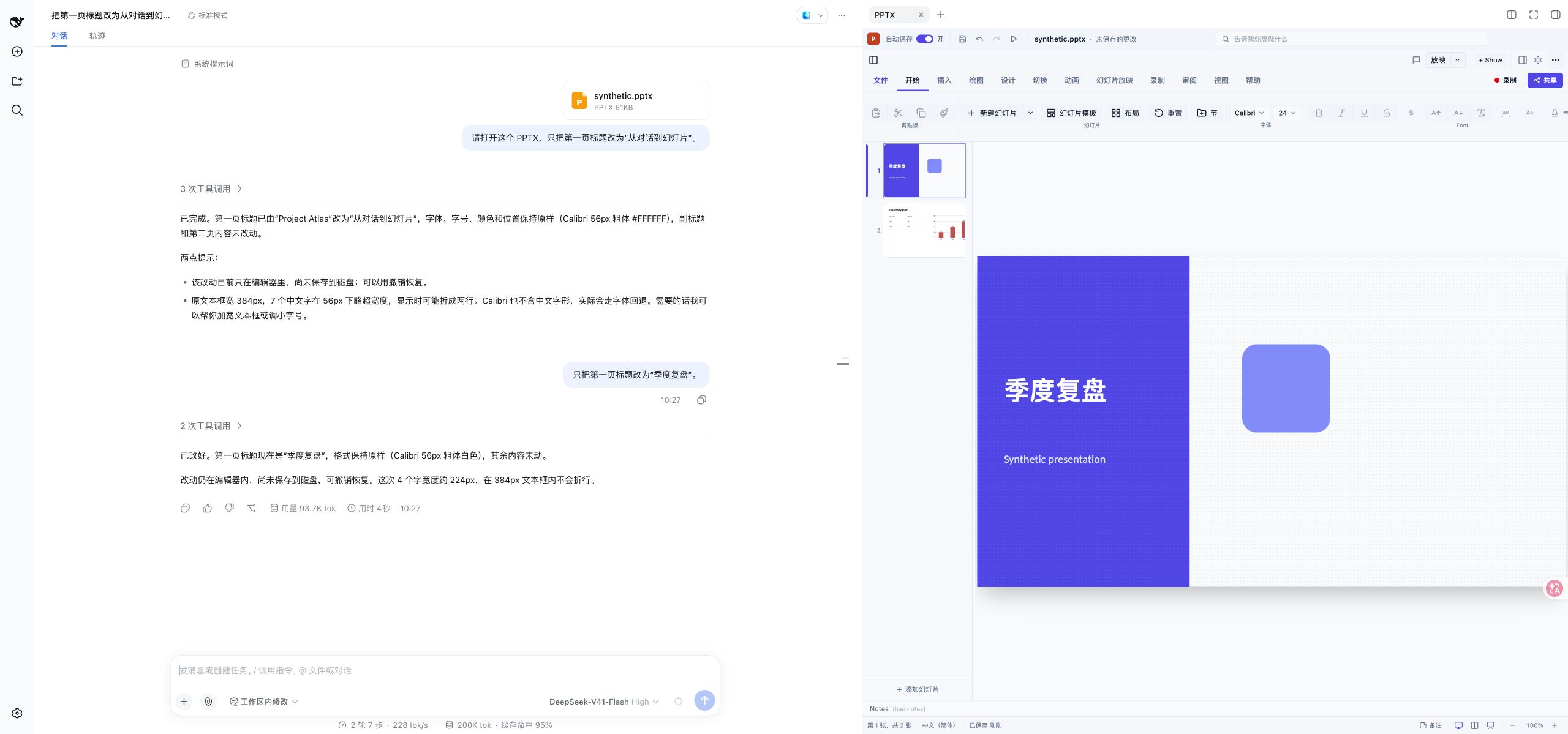 _A real DSH conversation using a synthetic presentation. The title change appears in the editor on the right._ ## Quick start You need **Node 24**, a configured **DeepSeek Harness**, and a current **Chrome or Edge** browser. Install the prebuilt npm package into the Web profile: ```sh dsh plugin --profile web add dsh-pptx-editor@1.0.0 dsh web ``` 1. Open the **login URL printed by DSH** in your browser. 2. Start a conversation, attach one `.pptx` file (up to **50 MiB**), and send it with a request such as “Preview this presentation.” 3. Ask for a change. The document opens in the right sidebar and updates there. 4. Use the editor's **Save** button when you want to download the edited PPTX. The plugin uses the model selected in DSH; no separate model key is needed. If DSH Web is already running, save open documents before restarting it to load the plugin. Do not load the npm package and a source patch at the same time. Tested host: DSH CLI `0.1.5-rc.1` with public plugin packages `0.1.5-rc.2`, running locally on `127.0.0.1`. For version details, local tarballs, updates and removal, see the [installation guide](https://github.com/yunfeizhu/dsh-pptx-editor/blob/main/docs/usage.md). ## What you can do | Area | Conversation controls | | ---------- | ------------------------------------------------------------------------------------------------- | | Slides | Add, duplicate, reorder, hide, delete and navigate | | Text | Rewrite content; change font, size, color, bold, italic and underline | | Paragraphs | Horizontal and vertical alignment, spacing, indents, bullets and numbered lists | | Layout | Move, resize, rotate, flip, align and distribute elements | | Shapes | Insert basic shapes; change fill and outline; copy or delete elements | | Tables | Insert tables, edit cell values and formatting, resize rows/columns and change unmerged structure | | Charts | Insert column/bar, line, pie, doughnut, area and radar charts; update supported data and styles | | Images | Insert an uploaded image; crop it or adjust opacity, brightness and contrast | | History | Undo and redo edits, or reopen the presentation through conversation | The native editor remains available for direct manipulation. Conversation edits use the same document and editor history. A sequence of separate tool commands is **not** a single atomic undo step. Use `edit_pptx_batch` to change up to 100 existing elements across slides with one undo step. 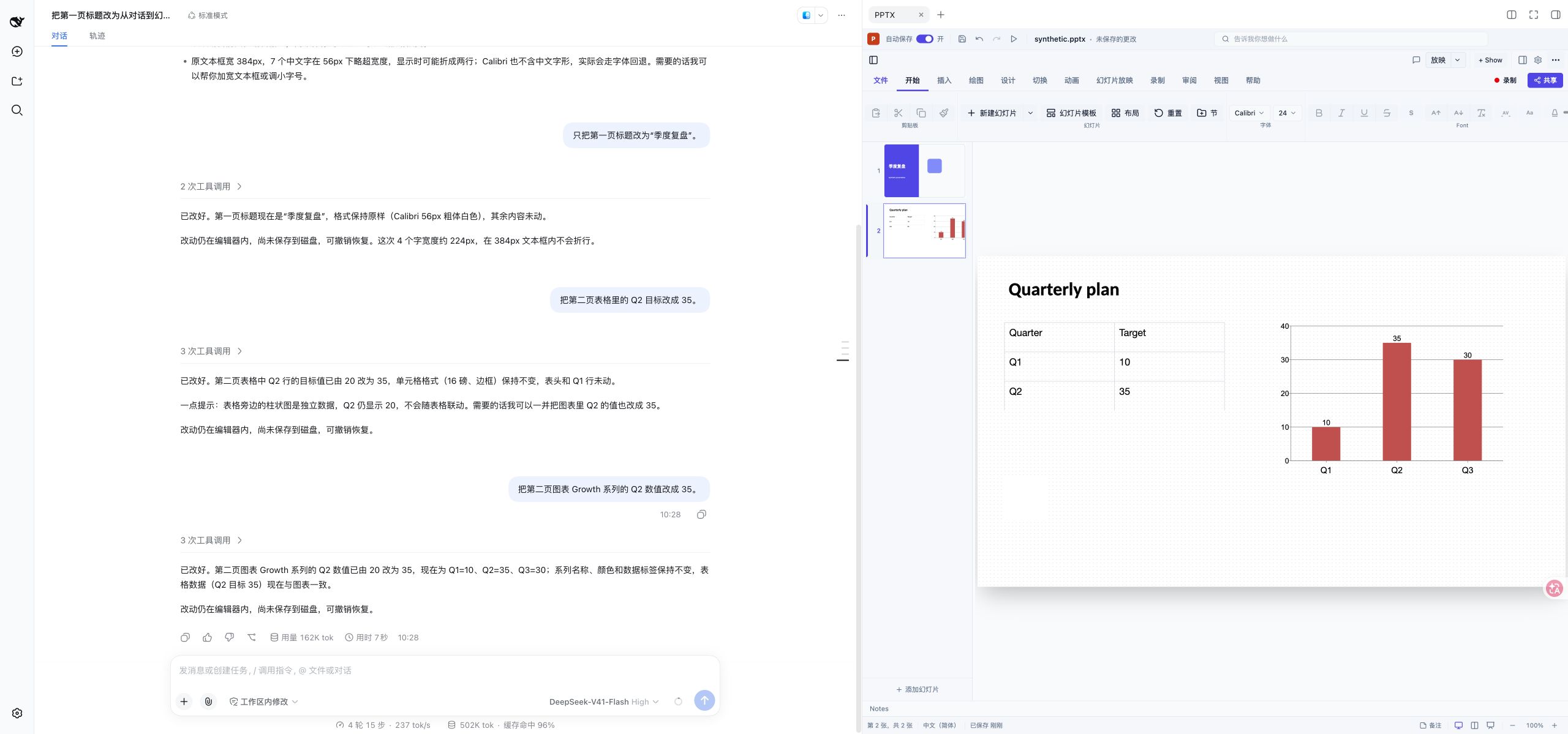 _The native editor displays table cells and chart data alongside the slides. Screenshots use synthetic content; they do not promise identical rendering for every PowerPoint file._ ## Try it in conversation Start with an attached presentation, then send one request at a time: | Goal | Example request | | ---------------------- | ------------------------------------------------------------------- | | Rewrite a title | “Change the title on slide 1 to ‘Quarterly review’.” | | Add a slide | “Add a blank slide at the end.” | | Add text | “Add a text box on slide 3 containing ‘Next steps’.” | | Format a paragraph | “Center the paragraph in the title text box on slide 3.” | | Edit a table | “Change the Q2 target in the table on slide 2 to 35.” | | Edit a chart | “Change the Q2 value in the Growth series on slide 2 to 35.” | | Insert a picture | Attach an image, then ask “Insert the uploaded picture on slide 3.” | | Recover your workspace | “Reopen the PPTX on the right.” | | Undo | “Undo the last edit.” | PNG, JPEG, WebP and GIF image attachments up to **1 MiB** are supported. Image insertion uses attachments from the same conversation. See the [usage guide](https://github.com/yunfeizhu/dsh-pptx-editor/blob/main/docs/usage.md) for detailed examples and operation limits. ## Saving and recovery > **AutoSave keeps a recovery cache in this browser (IndexedDB). It does not > write or overwrite a `.pptx` file.** The editor's “Saved to this computer” > status refers to that browser copy. Click **Save** to download a PPTX file you > can keep or share. | Action | What it saves | What to expect | | -------------------------- | ------------------------------- | ---------------------------------------------------------------------------------------- | | **Save** in the editor | A downloaded `.pptx` file | Keep or share this file; it does not overwrite the uploaded attachment or source file | | **AutoSave** in the editor | A recovery copy in this browser | After reopening the same source in the same conversation, restore the copy when prompted | With AutoSave enabled, the plugin checks for changes every two seconds and stores a recovery snapshot. Recovery prompts cover the last 24 hours; the copies depend on browser storage and do not restore undo history. Clearing browser data removes them. A refresh before the latest snapshot finishes can lose that last edit. **Download the PPTX for a durable, shareable copy.** Closing the PPTX tab keeps its editor available in memory for reopening. An explicitly closed tab stays closed after refresh; ask to reopen it when needed. See [recovery and troubleshooting](https://github.com/yunfeizhu/dsh-pptx-editor/blob/main/docs/usage.md) for the full lifecycle. ## Scope and limitations - This is a **DSH Web plugin for an existing PPTX attachment**. It does not need a separate editor launcher on the sidebar's Start page. - Animation, transition, theme/master, speaker-note and comment editing are not connected to conversation commands. Some native UI functions have no supported plugin editing interface. - Complex charts, merged-table structure, character-range formatting and some image effects have restrictions. Imported files are not guaranteed to make a lossless round trip. Consult the [capability matrix](https://github.com/yunfeizhu/dsh-pptx-editor/blob/main/docs/capabilities.md). - The Agent can read slide text, formatting and supported table/chart data. This information becomes part of the DSH conversation and may reach its configured model provider. See [data handling](https://github.com/yunfeizhu/dsh-pptx-editor/blob/main/docs/usage.md#data-and-compatibility). ## Frequently asked questions **Why did choosing an attachment not open it?** Send the message first. Opening follows DSH's admitted-message feed, not the file picker selection. Send one PPTX per message. **Does “saved” mean my original file was overwritten?** No. AutoSave is browser recovery; Save downloads a PPTX. Neither overwrites the original attachment or local source file. **Can I keep using the mouse and keyboard?** Yes. Manual changes and Agent changes share the open document. You can also use the editor's native undo and redo controls. **How is the interface language chosen?** It follows DSH for English and Simplified Chinese, with English as the fallback. There is no separate plugin language selector. ## Documentation and support - [Installation, usage and troubleshooting](https://github.com/yunfeizhu/dsh-pptx-editor/blob/main/docs/usage.md) - [Conversation capability matrix](https://github.com/yunfeizhu/dsh-pptx-editor/blob/main/docs/capabilities.md) - [Report a bug or request a feature](https://github.com/yunfeizhu/dsh-pptx-editor/issues/new/choose) - [DSH community discussion](https://github.com/deepseek-ai/deepseek-harness/discussions/6854) - [Release notes](https://github.com/yunfeizhu/dsh-pptx-editor/releases) - [Contributing](https://github.com/yunfeizhu/dsh-pptx-editor/blob/main/CONTRIBUTING.md) · [Code of conduct](https://github.com/yunfeizhu/dsh-pptx-editor/blob/main/CODE_OF_CONDUCT.md) · [Security policy](https://github.com/yunfeizhu/dsh-pptx-editor/blob/main/SECURITY.md) For a bug report, include plugin/DSH/browser versions, a minimal reproduction and a non-sensitive sample if possible. Avoid attaching private presentations or credentials to a public issue. ## Local development Use the Node and pnpm versions specified in `.node-version` and `package.json`: ```sh corepack enable pnpm install --frozen-lockfile pnpm check pnpm dev ``` [Development instructions](https://github.com/yunfeizhu/dsh-pptx-editor/blob/main/docs/development.md) distinguish unit, browser and live DSH checks. See [contributing](https://github.com/yunfeizhu/dsh-pptx-editor/blob/main/CONTRIBUTING.md) before opening a PR. ## Credits and license - Thanks to the [DeepSeek team (@deepseek-ai)](https://github.com/deepseek-ai) for [DeepSeek Harness](https://github.com/deepseek-ai/deepseek-harness), the plugin host and conversation environment. - Thanks to Christopher van Rooyen ([@ChristopherVR](https://github.com/ChristopherVR)) and the contributors to [pptx-viewer](https://github.com/ChristopherVR/pptx-viewer) for the PPTX editing and rendering engine. [Apache License 2.0](https://github.com/yunfeizhu/dsh-pptx-editor/blob/main/LICENSE). Third-party license details are in [THIRD_PARTY_NOTICES.md](https://github.com/yunfeizhu/dsh-pptx-editor/blob/main/THIRD_PARTY_NOTICES.md).
Install
dsh plugin --profile web add github:yunfeizhu/dsh-pptx-editor
Profile: web
With the hub plugin installed, ask your agent to install it by name — it resolves the same plan shown here.
dsh plugin --profile web add github:stvlynn/dsh.fish#path:packages/dsh-plugin-hub
install dsh-pptx-editor from the hub
- This package builds from source on install. pnpm will ask you to allow its build script — that is permission to run the package’s code on your machine, outside the agent sandbox. Only allow sources you trust.
- This source has no pinned commit, so a later push upstream changes what installs. Prefer pinning a commit.