Bundle
dsh-notify-zeta
DeepSeek Harness notification center with interactive Windows question and approval cards
- Source
- zeta987
- License
- MIT
- Updated
- Updated 15 hours ago
Readme
[English](https://github.com/zeta987/dsh-notify-zeta/blob/main/README.md) | [繁體中文](https://github.com/zeta987/dsh-notify-zeta/blob/main/README.zh-TW.md) | [简体中文](https://github.com/zeta987/dsh-notify-zeta/blob/main/README.zh-CN.md) # Zeta Notify Notifications and interactive Windows cards for DeepSeek Harness (DSH). Follow task progress, answer questions, and handle one-time approvals from native cards, even with the browser tab closed, as long as DSH keeps running on the Windows host. `dsh-notify-zeta` (version 0.1.2) is an independent community plugin and is not affiliated with DeepSeek. The plugin's interface follows the language DSH is running in, English or Traditional Chinese; this README is available in English, Traditional Chinese, and Simplified Chinese. ## Features - **Notification center inside DSH.** Open **Settings → Zeta Notify** to review recent notices, filter by unread state or type, mark items as read, and clear recent history. - **Interactive Windows cards.** Answer several questions in one card with single-choice, multiple-choice, or free-text responses, read plan details, and explicitly allow or reject one operation. These are WPF windows, not reply fields in the Windows notification center. - **Two delivery channels.** Native Windows cards arrive even while the browser tab is closed, as long as the DSH process keeps running on that Windows machine. Browser system notifications need a live page, a secure context (HTTPS or loopback), and notification permission for the exact origin and port. - **Control over what reaches you.** 14 event switches, a separate child-agent switch, sound, content previews, and the option to suppress ordinary notices for the session you are currently viewing. - **Safe test buttons.** Built-in browser, native, question, and approval tests create synthetic notices without running real tools or calling a model. - **Follows the DSH language.** The page and the notification text are written in English or Traditional Chinese, following the language selected in DSH; switching the language relabels the page right away, and the Windows card follows it too. The `language` config field of the plugin row overrides that: `auto` (the default) follows DSH and falls back to Chinese when no language was ever selected, while `zh` or `en` pins host-written titles to one language. Notices already in the history keep the language they were written in. ## Screenshots 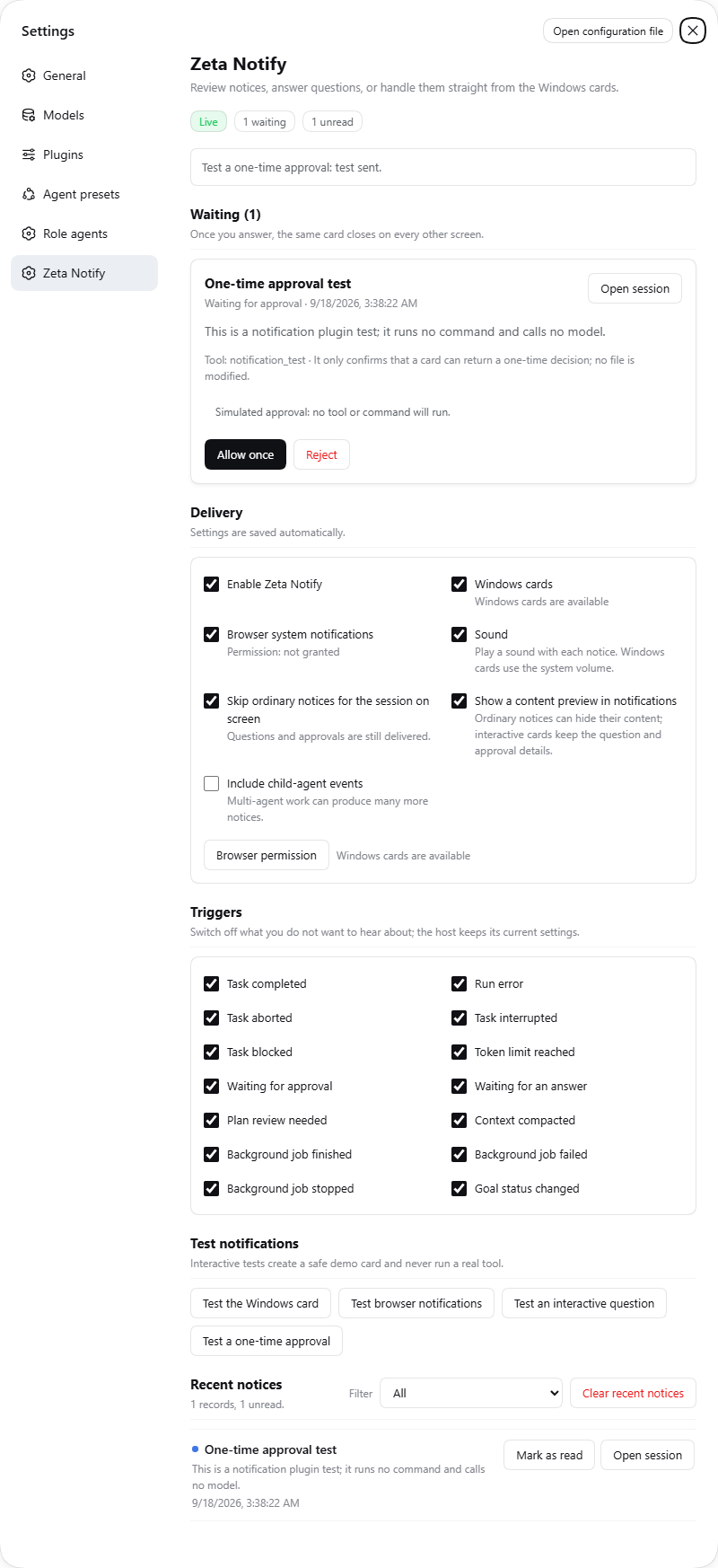 Settings, the 14 event switches, and recent notices in the in-app notification center. 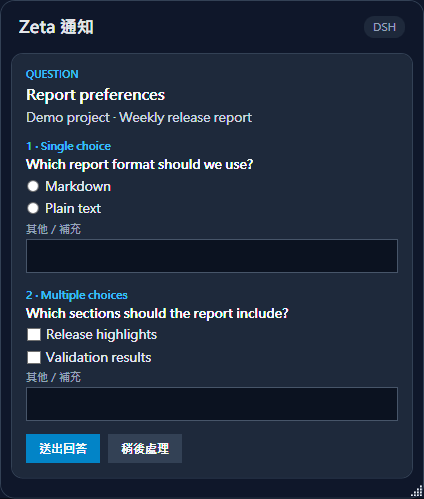 A native question card with single-choice, multiple-choice, and free-text inputs, using fictitious demo data. 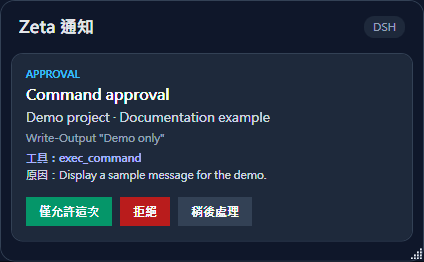 A native approval card shows the operation details before you allow or reject it once. ## Requirements - DSH installed with its `web` profile initialized. See [DSH development basics](https://deepseek-harness.github.io/deepseek-harness/develop/basic/). - Node.js 22.19.0 or newer, with `pnpm` on `PATH`. - Windows 10 or 11 for native cards. The plugin's native helper uses Windows PowerShell 5.1 and WPF, both included with Windows. It needs no .NET 10 installation and no downloaded helper EXE. - For browser notifications: a live page served over HTTPS or a loopback address, with notification permission granted for the exact origin including its port. The browser channel can load on other platforms, but full native functionality is Windows-only, and only Windows 11 has been tested. Tested versions: Node.js 24.19.0, Windows PowerShell 5.1, and DSH CLI 0.1.5-rc.1 with interaction/session dependencies resolved to 0.1.5-rc.2. DSH developer-preview APIs can change, so other DSH versions may not work. ## Install ```sh npx @deepseek-ai/dsh plugin --profile web add dsh-notify-zeta npx @deepseek-ai/dsh web ``` If DSH was already running, restart that process after installation, refresh the browser page, and open **Settings → Zeta Notify**. The package declares `dsh.bundle.patch`, so no manual patch editing is needed. The examples use `npx` to avoid shell aliases; an installed `dsh` command works directly if it resolves to the real DSH CLI. ### Update Nothing updates on its own: `dsh plugin` forwards to pnpm inside the profile, starting DSH installs nothing, and no page checks a registry. To move to a release: ```sh npx @deepseek-ai/dsh plugin --profile web add dsh-notify-zeta@0.1.2 # restart DSH, then refresh the browser page ``` Name the version. `update` stays inside the `^0.x` range pnpm wrote at install time, and pnpm 11+ hides a version published less than 24 hours ago from `outdated` and `@latest` (`minimumReleaseAge`); an explicit version installs right away. ### Quick test 1. Open **Settings → Zeta Notify**. 2. Grant browser notification permission if you want that channel. 3. Press the browser and native test buttons, then try the synthetic question and approval cards. Browser sound plays only after you have interacted with the page. Native cards need the DSH process to stay running on the Windows host, even with the browser tab closed. ### Remove ```sh npx @deepseek-ai/dsh plugin --profile web remove dsh-notify-zeta ``` Restart DSH after removal. No other profile or global configuration needs to be deleted. ## Defaults | Setting | Default and behavior | | --- | --- | | Native and browser channels | Both enabled. | | Sound | Enabled. Native sound follows Windows system volume. Browser sound is a chime synthesized locally after page interaction, with no remote audio download. | | Content previews | Enabled. | | 14 event switches | All enabled: task completed, error, aborted, interrupted, blocked, token limit, approval, question, plan review, compaction, background job completed, background job failed, background job killed, and important goal state changes (paused, blocked, or complete). | | Child-agent events | Disabled. DSH's prohibition on live child agents asking humans remains in place. | You can suppress ordinary notices for the session you are currently viewing. Other sessions and pending interactive cards still notify. Turning previews off hides ordinary notification details. Interactive cards still show the full question or operation so you can answer with full context. ## Answers and approvals Approval cards display the actual matched operation details. If the plugin cannot show those details, it defers to DSH's standard approval interface. Each answer is bound to the exact session, the original live agent, the specific request, and a random single-use token. The plugin validates question IDs, allowed options, and single-choice versus multiple-choice answers, and rejects stale, duplicate, or cancelled submissions. The native card and the custom web center share one request owned by the DSH host. They do not compete separately with the standard DSH dialog. If native interaction is unavailable, disabled, fails to start, or cannot handle a request, DSH's standard interface handles it instead. ## Privacy and storage - Settings persist as `zeta-notify.settings.json` in the active DSH profile. - Up to 200 recent records are kept in memory only. Restarting DSH clears that history, and answer text is not written to notification history. - The plugin includes no telemetry, external push transport, or webhook. This applies to the plugin itself, not to network activity by DSH or other plugins. - The browser API uses DSH authentication and origin validation. JSON POST requests that change state must come from the same origin and have a bounded body size. - The native helper exchanges JSON with its parent process over pipes. Text is treated as data and is never executed as PowerShell or XAML. - The package has no npm runtime dependencies and no install lifecycle scripts. ## Limits and troubleshooting ### Interactive request limits | Limit | Maximum | | --- | ---: | | Pending requests | 32 | | Questions per request | 20 | | Options per question | 100 | | Request question JSON | 96 KB | | Custom response | 16,000 characters | Each question needs a valid choice or a nonempty custom answer. Duplicate question IDs and unsupported or oversized requests fall back to DSH's standard interface. ### A browser notification is missing Check that the page is still open, is served over HTTPS or a loopback address, and has notification permission for its exact origin and port. A different port needs its own permission. Also check whether the matching event switch is on and whether visible-session suppression is active. ### A Windows card is missing Confirm that DSH is still running on the Windows host and that the native channel is enabled. Native cards require Windows 10 or 11 with Windows PowerShell 5.1 and WPF, and only Windows 11 has been tested. If native delivery fails for a newly observed notice, the plugin allows one fallback delivery through the browser channel. Historical snapshots are not replayed as fresh notifications. Interactive requests that native cards cannot handle go to DSH's standard interface. ## Development Run the source tests: ```sh npm test ``` DSH plugin discovery: [dsh-plugin topic on GitHub](https://github.com/topics/dsh-plugin). ## License and inspiration Released under the [MIT License](LICENSE). Inspired by [dsh-notify-yimit](https://www.npmjs.com/package/dsh-notify-yimit), [dsh-notification-center](https://github.com/610la/dsh-notification-center), [dsh-notifications](https://github.com/Ycet/dsh-notifications), [dsh-web-push-notification](https://github.com/blauerberg/dsh-web-push-notification), and [dsh-notify-win](https://github.com/Andyqwe44/dsh-notify-win).
Install
dsh plugin --profile web add github:zeta987/dsh-notify-zeta#b98aba956c3a9448d8447955376369e288c7367e
Profile: web
With the hub plugin installed, ask your agent to install it by name — it resolves the same plan shown here.
dsh plugin --profile web add github:stvlynn/dsh.fish#path:packages/dsh-plugin-hub
install dsh-notify-zeta from the hub