Bundle
dsh-market-gist-autosync
DSH plugin: back up your DSH configuration to GitHub Gist on a schedule. · 把 DSH 配置定时备份到 GitHub Gist。
- Source
- jacket-sikaha
- stars
- 1 stars
- License
- MIT
- Updated
- Updated 4 days ago
Readme
# dsh-market-gist-autosync [](https://www.npmjs.com/package/dsh-market-gist-autosync) [](https://www.npmjs.com/package/dsh-market-gist-autosync) [](./LICENSE) 把 DSH 配置备份到 GitHub Gist 的插件:手动 / 定时备份 + 合并恢复,备份格式与插件市场(dshmarket)**完全兼容、可互相恢复**。 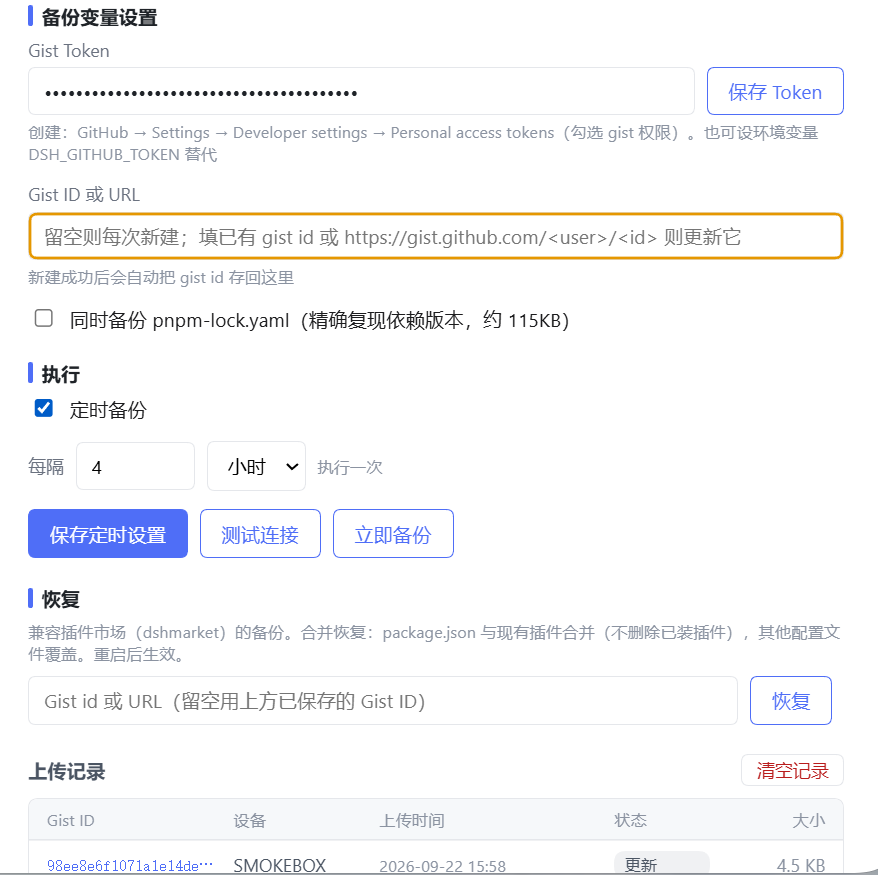 ## 功能 - **备份**:把当前 profile 的配置打包为私有 Gist(自动识别 desktop / web,见下文「多 profile 支持」) - **定时备份**:分钟 / 小时粒度,自持调度,随配置保存即时生效 - **恢复**:合并语义 —— `package.json` 与现有插件合并(**不删除已装插件**),其他配置文件覆盖;恢复后自动 `pnpm install` 缺失依赖并显示实时进度;依赖全部安装失败时自动回滚文件写入 - **上传记录**:最近 20 条,存 dsh-storage 域(不可用时回退 `config.json`),支持一键清空 - **设置页 UI**:Token 独立保存按钮、测试连接、立即备份、恢复进度实时显示、右上角浮动 toast 提示 - **明确的中文失败原因**:未配置 token / token 无效 / gist id 无效 / 备份超 1MB 等 - **Gist id 容错**:支持粘贴 gist URL;gist 主页 URL 会被明确拒绝并提示 ## 安装 ```bash dsh plugin --profile desktop add dsh-market-gist-autosync # 桌面端 dsh plugin --profile web add dsh-market-gist-autosync # 网页版(dsh web) ``` 安装后在 **设置 → Gist 备份** 中配置。 ## 多 profile 支持 插件自动识别自己运行在哪个 profile(desktop / web),备份内容与恢复目标始终是**当前 profile**。识别顺序与 dshmarket 一致: 1. DSH Desktop 的 `desktopProfiles` 服务(桌面端权威来源) 2. 启动参数 `--profile <名字>`(`dsh web --profile web`) 3. 环境变量 `DSH_PROFILE`(测试/手动覆盖用,运行时本身不设置) 4. 兜底默认 `desktop` 注意:两个 profile 的插件配置共享同一份 `$DSH_HOME/gist-autosync/config.json`(同一个 token / gistId)。**如果桌面端和网页版同时运行且都开了定时备份,两边会按各自的计时器上传到同一个 Gist**——备份内容以各自 profile 为准(envelope 里有 `profile` 字段区分来源),上传记录会交错出现。不想双份上传的话,只在一端开启定时即可。 ## 备份内容 当前 profile 目录下所有配置文件,排除:`node_modules`、`.dsh-market`、`.git`、`*.bak`、符号链接,以及 `pnpm-lock.yaml`(可用 `includeLock` 勾选包含,约 115KB)。 - `package.json` 以 JSON 对象形式存储,其余文件以行数组形式存储 - 打包为 `dsh-profile-backup.json`(`format: "dsh-profile-backup"`, `version: 0.2`),上传前做与 dshmarket 对齐的严格结构校验 - 上限:256 个文件 / 1MB(GitHub Gist 限制) ## 配置 配置持久化在 `$DSH_HOME/gist-autosync/config.json`;上传记录存 dsh-storage 域,不写入配置文件。 | 字段 | 默认 | 说明 | | --- | --- | --- | | `gistToken` | `""` | GitHub token(明文存本地文件);环境变量 `DSH_GITHUB_TOKEN` 优先于此字段 | | `gistId` | `""` | 已有 Gist id 或 URL;空 = 每次新建 Gist,成功后自动回写 | | `deviceName` | `""` | 设备名(空则自动探测 `COMPUTERNAME` / `HOSTNAME`) | | `scheduleEnabled` | `false` | 是否定时备份 | | `scheduleIntervalValue` | `24` | 周期间隔数值(≥1) | | `scheduleIntervalUnit` | `"hour"` | 周期单位:`"hour"` / `"minute"` | | `includeLock` | `false` | 同时备份 `pnpm-lock.yaml`(精确复现依赖版本) | ## 恢复 设置页「恢复」区输入 Gist id 或 URL(留空用已保存的 gistId): 1. 下载并严格校验备份结构(格式、路径安全、无重复路径) 2. 原子写回:先写临时文件再替换,任一文件失败则回滚全部 3. 合并 `package.json` 依赖(保留已装插件) 4. 自动 `pnpm install` 缺失依赖(实时进度);全部失败则回滚恢复 5. 重启 DSH 后生效 ## 开发 ```bash pnpm build # Vite 8 (rolldown) 把 host 半打包为单文件 ESM 到 lib/ ``` 测试脚本(`scripts/`): | 脚本 | 覆盖点 | | --- | --- | | `smoke-apply.mjs` | 真实 cordis apply + RPC handler 级端到端验证 | | `itest-compat.mjs` | 备份格式与 dshmarket 恢复完全兼容 | | `itest-restore.mjs` | 合并恢复语义(现有插件被保留) | | `itest-install-safety.mjs` | 恢复后已安装插件不丢失 | | `itest-module-resolution.mjs` | 打包产物模块解析 | | `itest-strict-validation.mjs` | 严格校验拒绝非法备份 | | `itest-storage.mjs` | 上传记录 dsh-storage 域读写/迁移 | | `itest-profile-detect.mjs` | 当前 profile 识别(desktopProfiles / argv / env / 兜底) | | `diff-gists.mjs` | 开发工具:对比两个 Gist 备份的文件树与内容差异 | ## 安全说明 - Token 明文保存在本地 `config.json`;更推荐设置环境变量 `DSH_GITHUB_TOKEN`(优先于配置文件) - 备份内容可能包含 `settings.yaml` 等含 API key 的文件 —— Gist 为私有,但请勿改为公开 ## License [MIT](LICENSE)
Install
dsh plugin --profile web add github:jacket-sikaha/dsh-market-gist-autosync#5011a0cdbae40a05e74e98671a219e5b1bb338b9
Profile: web
With the hub plugin installed, ask your agent to install it by name — it resolves the same plan shown here.
dsh plugin --profile web add github:stvlynn/dsh.fish#path:packages/dsh-plugin-hub
install dsh-market-gist-autosync from the hub
- This package builds from source on install. pnpm will ask you to allow its build script — that is permission to run the package’s code on your machine, outside the agent sandbox. Only allow sources you trust.