Bundle
dsh-flykit
flykit for DeepSeek Harness — status line, file explorer with editor and live watch, and Claude Code / Pi / Codex terminals in the web GUI. Fly your agents.
- Source
- flykit-cc
- License
- MIT
- Updated
- Updated 4 hours ago
Readme
# dsh-flykit Fly your agents. A plugin for [DeepSeek Harness](https://github.com/deepseek-ai/deepseek-harness) that turns the `dsh web` GUI into an agent cockpit: a file explorer with an editor, real coding-agent terminals, a searchable model picker, and a status line under the composer. 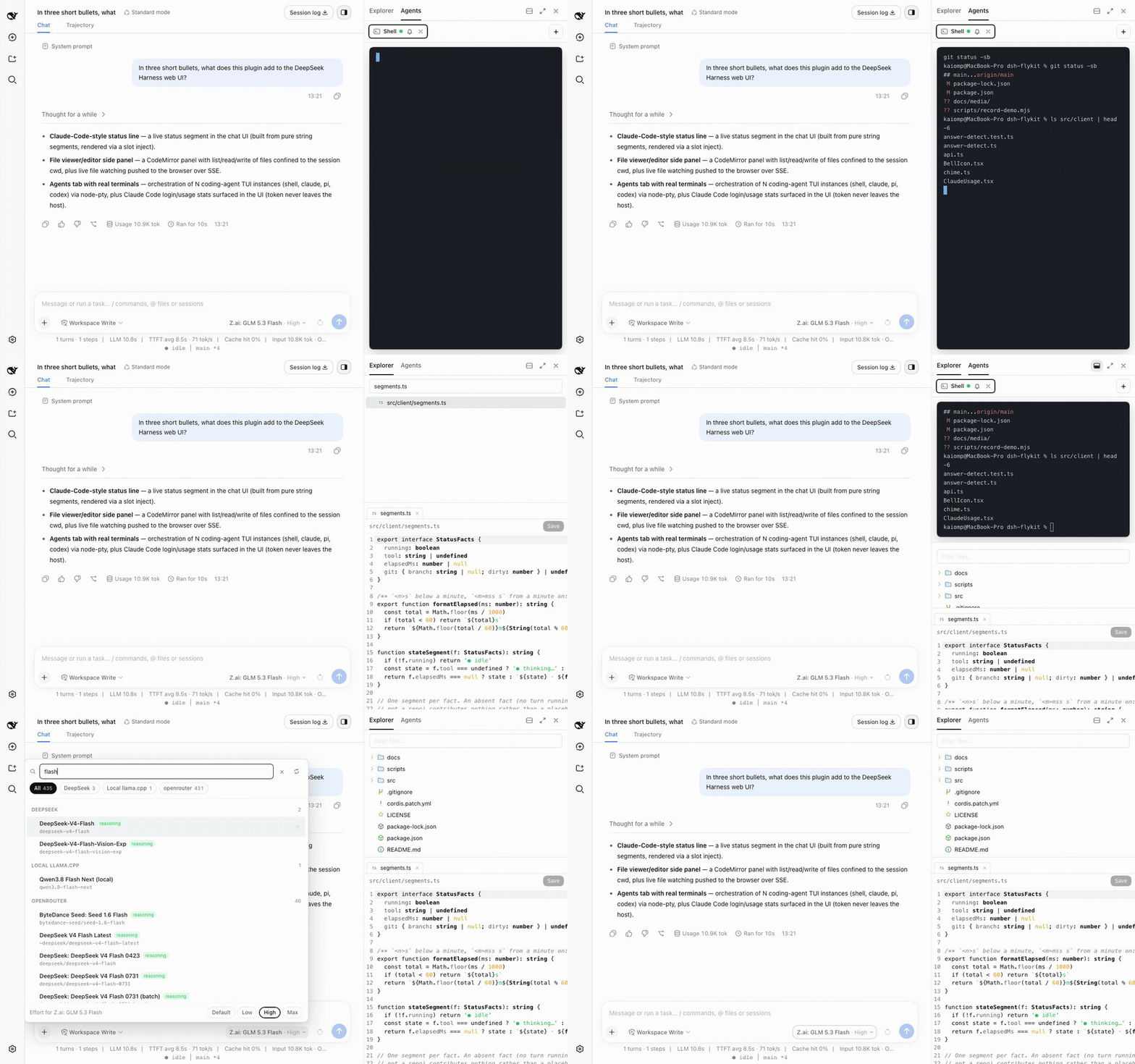 ## What you get **Explorer** — the session's file list (`git ls-files`, or a plain walk outside a repo), a CodeMirror editor that saves back to disk, Markdown and HTML/SVG preview, and a live `fs.watch` that refreshes the tree, dots changed files, and reloads an open file when it changes on disk (dirty files keep your edits and show a notice instead). 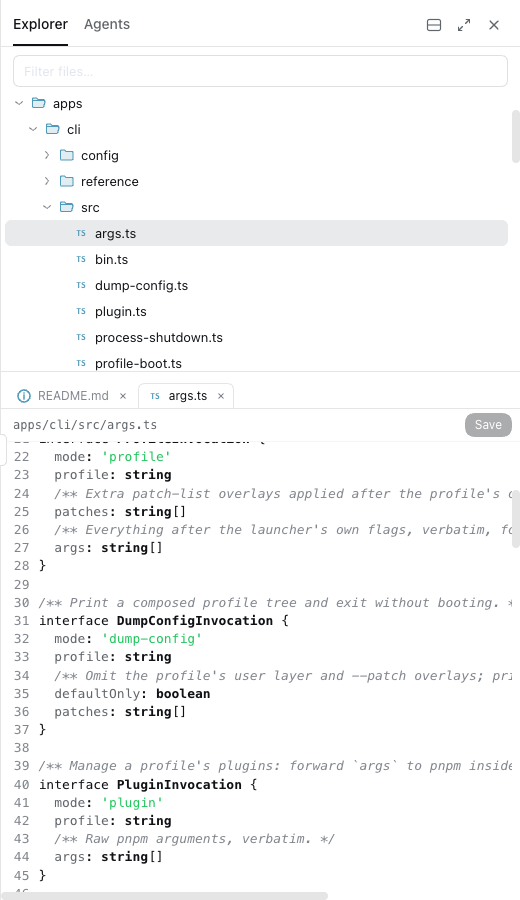 **Agents** — real PTY terminals in the session's workspace: Claude Code, Pi, Codex, or a plain shell, in an xterm view. A chime and a dot mark the tab when an agent stops printing after a burst of output; per-terminal mute. Claude subscription usage bars appear above a Claude Code terminal. 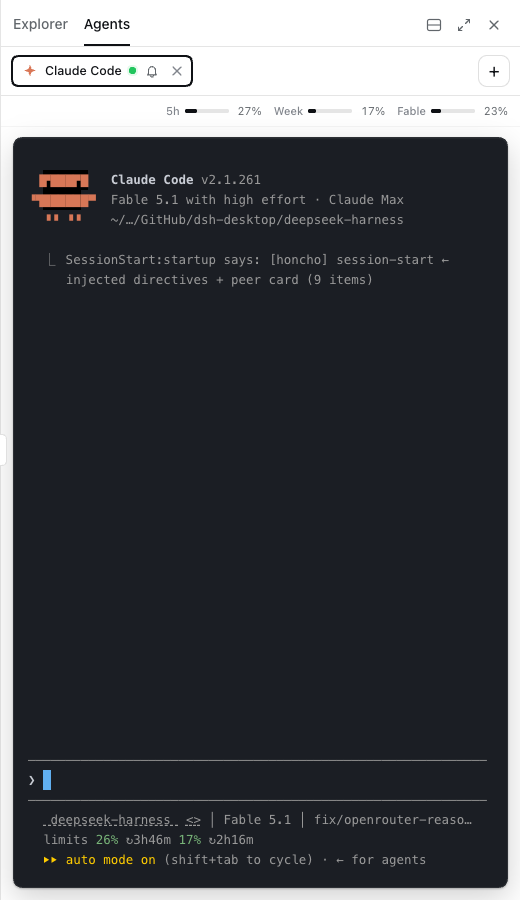 **Stage view** — the focused agent fills the panel, the others sit under it as live thumbnails. 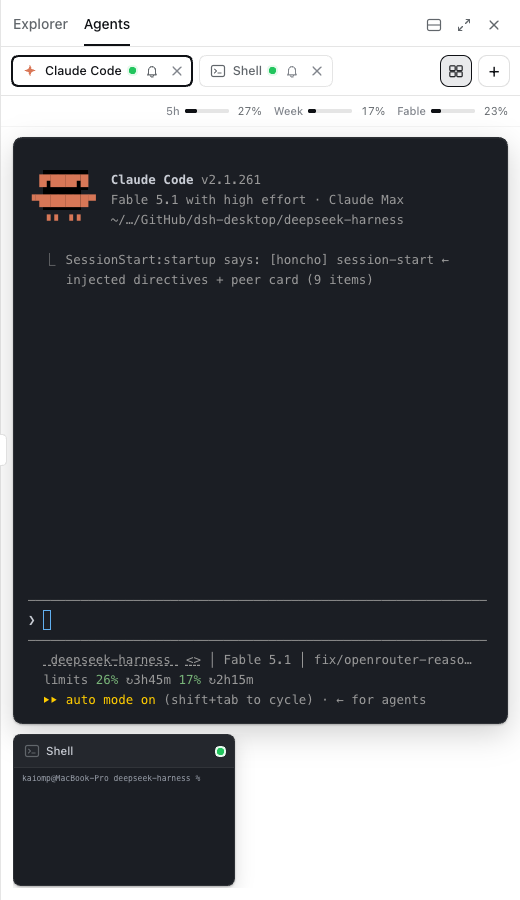 **Split mode** — Agents stacked above Explorer, so a running terminal and an open file are visible at once. The panel also maximises to the full window. 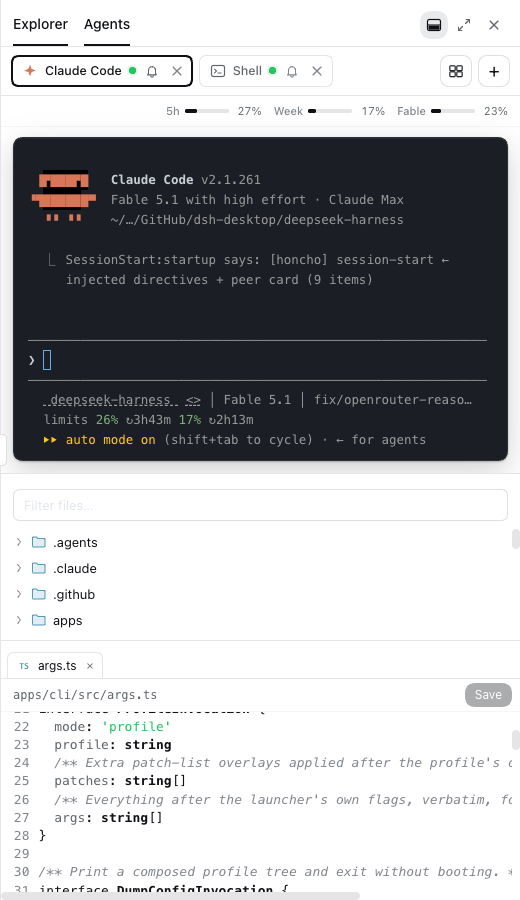 **Apps** — WhatsApp Web inside the panel. A headless Google Chrome owned by the host (`apps/whatsapp/`) runs web.whatsapp.com; the tab shows its live CDP screencast and forwards clicks, typing, wheel and paste. Opening the tab starts that Chrome if it is down. The linked session lives in `~/.dsh/flykit/whatsapp/`, outside the package. First time: `cd apps/whatsapp && node wa.mjs login` prints the QR in the terminal (the tab shows it too). Details and what was verified: `apps/whatsapp/README.md`. **Model picker** — replaces the shell's model seat with a search box over the same directory `/model` uses, so both stay one state. Provider pills, favourites, recents, reasoning badges, an effort row for reasoning models, and a button that refreshes the OpenRouter catalog live. 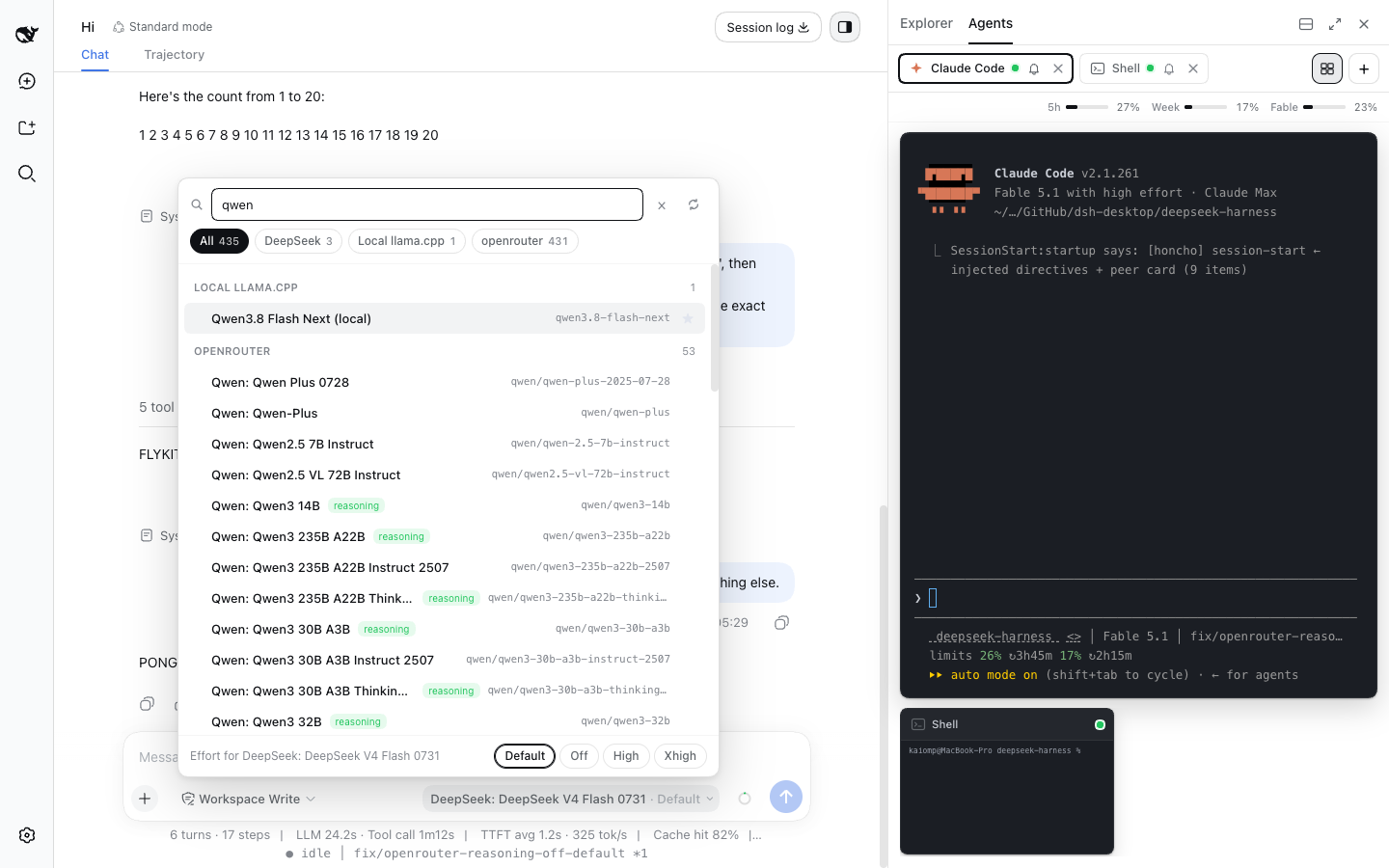 **Status line** — idle / thinking / running *tool*, a turn timer, the session's git branch and dirty count. It also recolours the shell's context ring as the window fills.  **Agent tools** — seven `flykit_agent_*` tools that let the DSH agent itself open, drive and read those terminals. See the table below. ## Install From npm: ```sh dsh plugin --profile web add dsh-flykit ``` From GitHub: ```sh dsh plugin --profile web add github:flykit-cc/dsh-flykit ``` Or from a checkout: ```sh git clone https://github.com/flykit-cc/dsh-flykit cd dsh-flykit npm install && npm run build dsh plugin --profile web add . ``` Check the layer landed, then start the GUI: ```sh dsh --profile web --dump-config | grep flykit dsh web ``` Remove it with `dsh plugin --profile web remove dsh-flykit`. ## Requirements - Node ≥ 22 - DSH 0.1.2-rc.1 - macOS or Linux. The Agents tab uses [node-pty](https://github.com/microsoft/node-pty), a native module; there is no Windows build here. - `git` on `PATH` for the branch segment and the Explorer's file list (without it, a plain directory walk). - `claude`, `pi` or `codex` on `PATH` for the terminals that run them. A missing binary just makes that terminal exit. ## How it works One package, two halves: - **Host half** (`lib/index.js`, a Cordis plugin) runs in the `dsh` process. It registers routes on DSH's web server under `/api/flykit/*`: `git`, `files`, `file` (GET/PUT), `watch` (SSE), `terms`, `term/input`, `term/resize`, `term/screen`, `term/stream` (SSE), `claude-usage` and `catalog-sync`. It also registers the seven agent tools, if the tool registry is present. - **Client half** (`lib/client.js`) is a CommonJS bundle the shell loads in the browser. It injects React components into the shell's slots and reaches the host over those routes with `fetch` and `EventSource`. Everything outside the shell's own platform modules is inlined, so the bundle is large. **The routes have no authentication.** DSH's web server binds to loopback, and that is the only thing keeping them private — anything that can reach the port can call them, and `term/input` writes to a live shell. Two limits do apply: the working directory always comes from the session header, never from the request, and file reads and writes are confined below it. Do not expose `dsh web` on a public interface with this plugin installed. **Catalog sync writes your settings.** If `llm-pi-ai` already has an `openrouter` provider configured, flykit fetches openrouter.ai's live model list three seconds after boot and once a day after that, and writes it to `llm-pi-ai.providers.openrouter.models` through the settings service — replacing whatever list is there. A short answer (under 50 models) is discarded rather than written, but there is no undo and no backup: backing up your settings is your job. With no `openrouter` provider configured, nothing is written. ## Agent tools Available to the DSH agent when `dsh-tools` is in the composition. Every tool is scoped to the calling session — one session never reaches another's terminals. | Tool | What it does | |------|--------------| | `flykit_agent_start` | Open `claude`, `pi`, `codex` or `shell` in the session's workspace; returns once the TUI has drawn itself, so the first send is not swallowed. | | `flykit_agent_send` | Type text into a running terminal; presses Enter unless `enter: false`. | | `flykit_agent_read` | Read a terminal as plain text, colours and redraws resolved. `sinceSeq` returns only what is new. | | `flykit_agent_wait` | Wait for the terminal to go quiet, then return what it printed. This is how an answer is collected. | | `flykit_agent_list` | List this session's terminals, running or exited. | | `flykit_agent_stop` | Kill a terminal and remove it from the panel. | | `flykit_agent_run` | One headless question to `claude` or `pi` in this workspace; no terminal, no follow-up. | ## Privacy The usage bars read the Claude Code login already on this machine — the macOS Keychain entry `Claude Code-credentials`, or `~/.claude/.credentials.json` elsewhere — and call Anthropic's usage endpoint from the host process. The OAuth token never leaves that process and is never sent to the browser; the browser receives only the plan name, the percentages and their reset times. With no Claude Code login present, the bars stay hidden. The Apps tab runs WhatsApp Web in a separate headless Chrome on this machine; its CDP port (9222) and viewer (9223) bind to 127.0.0.1 only, and the linked WhatsApp session is stored under `~/.dsh/flykit/`, never inside the package or a repo. The only other network call flykit makes is the OpenRouter catalog fetch described above. File contents, terminal output and git status stay between the `dsh` host process and your browser. ## Development ```sh npm install npm run dev # tsdown --watch: client bundle hot-reloads dsh plugin --profile web add . # once dsh web --port 3080 --no-open ``` Client bundle edits reload in the browser; host-half edits need `dsh web` restarted. `npm run typecheck` and `npm test` cover both halves — the test run also verifies the client bundle registers exactly one module and pulls in no non-platform imports. ## Status 0.1.0, and rough in places: - Not published to npm yet; install from GitHub. - The routes are unauthenticated (see above). - Terminals live in the host process. Restarting `dsh web` kills them; scrollback is capped at 256 KiB per terminal. - The Agents tab polls the terminal list every two seconds rather than streaming it. - The file list stops at 5,000 entries and the editor refuses files over 2 MiB. - The editor is CodeMirror with syntax highlighting only: no language server, no diff view. - The model picker shadows the shell's shipped model seat. Removing the plugin restores it. ## License MIT. [flykit.cc](https://flykit.cc)
Install
dsh plugin --profile web add github:flykit-cc/dsh-flykit
Profile: web
With the hub plugin installed, ask your agent to install it by name — it resolves the same plan shown here.
dsh plugin --profile web add github:stvlynn/dsh.fish#path:packages/dsh-plugin-hub
install dsh-flykit from the hub
- This package builds from source on install. pnpm will ask you to allow its build script — that is permission to run the package’s code on your machine, outside the agent sandbox. Only allow sources you trust.
- This source has no pinned commit, so a later push upstream changes what installs. Prefer pinning a commit.