Bundle
@dsh-external/dsh-theme-switch
DSH 主题切换:自动检测已安装皮肤,官方风格 UI 一键互斥切换,全部禁用时回退官方皮肤
- Source
- kinmat-A
- stars
- 2 stars
- License
- BSD-3-Clause
- Updated
- Updated 2 days ago
Readme
# @dsh-external/dsh-theme-switch
DSH 主题切换:自动检测已安装的主题/皮肤插件,在 **设置 → 插件 → 皮肤** 里提供官方风格的一键开关。
[English](README.en.md)
[](https://awesome-dsh-plugin.com)
## 安装
```sh
dsh plugin --profile web add github:kinmat-A/dsh-theme-switch
```
装完重启 `dsh web`(或由 dsh-market 插件市场安装并热激活),打开 **设置 → 插件 → 皮肤**。
## 使用
在 **设置 → 插件 → 皮肤** 点击按钮即可切换皮肤;切换后刷新一下浏览器页面(Ctrl+F5),新皮肤才会显示。
## 截图
「皮肤」标签页(设置 → 插件 → 皮肤),深色主题:
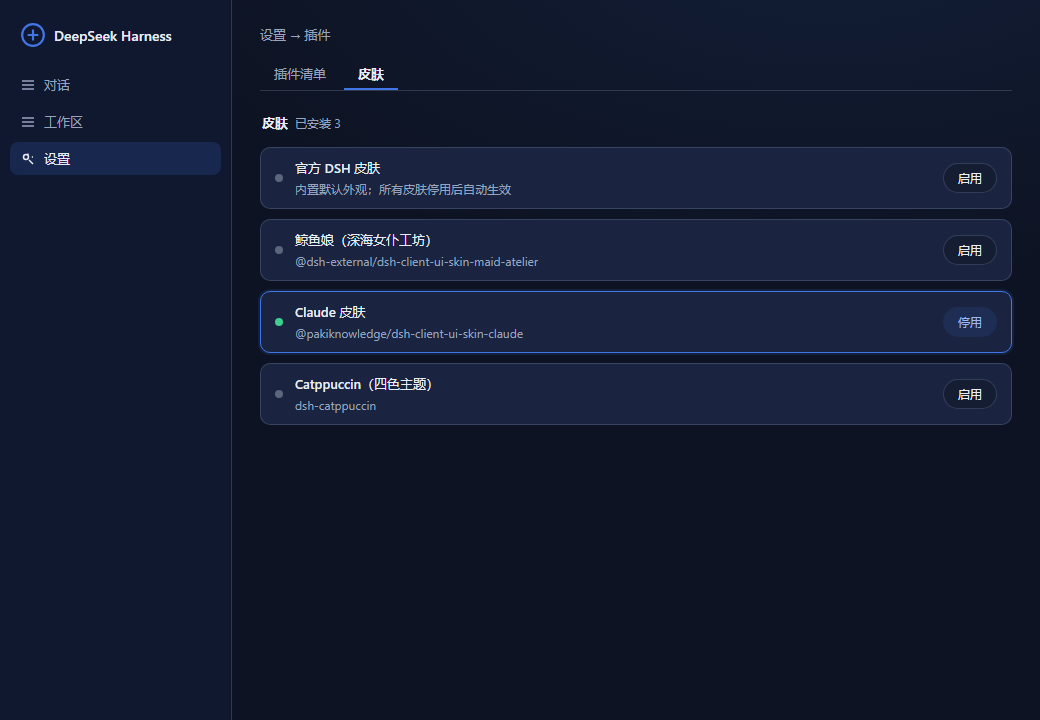
> 注:图片中出现的主题外观仅为展示用。
## 特性
- **自动检测**:扫描 profile 的 dependencies + bundles,按包名 / `skin.json` / bundle patch 行启发式识别皮肤(可用 `config.themes` 手动补充)。
- **互斥切换**:点击某套皮肤的按钮即启用它并自动停用其余所有皮肤;再点一次则停用它。
- **官方回退**:所有皮肤都停用时自动回到官方默认外观(面板里的「官方 DSH 皮肤」行有对应按钮)。
- **即时生效 + 跨重启保留**:开关状态写入 home 层补丁 `~/.dsh/cordis.patch.yml`,由 dsh 启动流程实时监听并每次启动重放;修改后无需重启。
## 开发
```sh
pnpm install # 首次(需网络)
pnpm run build:client # 编译 client(tsdown)
```
## 结构
- `lib/index.js` — host 入口(纯 ESM,零依赖):皮肤检测、home 补丁读写、HTTP API。
- `src/client/index.tsx` → `lib/client.js` — 官方风格设置标签页(`--dsw-alias-*` token + primitives)。
- API:`GET /@dsh-external/dsh-theme-switch/api/themes`、`POST …/api/toggle {id}`(`id` 为 `__official__` 时停用全部皮肤)。
License: BSD-3-Clause
Install
dsh plugin --profile web add github:kinmat-A/dsh-theme-switch
Profile: web
With the hub plugin installed, ask your agent to install it by name — it resolves the same plan shown here.
dsh plugin --profile web add github:stvlynn/dsh.fish#path:packages/dsh-plugin-hub
install dsh-external-dsh-theme-switch from the hub
- This package builds from source on install. pnpm will ask you to allow its build script — that is permission to run the package’s code on your machine, outside the agent sandbox. Only allow sources you trust.
- This source has no pinned commit, so a later push upstream changes what installs. Prefer pinning a commit.