Bundle
dsh-concurrency-meter
Read-only model request concurrency monitoring for DeepSeek Harness
- Source
- Wanbinyu
- stars
- 2 stars
- License
- MIT
- Updated
- Updated 13 days ago
Readme
# dsh-concurrency-meter
[English](README.en.md) | 简体中文
> 非官方社区插件,与 DeepSeek 官方无隶属或背书关系。
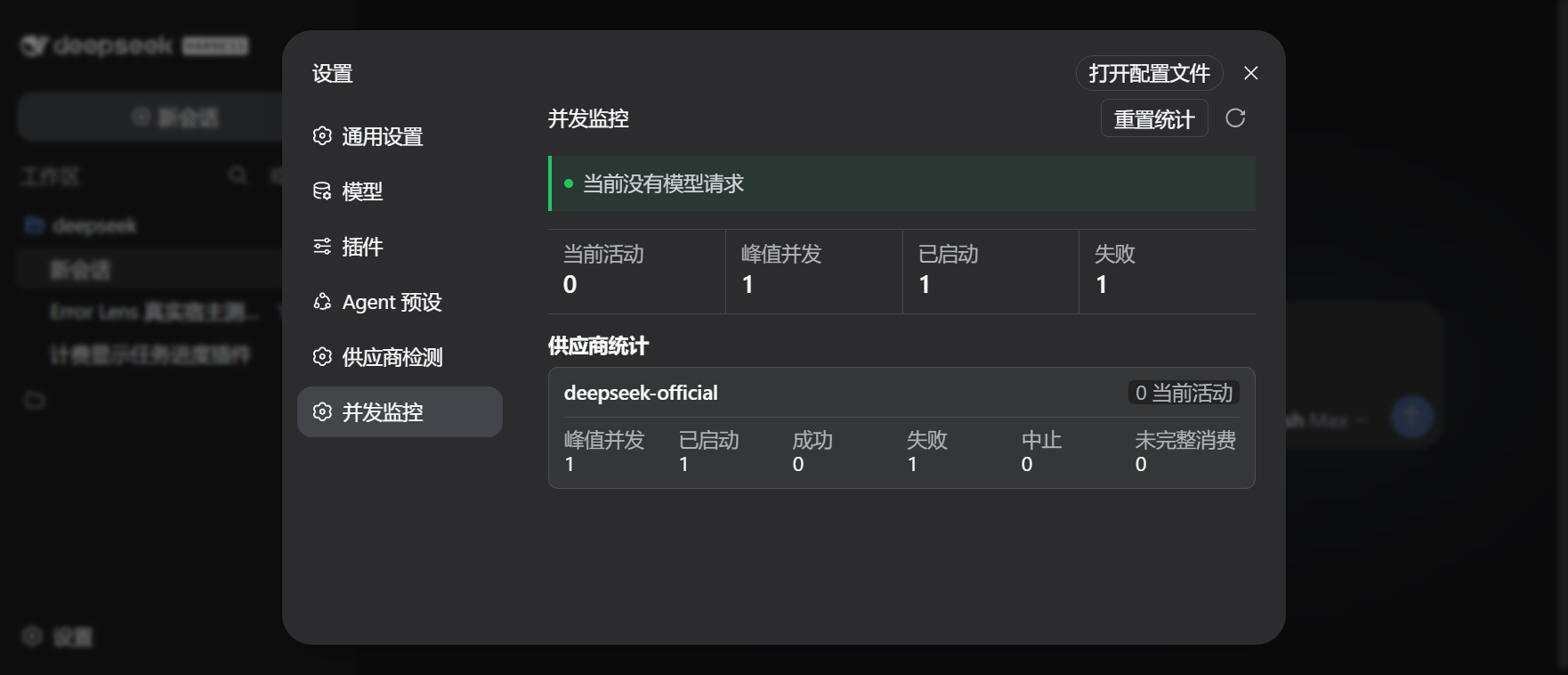
为 DeepSeek Harness Web 提供只读的模型请求并发监控。插件接入 DSH 官方 `llm/stream` 调用链,展示当前活动请求、峰值并发、执行结果和各供应商统计,但不会拦截、排队或修改请求。
## 功能
- 实时展示当前活动数、峰值并发、已启动请求和失败数;
- 分供应商统计成功、失败、中止与未完整消费的流;
- 展示活动请求的供应商、模型、用途和已运行时间;
- 默认并发达到 3 时显示提醒,可配置阈值;
- 设置页打开期间每秒刷新,关闭后不进行浏览器轮询;
- 支持重置内存统计,重置不会取消正在运行的请求;
- 不读取消息、提示词、模型输出、凭据或会话 ID;
- 只观察调用链,不限流、不排队,也不改变模型请求结果。
## 安装
要求 Node.js `>=22.19` 和 DeepSeek Harness `0.1.0-rc.6` 或更高版本。
`v0.1.2` 已使用 DeepSeek Harness `0.1.1-rc.2` 完成类型、测试、构建和打包验证,并保留 `0.1.0-rc.6` 至 `rc.8`、`0.1.1-rc.1` 的兼容分支。活动请求期间每秒刷新,空闲时自动降为每 5 秒刷新。
```bash
dsh plugin --profile web add https://github.com/Wanbinyu/dsh-concurrency-meter/releases/download/v0.1.2/dsh-concurrency-meter-0.1.2.tgz
```
安装或更新后重启:
```bash
dsh web
```
打开“设置 -> 并发监控”查看统计。
卸载:
```bash
dsh plugin --profile web remove dsh-concurrency-meter
```
## 配置
```yaml
- insert:
- id: concurrency-meter
name: dsh-concurrency-meter
config:
warningThreshold: 3
maxActiveDetails: 20
```
| 选项 | 默认值 | 说明 |
| --- | ---: | --- |
| `warningThreshold` | `3` | 并发提醒阈值,范围 1-100;只改变提示状态,不限制请求 |
| `maxActiveDetails` | `20` | 最多展开的活动请求数,范围 1-100;总数仍会完整统计 |
## 统计口径
- `成功`:流以正常结束原因完成;
- `失败`:流返回错误结束原因,或调用链抛出异常;
- `中止`:流明确返回中止结束原因;
- `未完整消费`:消费者提前关闭流,或流未返回结束事件;
- 未被实际消费的惰性流不会计入已启动请求;
- 所有统计仅保存在当前 DSH Host 进程内,重启后自动清零。
供应商和模型 ID 用于定位并发来源,不属于提示词内容。插件不持久化统计,也不提供历史趋势、限流或请求队列。
## 开发
```bash
npm install
npm run verify
```
`verify` 会执行 Host/Web 类型检查、单元测试、客户端构建和安装包内容检查。浏览器端使用轻量 Remote 边界解析器,当前主包约 21 KB(gzip 约 5.4 KB),不会重复打入完整 Zod。
## 反馈
问题与建议请提交到 [GitHub Issues](https://github.com/Wanbinyu/dsh-concurrency-meter/issues)。
## 许可证
[MIT](LICENSE)
Install
dsh plugin --profile web add github:Wanbinyu/dsh-concurrency-meter
Profile: web
With the hub plugin installed, ask your agent to install it by name — it resolves the same plan shown here.
dsh plugin --profile web add github:stvlynn/dsh.fish#path:packages/dsh-plugin-hub
install dsh-concurrency-meter from the hub
- This package builds from source on install. pnpm will ask you to allow its build script — that is permission to run the package’s code on your machine, outside the agent sandbox. Only allow sources you trust.
- This source has no pinned commit, so a later push upstream changes what installs. Prefer pinning a commit.