Bundle
dsh-completion-guard
A task-contract and completion-certification layer for DeepSeek Harness.
- Source
- GreenLv
- License
- Apache-2.0
- Updated
- Updated 6 days ago
Readme
# dsh-completion-guard
[简体中文](README.zh-CN.md)
An add-on for DeepSeek Harness (DSH) that keeps a task's requirements and checks them before the task is marked complete. It restores the same checklist after a resumed session and accepts only matching saved tool results as evidence.

## Quick start
Install the published plugin into the DSH Web environment:
```sh
dsh plugin --profile web add dsh-completion-guard@0.4.0
```
Before restarting DSH, record and verify the DSH program directory and the Web settings directory. Replace the example paths with the absolute paths on your machine:
```sh
DSH_RUNTIME_ROOT=/absolute/path/to/.dsh-runtime
DSH_PROFILE_ROOT=/absolute/path/to/.dsh/profiles/web
DSH_COMPOSED_DUMP=/tmp/dsh-web-composed.yml
GUARD_HOST_LOCK="$DSH_PROFILE_ROOT/node_modules/.bin/dsh-completion-guard-host-lock"
"$GUARD_HOST_LOCK" inspect --runtime-root "$DSH_RUNTIME_ROOT" --profile-root "$DSH_PROFILE_ROOT"
"$GUARD_HOST_LOCK" inject --runtime-root "$DSH_RUNTIME_ROOT" --profile-root "$DSH_PROFILE_ROOT"
dsh --profile web --dump-config > "$DSH_COMPOSED_DUMP"
"$GUARD_HOST_LOCK" verify-dump --runtime-root "$DSH_RUNTIME_ROOT" --profile-root "$DSH_PROFILE_ROOT" --dump-config "$DSH_COMPOSED_DUMP"
```
On Windows, run the same three subcommands through `dsh-completion-guard-host-lock.cmd` in the Web settings directory's `node_modules\.bin` directory and use Windows absolute paths. Repeat this check after upgrading DSH, its Web or Headless settings, or the package. The Guard stays unavailable if the active package set is missing, mixed, duplicated, or different from a checked setup.
Restart DSH Web, open a session, and enable the Guard:
```text
/context-guard on
/context-guard status
```
Activation is opt-in by default. `status` shows whether the Guard is on and how many checks remain. `off` stops protection for the current session without deleting its history. `clear` closes the current checklist while keeping prohibitions. `diagnose` explains why a completion check passed or failed.
## What it protects
- Saves requirements, acceptance checks, prohibitions, and later corrections without overwriting history.
- Uses only tool calls and results that DSH has saved, and stores a redacted summary rather than full output.
- Accepts evidence only when the action and result match the requested command, file, or other target.
- Rechecks completion after a session is rebuilt or resumed, and refuses to certify damaged state.
- Stops the Guard-owned Goal completion path when the current checklist has not passed. DSH internals can still bypass this path, so the plugin reports those cases rather than claiming to block every possible write.
## Status and compatibility
Version 0.4.0 is the current release. Install it from [npm](https://www.npmjs.com/package/dsh-completion-guard); its [GitHub Release](https://github.com/GreenLv/dsh-completion-guard/releases/tag/v0.4.0) carries the exact package checksum and native macOS and Windows acceptance records. It targets DSH `0.1.2-alpha.3` with dshmarket `1.39.0` and Cordis `4.0.2`.
Version `0.4.1-rc.1` is a prerelease candidate for DSH `0.1.2-rc.1` with dshmarket `1.41.0`. Its host cohort is audited on native macOS/posix and against the native Windows rc.1 host graph; host-graph audits do not replace the cross-platform exact-artifact acceptance of one frozen package. See [`docs/COMPATIBILITY.md`](docs/COMPATIBILITY.md).
Version 0.3.2 remains available for the checked DSH `0.1.1-rc.2` and `0.1.2-alpha.2` setups. Do not combine packages from different checked setups; the Guard fails closed when the active package set does not match one complete cohort in [`docs/COMPATIBILITY.md`](docs/COMPATIBILITY.md).
Version 0.4.0 remains frozen on this alpha.3 setup. Alpha.4 and later alpha releases are not new adaptation targets; compatibility work resumes with the first upstream RC published after alpha.3. Track that milestone on the [DeepSeek Harness tags page](https://github.com/deepseek-ai/deepseek-harness/tags).
Release packages are built once from a clean commit and published only after those exact bytes pass native macOS and Windows Web and Headless checks. CI, native lifecycle checks, package publication, and public readback remain separate evidence scopes; see [`docs/LOCAL_ACCEPTANCE.md`](docs/LOCAL_ACCEPTANCE.md).
Version 0.3.0 is not recommended. Its package passed native checks, but npm did not record the required source commit, so the version cannot be repaired in place and has no GitHub Release. Use 0.3.2.
> The project was renamed from `dsh-context-guard` to `dsh-completion-guard` on 2026-08-29 because an unrelated plugin already used the old name. The internal bundle id remains `context-guard`, and the old npm package points users to this one. Supported DSH setups are listed in [`docs/COMPATIBILITY.md`](docs/COMPATIBILITY.md); Node.js `>=22` and pnpm `>=11` are required.
## Activation modes
Context Guard has two activation modes:
- `opt-in` (default): protection is off when a session starts. Run `/context-guard on` in that session to turn it on, and `/context-guard off` to turn it off again. This changes only the current session.
- `always`: DSH sessions are protected automatically. Running `/context-guard off` turns protection off only for that session; other sessions start with protection on.
These modes only control Guard protection. They are not the DSH session mode (for example, the standard or minimal mode) that a session starts with. With `always`, the Guard loads before each DSH session starts. DSH currently cannot switch a session's mode after the session has started, so a session protected this way keeps the DSH session mode it started with. `/context-guard on` and `/context-guard off` turn Guard protection on or off; they never change the DSH session mode.
To make DSH sessions start with protection on, add this entry to the `cordis.patch.yml` used by the way you start DSH:
```yaml
- id: context-guard
name: dsh-completion-guard
config:
activation: always
```
DSH can run with a **Web** interface in a browser, or **Headless** without a browser interface from a terminal or an automated task. These two ways of running DSH use separate settings files. Edit the file for the one you use, or edit both if you use both:
| System | How you use DSH | Default path |
| --- | --- | --- |
| macOS / Linux | Web | `$HOME/.dsh/profiles/web/cordis.patch.yml` |
| macOS / Linux | Headless | `$HOME/.dsh/profiles/headless/cordis.patch.yml` |
| Windows | Web | `%USERPROFILE%\.dsh\profiles\web\cordis.patch.yml` |
| Windows | Headless | `%USERPROFILE%\.dsh\profiles\headless\cordis.patch.yml` |
If you set a custom `DSH_HOME`, use that directory instead of `$HOME/.dsh` or `%USERPROFILE%\.dsh`.
You can also paste this prompt into DSH and let it make the change:
> Set `dsh-completion-guard` to `always` mode. Find the `cordis.patch.yml` used by the way I am currently running DSH (Web interface or Headless), back it up first, and only set `activation: always` on the entry with `id: context-guard`. Do not change any other settings or restart DSH. When finished, show me the file path and the exact diff.
After the change, restart DSH.
## How completion is checked
Once enabled, the Guard saves direct user requirements and acceptance checks. A saved tool result counts only when it matches the requested command, file, or other target. Before claiming the whole task complete, the model must pass the Guard's checkpoint; missing, stale, or mismatched evidence leaves the task open.
Read-only evidence collection and actions that change packages, files, services, or Git state use separate tools. A successful lookup never grants permission to make a change. Exact command limits and platform evidence are documented in [`docs/COMPATIBILITY.md`](docs/COMPATIBILITY.md).
## Boundaries
Context Guard certifies completion; DSH still owns Goal, Todo, Compaction, continuation, permissions, and tool execution. This plugin is not a security sandbox, semantic proof system, token-pruning tool, or replacement for those DSH facilities.
Evidence is bounded and redacted. Complete prompts, stdout, file contents, credentials, Authorization headers, URL query values, image bytes, and raw transcripts are not stored by the guard. See [`docs/PRIVACY.md`](docs/PRIVACY.md).
## Relationship to Codex Context Guard
This project began as a DSH port of deterministic behavior from [`GreenLv/codex-context-guard`](https://github.com/GreenLv/codex-context-guard) v0.8.8. That version is the historical starting point, not the current compatibility level.
Version 0.4.0 was deliberately aligned with the shared evidence rules in Codex Context Guard 0.10.0: proof must belong to work that is still open and must show the operation, target, and result the user actually requested. This is a limited behavior-level alignment, not a claim that the two products have the same features.
Codex Context Guard 0.11.0 was released afterward. DSH 0.4.0 already has native checks for exact mutation targets, typed waits, and quoted text, but it does not yet include the full 0.11.0 authorization-ticket, work-unit, supersession, or incident-benchmark changes. The plain-language comparison and current delta ledger are in [`docs/SEMANTIC_COMPATIBILITY.md`](docs/SEMANTIC_COMPATIBILITY.md).
The two repositories serve different runtimes:
- `codex-context-guard` is the Codex Hook/Python implementation with Codex plugin-cache and Hook lifecycle integration.
- `dsh-completion-guard` is an independent TypeScript implementation over native DSH Session events, commands, tools, and agent lifecycle.
They do not share runtime state, installers, caches, or release histories. Fixes are contributed to the repository that owns the affected runtime and are ported deliberately when the same behavior belongs in both products. See [`docs/UPSTREAM_BASE.md`](docs/UPSTREAM_BASE.md) and [`docs/PORTING_NOTES.md`](docs/PORTING_NOTES.md) for the exact reused and replaced boundaries.
## npm download history
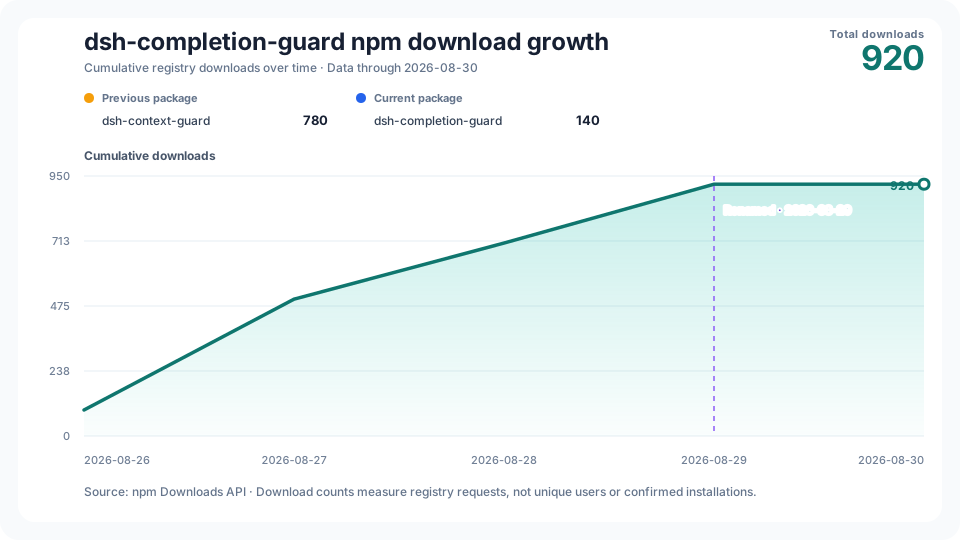
The cumulative chart keeps the old and new npm package totals visibly separate, marks the 2026-08-29 rename, and combines them only for the project growth line. npm download counts measure registry requests; they are not counts of unique users or confirmed installations. The workflow updates the chart daily and can also be triggered manually.
## Documentation
- [`CHANGELOG.md`](CHANGELOG.md) — versioned user-visible changes.
- [`docs/ARCHITECTURE.md`](docs/ARCHITECTURE.md) — ownership, durable state, and certification pipeline.
- [`docs/COMPATIBILITY.md`](docs/COMPATIBILITY.md) — supported DSH versions and certifiable command subset.
- [`docs/LOCAL_ACCEPTANCE.md`](docs/LOCAL_ACCEPTANCE.md) — deterministic, isolated, native, and public-package validation scopes.
- [`docs/distribution.md`](docs/distribution.md) — verified public distribution destinations and the rename note.
- [`docs/PRIVACY.md`](docs/PRIVACY.md) — stored facts, prohibited data, and failure behavior.
- [`docs/UPSTREAM_BASE.md`](docs/UPSTREAM_BASE.md) — historical starting point and repository authority boundary.
- [`docs/SEMANTIC_COMPATIBILITY.md`](docs/SEMANTIC_COMPATIBILITY.md) — current shared behavior and known gaps.
- [`docs/PORTING_NOTES.md`](docs/PORTING_NOTES.md) — behavior retained from Codex and DSH-specific replacements.
## Development
```sh
pnpm install --frozen-lockfile
pnpm run test:stats
pnpm run typecheck
pnpm test
pnpm run lint
pnpm run build
pnpm run pack:check
```
These commands validate a local source tree and package. CI, native-platform acceptance, npm publication, GitHub release identity, and installation in a live DSH environment remain separate evidence scopes.
Install
dsh plugin --profile web add github:GreenLv/dsh-completion-guard
Profile: web
With the hub plugin installed, ask your agent to install it by name — it resolves the same plan shown here.
dsh plugin --profile web add github:stvlynn/dsh.fish#path:packages/dsh-plugin-hub
install dsh-completion-guard from the hub
- This package builds from source on install. pnpm will ask you to allow its build script — that is permission to run the package’s code on your machine, outside the agent sandbox. Only allow sources you trust.
- This source has no pinned commit, so a later push upstream changes what installs. Prefer pinning a commit.