Bundle
dsh-approve-for-me
A fail-closed automatic approval mode with selectable reviewer models and visible decisions for DeepSeek Harness
- Source
- Hakunm
- License
- GPL-3.0-only
- Updated
- Updated 19 hours ago
Readme
<div align="center"> # dsh-approve-for-me 让 AI 替你审查 DSH 的敏感操作,而不是直接交出全部权限。 [English](README.en.md) · 简体中文 [](https://github.com/Hakunm/dsh-approve-for-me/releases/latest) [](https://github.com/Hakunm/dsh-approve-for-me/actions/workflows/ci.yml) [](LICENSE) [](https://github.com/topics/dsh-plugin) </div> `dsh-approve-for-me` 为 [DeepSeek Harness](https://github.com/deepseek-ai/deepseek-harness) 增加“代我审批”权限模式。打开后,DSH 仍在 `workspace-write` 沙箱中运行。每当操作需要确认,插件会先让你选择的模型判断风险,再决定是否只放行这一次。 审批结论会出现在对应操作旁边。你可以展开查看理由、实际使用的模型、风险判断和授权依据,不必去日志里找答案。 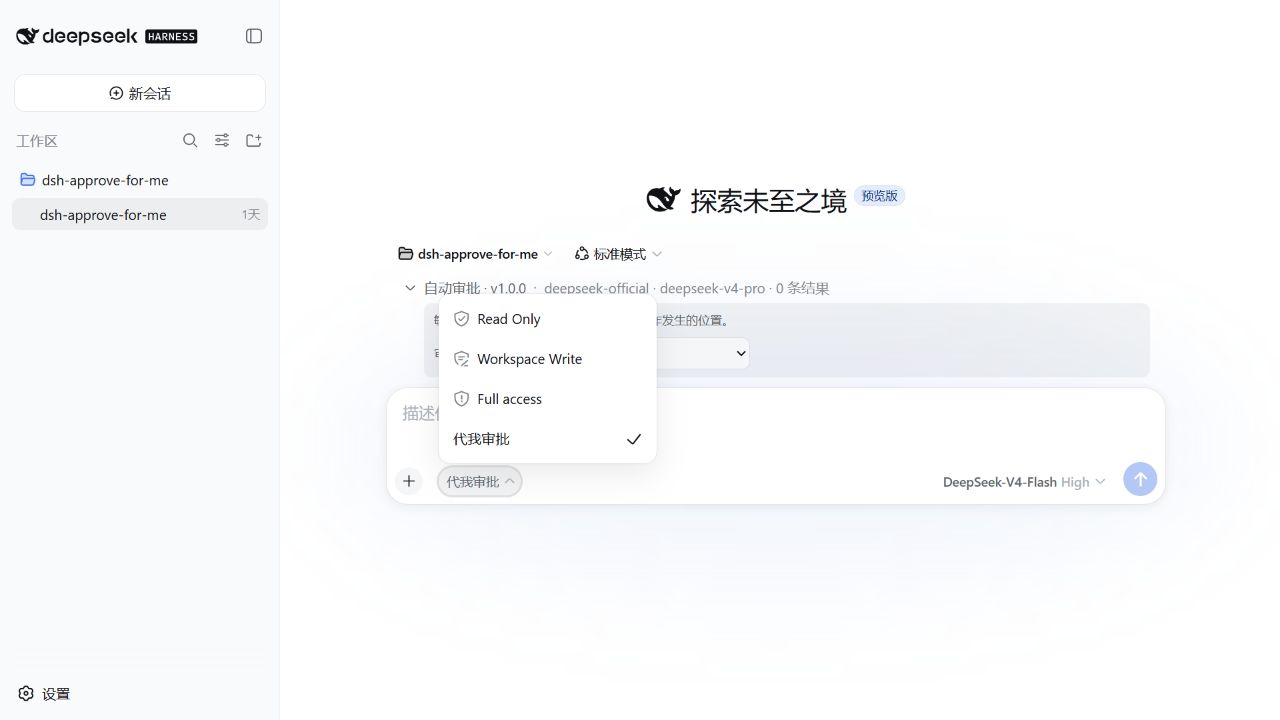 ## 为什么用它 Workspace Write 会在敏感操作前停下来等你点击;Full access 虽然省事,却连沙箱和审批也一起关掉了。代我审批保留 DSH 的工作区沙箱,把每一次敏感操作交给模型审查,并把结果留在对话里。 - **一次一审**:允许只对当前请求生效,不会积累成长期授权。 - **模型可选**:跟随对话模型,或从 DSH 已启用的供应商中另选审批模型。 - **结果可见**:允许、拒绝和调用失败都会显示,不会静默处理。 - **失败时不放行**:超时、模型不可用、输出无效或记录失败都会拒绝操作。 - **不改 DSH 源码**:通过官方插件与 Profile 机制安装、更新和卸载。  ## 安装 需要: - DeepSeek Harness `>=0.1.0-rc.5 <0.2.0` - Node.js `^22.19.0` 或 `>=24.0.0` 从 [最新 Release](https://github.com/Hakunm/dsh-approve-for-me/releases/latest) 下载 `dsh-approve-for-me-1.0.0.tgz`,再通过 DSH 的官方插件命令安装。下面以 `web` Profile 为例: ```powershell dsh plugin --profile web add C:\path\to\dsh-approve-for-me-1.0.0.tgz ``` 安装完成后,重启正在运行的 DSH Web 服务并刷新页面。访问模式菜单中出现“代我审批”,输入区上方显示“自动审批 · v1.0.0”,就说明插件已经加载。 Linux 和 macOS 使用同一条命令,只需换成实际文件路径: ```bash dsh plugin --profile web add /path/to/dsh-approve-for-me-1.0.0.tgz ``` 升级时下载新版本的 `.tgz`,再次执行 `plugin add`,然后重启对应 Profile。 ## 使用 1. 打开会话输入区的访问模式菜单,选择 **代我审批**。 2. 展开“自动审批 · v1.0.0”,选择审批模型。默认的“跟随对话模型”最省配置;也可以指定另一个已启用模型做独立审查。 3. 正常与 DSH 对话。敏感操作出现时,插件会自动审查,并把结果放在操作附近。 4. 展开结果即可查看完整理由和实际审批模型。 切换到 Read Only、Workspace Write 或 Full access 会立即停用新的自动审批;已有结果仍留在原来的位置。 也可以使用命令: ```text /approve-for-me on /approve-for-me off /approve-for-me status /approve-for-me model follow ``` ## 它如何保护你 插件只接管 DSH 已经要求审批的请求,不会绕过沙箱。审批模型没有工具权限,只会收到判断当前动作所需的有限上下文,并且必须按固定格式回答。即使模型给出“允许”,插件仍会用本地风险规则复核;最终最多发放一次性的 `allowed-once`。 碰到下面这些情况,插件不会放行: - 操作风险超出自动放行范围; - 用户意图或上下文不足; - 审批模型超时、不可用或返回无效内容; - 指定的模型已从 DSH 配置中移除; - 审批结果无法可靠记录。 选择第三方审批模型时,用于审查当前操作的有限载荷会发送给对应供应商,也可能产生额外费用。界面会显示实际调用的 provider/model。插件的审计记录不会复制完整对话、工具输出、凭据、令牌或模型原始响应。 自动审批仍然可能误判。重要项目请继续使用版本控制、备份和最小权限,并在可信网络环境中运行 DSH。 ## 常见问题 <details> <summary><strong>代我审批和 Full access 有什么区别?</strong></summary> 代我审批使用 `workspace-write` 沙箱,并让敏感操作继续经过审批;Full access 使用更开放的权限并跳过审批。想减少手动点击、又不愿关闭安全边界时,适合使用代我审批。 </details> <details> <summary><strong>审批模型调用失败后会怎样?</strong></summary> 操作不会执行。对话中会显示失败结果和可理解的原因,你可以检查模型配置、改回“跟随对话模型”,或自行切换到 Workspace Write 后手动审批。 </details> <details> <summary><strong>如何卸载?</strong></summary> ```powershell dsh plugin --profile web remove dsh-approve-for-me ``` 随后重启对应的 DSH Profile。卸载不会删除 DSH 会话;插件留下的审批元数据可按你的数据保留策略处理。 </details> ## 反馈与许可 遇到问题或有功能建议,请提交 [GitHub Issue](https://github.com/Hakunm/dsh-approve-for-me/issues)。不要在公开 Issue 中附上凭据、完整对话或未脱敏日志。 本项目采用 [GNU GPL v3.0](LICENSE) 开源协议。
Install
dsh plugin --profile web add github:Hakunm/dsh-approve-for-me
Profile: web
With the hub plugin installed, ask your agent to install it by name — it resolves the same plan shown here.
dsh plugin --profile web add github:stvlynn/dsh.fish#path:packages/dsh-plugin-hub
install dsh-approve-for-me from the hub
- This package builds from source on install. pnpm will ask you to allow its build script — that is permission to run the package’s code on your machine, outside the agent sandbox. Only allow sources you trust.
- This source has no pinned commit, so a later push upstream changes what installs. Prefer pinning a commit.