Bundle
dsh-agent-skills
Discover and manage Claude Code, Codex, Gemini CLI, and other Agent Skills inside DeepSeek Harness.
- Source
- minivv
- stars
- 14 stars
- License
- MIT
- Updated
- Updated 3 days ago
Readme
# dsh-agent-skills [](https://www.npmjs.com/package/dsh-agent-skills) [](https://www.npmjs.com/package/dsh-agent-skills) [](./LICENSE) [](https://github.com/deepseek-ai/deepseek-harness) [](https://github.com/zp-home/dsh-recommend) 在 DeepSeek Harness 的设置页中查看、启停和管理本地 Agent Skills。 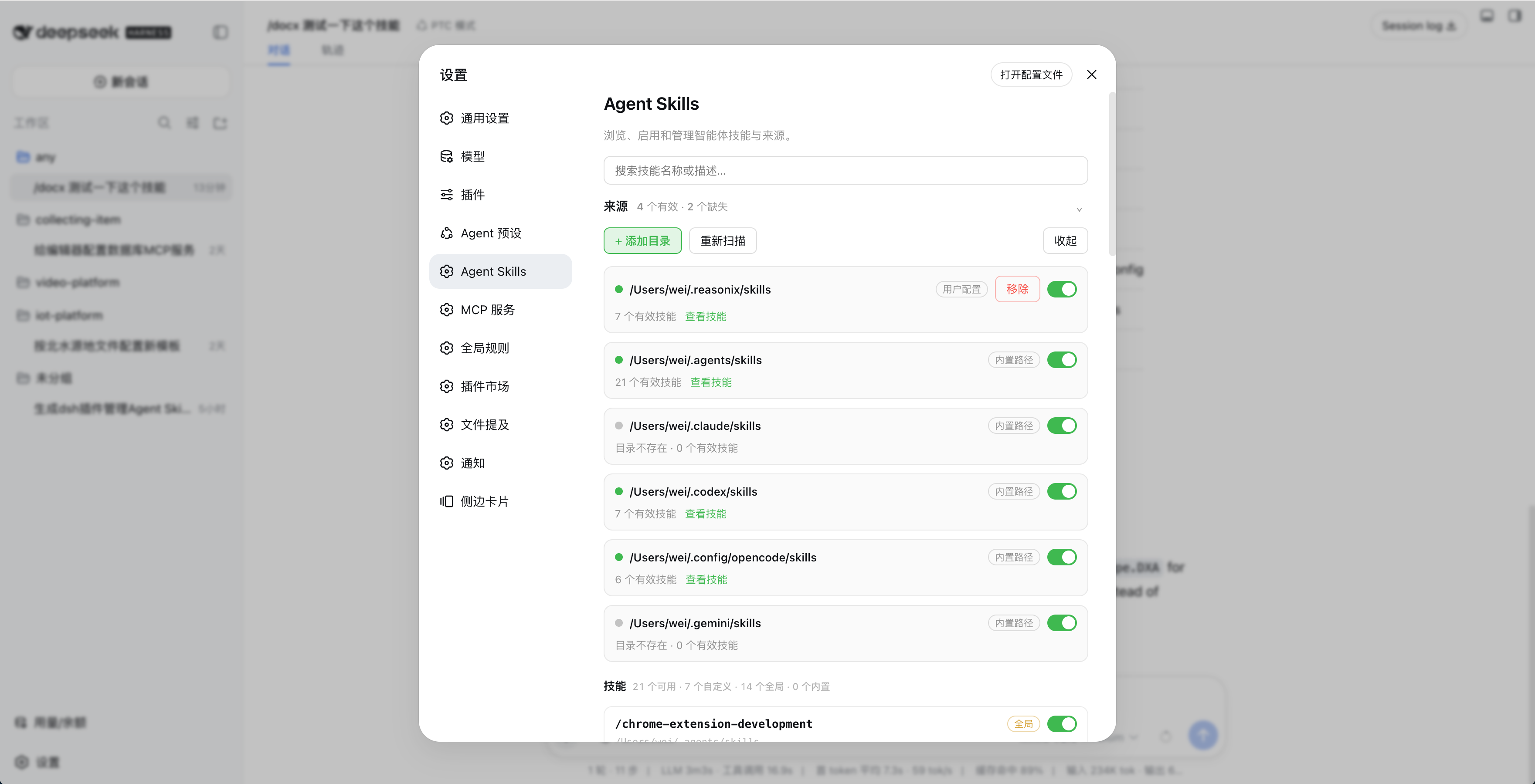 ## 功能 - 自动扫描 `~/.agents/skills`、`~/.claude/skills`、`~/.codex/skills`、`~/.config/opencode/skills` 和 `~/.gemini/skills` - 支持自定义技能目录 - 按目录或单个技能启停 - 搜索、查看描述并监听技能文件变化 - 不修改原始 `SKILL.md` ## 安装 ### npm(推荐) ```bash dsh plugin --profile web add dsh-agent-skills ``` 安装后打开「设置 → Agent Skills」,点击「开启接管 DSH 技能」,再点击「重启 DSH」。 ### DSH 插件市场 在「设置 → 插件市场」中搜索 **Agent Skills**,或查看 [DSH 插件市场](https://github.com/dsh-market/dsh-market)。 ### GitHub ```bash dsh plugin --profile web add github:minivv/dsh-agent-skills ``` Git 安装可能需要授权 pnpm 执行构建脚本。 ## 使用 1. 在「设置 → Agent Skills」中检查自动发现的目录,或点击「+ 添加目录」。 2. 使用目录和技能开关控制可用技能。 3. 出现技能变更提示后,点击「刷新页面」。 4. 修改技能文件后,点击「重新扫描」或等待自动刷新。 点击「取消接管」并重启 DSH,可恢复 DSH 原来的技能来源。 设置保存在 `$DSH_HOME/agent-skills/state.json`。 ## 技能格式 ```text skills/ ├── my-skill/ │ └── SKILL.md └── another-skill.md ``` `SKILL.md` 需要 YAML frontmatter,`name` 使用小写 kebab-case: ```markdown --- name: my-skill description: Explain when this skill should be used. --- # Instructions ``` ## 卸载 先在设置页点击「取消接管」和「重启 DSH」,再运行: ```bash dsh plugin --profile web remove dsh-agent-skills ``` 如果设置页无法打开,先恢复 DSH 技能来源: ```bash DSH_INSTALL_ROOT="$(npm root -g)/@deepseek-ai/dsh" \ node ~/.dsh/profiles/web/node_modules/dsh-agent-skills/scripts/uninstall-preset.mjs dsh plugin --profile web remove dsh-agent-skills ``` ## 开发 要求 Node.js 20+。 ```bash npm install npm run typecheck npm run build npm test npm pack --dry-run ``` ## 注意 - 技能名必须匹配 `[a-z0-9]+(?:-[a-z0-9]+)*` - DSH 升级后如果开关失效,重新开启接管并重启 DSH ## 链接 - [GitHub](https://github.com/minivv/dsh-agent-skills) - [npm](https://www.npmjs.com/package/dsh-agent-skills) - [DSH 插件市场](https://github.com/dsh-market/dsh-market) - [WeiSpot](https://weispot.vercel.app/projects/dsh-agent-skills) ## License [MIT](./LICENSE)
Install
dsh plugin --profile web add github:minivv/dsh-agent-skills
Profile: web
With the hub plugin installed, ask your agent to install it by name — it resolves the same plan shown here.
dsh plugin --profile web add github:stvlynn/dsh.fish#path:packages/dsh-plugin-hub
install dsh-agent-skills from the hub
- This package builds from source on install. pnpm will ask you to allow its build script — that is permission to run the package’s code on your machine, outside the agent sandbox. Only allow sources you trust.
- This source has no pinned commit, so a later push upstream changes what installs. Prefer pinning a commit.