Bundle
@dougen/dsh-deepseek-usage
DeepSeek 余额侧边栏插件:余额(官方 API)、当前档单价与峰谷时段指示灯,支持中/英文界面。
- Source
- dougen
- License
- MIT
- Updated
- Updated 11 days ago
Readme
# @dougen/dsh-deepseek-usage A sidebar plugin for **DeepSeek Harness Web UI** that shows your **DeepSeek account balance** (large display) and the **current model's unit pricing**, with a peak/off-peak billing indicator. UI language follows the DSH locale (Chinese UI shows Chinese, other languages show English). DeepSeek **余额侧边栏插件**(DeepSeek Harness Web UI):在 DSH **网页界面**的侧边栏底部常驻显示你的 **DeepSeek 账号余额**(放大显示)与**当前模型档单价**,并提供高峰/空闲计费时段指示灯。界面语言跟随 DSH 语言设置(中文界面显示中文,其他语言显示英文)。 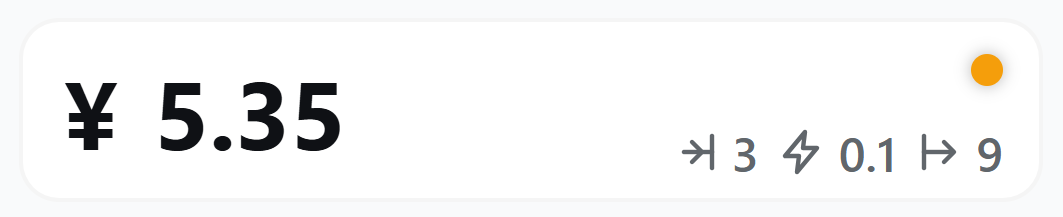 ## Features / 功能 - **Balance**: `¥ 110.00` large display (symbol follows account currency: `¥` CNY / `$` USD) - **Unit pricing**: `→|1.5 ⚡0.05 |→4.5` (input / input cache / output, bottom-right of the card; switches with the active model and peak/off-peak window — **updates instantly when you switch models**) - **Peak indicator**: top-right dot, orange during peak hours (Mon–Fri 9:00–12:00, 14:00–18:00 Beijing Time), green otherwise - **Auto refresh**: every 5 minutes; click the card to refresh instantly - **i18n**: UI copy follows the DSH locale (Chinese / English) - Follows the app light/dark theme - **余额**:`¥ 110.00` 大字显示(符号随账号币种自动切换:人民币 `¥` / 美元 `$`) - **档单价**:`→|1.5 ⚡0.05 |→4.5`(输入 / 输入缓存 / 输出,位于卡片右下角;随当前启用模型与峰谷时段自动切换,**切换模型时立即同步**) - **峰谷指示灯**:卡片右上角,高峰(周一至周五 9:00–12:00、14:00–18:00 北京时间)橙色,空闲绿色 - **自动刷新**:每 5 分钟一次;点击卡片任意位置立即刷新 - **多语言**:界面文案跟随 DSH 语言(中文 / English) - 跟随应用明暗主题 ## Supported scope / 支持范围 > ⚠️ This plugin **only supports DeepSeek's official platform** balance display: balance comes from the official API `GET https://api.deepseek.com/user/balance` (using the `DEEPSEEK_API_KEY` configured in DSH). Pointing `DEEPSEEK_BASE_URL` at a third-party proxy/gateway may break or return unexpected results for the balance endpoint — **not guaranteed to be compatible**. Use an official DeepSeek platform account. > ⚠️ 本插件**仅支持 DeepSeek 官方平台**的余额显示:余额来自 DeepSeek 官方 API `GET https://api.deepseek.com/user/balance`(使用 DSH 中已配置的 `DEEPSEEK_API_KEY`)。通过 `DEEPSEEK_BASE_URL` 指向第三方中转/代理时,余额接口可能不可用或返回异常,**不保证兼容**,请使用 DeepSeek 官方平台账号。 ## Install / 安装 Requires the DSH CLI. Install from npm: 需要 DSH CLI,从 npm 安装: ```sh dsh plugin --profile web add @dougen/dsh-deepseek-usage ``` Restart the web app (`dsh web`), open http://127.0.0.1:3080 , and the usage card appears at the bottom of the sidebar (below the Cordis panel button). 安装后重启网页应用:`dsh web`,打开 http://127.0.0.1:3080 ,侧边栏底部(Cordis 面板按钮下方)即出现用量卡片。 ## Data sources / 数据来源 | Data | Source | |---|---| | Balance | Official DeepSeek API `GET /user/balance` (uses `DEEPSEEK_API_KEY` configured in DSH) | | Unit pricing / peak window | Built-in price table (DeepSeek official peak/off-peak pricing snapshot, effective 2026-08-21) | | 数据 | 来源 | |---|---| | 余额 | DeepSeek 官方 API `GET /user/balance`(使用 DSH 中已配置的 `DEEPSEEK_API_KEY`) | | 档单价 / 峰谷时段 | 内置价格表(DeepSeek 官方峰谷定价快照,2026-08-21 起) | Make sure `DEEPSEEK_API_KEY` is configured in DSH (Model settings page) before use. 使用前请确保 DSH 已配置 `DEEPSEEK_API_KEY`(可在 DSH 设置中的模型页面配置)。 ## FAQ / 常见问题 **Balance shows "—"? / 余额显示"—"?** - `DEEPSEEK_API_KEY` is not configured — configure it in DSH settings and restart. - Network or API error — the error message is shown below the card. - 未配置 `DEEPSEEK_API_KEY`:在 DSH 设置中配置后重启。 - 网络或接口异常:错误信息会显示在卡片下方。 **Price differs from the official one? / 单价与官方价格不一致?** - The unit price switches with the **active model** and the **peak/off-peak window**; if the active model is not in the built-in price table, `deepseek-chat` pricing is shown with a notice. - 单价按**当前启用模型**与**峰谷时段**自动切换;若当前模型不在内置价格表,会按 `deepseek-chat` 档展示并给出提示。 ## Uninstall / 卸载 ```sh dsh plugin --profile web remove @dougen/dsh-deepseek-usage ``` ## License MIT
Install
dsh plugin --profile web add github:dougen/dsh-deepseek-usage#55ee1d7e74ee1694c9159879c2d5c224708181bc
Profile: web
With the hub plugin installed, ask your agent to install it by name — it resolves the same plan shown here.
dsh plugin --profile web add github:stvlynn/dsh.fish#path:packages/dsh-plugin-hub
install dougen-dsh-deepseek-usage from the hub