Bundle
@deepblend/dsh-blender-bundle
Create Blender product scenes in DSH with editable recipes, model imports, previews and PNG/MP4 delivery; includes workbench and agent configuration.
- License
- MIT
- Updated
- Updated 4 hours ago
Readme
# DeepBlend Studio  [](https://www.npmjs.com/package/@deepblend/dsh-blender-bundle) [](https://github.com/pearjelly/deep-blend/blob/main/LICENSE) **在 DSH 里创建产品场景,调整造型、材质和灯光,再用 Blender 渲染交付。** 从台灯、玻璃陶瓷、音箱或带把手杯的作品配方开始,也可以导入自己的模型。 工作台负责具体编辑,DeepBlend Studio 智能体预设提供场景操作、预览、视觉评审和交付工具。 每次保存保留独立版本,可以对照真实图片继续修改。 ## 真实作品:光与材质 用本机安装的 DeepBlend 制作三组产品场景:琥珀玻璃、香槟金属灯具、编织格栅音箱。每组包含高清主图、材质近景和一段 **6 秒 / 1080p / 24 fps** 的真实镜头动画。 | 琥珀时间 · Amber Atlas | 金色暮光 · Solstice | 织声 · Nocturne | | --- | --- | --- | | [](https://github.com/pearjelly/deep-blend/blob/main/deepblend/docs/assets/showcase/amber-atlas-hero.png) | [](https://github.com/pearjelly/deep-blend/blob/main/deepblend/docs/assets/showcase/solstice-hero.png) | [](https://github.com/pearjelly/deep-blend/blob/main/deepblend/docs/assets/showcase/nocturne-hero.png) | | [播放 MP4](https://github.com/pearjelly/deep-blend/blob/main/deepblend/docs/assets/showcase/amber-atlas.mp4) | [播放 MP4](https://github.com/pearjelly/deep-blend/blob/main/deepblend/docs/assets/showcase/solstice.mp4) | [播放 MP4](https://github.com/pearjelly/deep-blend/blob/main/deepblend/docs/assets/showcase/nocturne.mp4) | 页内动图从实际成片按 12 fps 取样;MP4 保留全部 144 个渲染帧,帧率为 24 fps。点击预览可查看 2560×1440 高清静帧。 [打开作品画廊](https://pearjelly.github.io/deep-blend/) · [场景源码与复现](https://github.com/pearjelly/deep-blend/blob/main/deepblend/showcase/README.md) · [渲染来源记录](https://github.com/pearjelly/deep-blend/blob/main/deepblend/docs/assets/showcase/manifest.json) · [Blender 官网视觉参考](https://github.com/pearjelly/deep-blend/blob/main/deepblend/showcase/REFERENCES.md) 作品的造型、布景与输出来自公开 SceneSpec 和实际渲染;官网案例用于光影与材质的设计参考。以上三组原创产品场景没有使用官方案例的模型、纹理或成片。 ## 新案例:夜班 / Night Shift [](https://pearjelly.github.io/deep-blend/charge-study/) 在 DeepSeek Harness 实际安装的 deep-blend **0.5.0** 中,导入 Blender 官方 CHARGE Packbot,制作工业布景、灯光和六秒相机运动。**79 个网格部件、511,595 个面、19 张嵌入图片;1080p / 24 fps / 144 个实际渲染帧。** 第二个实际 DSH 项目已验证相同场景摘要,第 72 帧预览最大通道差值为 1/255。 [播放视频 / Watch](https://pearjelly.github.io/deep-blend/charge-study/) · [复现指南 / Replay guide](https://github.com/pearjelly/deep-blend/blob/main/deepblend/showcase/charge-study/README.md) · [完整复现素材 / Replay inputs](https://github.com/pearjelly/deep-blend/releases/download/v0.8.1/night-shift-replay.zip) 机器人使用原资产第 1 帧的静态姿态,视频展示新布景与相机运动。**CHARGE Packbot © Blender Studio / Blender Foundation — CC-BY**;新增场景与脚本为 MIT。推广版只增加标题和署名。0.8.1 安装包包含 `examples/charge-study/` 的场景、提示词与复现工具;指南固定本次已验证的 0.5.0 环境。 ## 可以怎样使用 - **继续创建草稿:** 刷新或重新打开工作台后,明确恢复本浏览器保存的输入,再创建或重试原请求;恢复不会自动提交。见[草稿指南](https://github.com/pearjelly/deep-blend/blob/main/deepblend/docs/creation-drafts.md)。 - **比较作品起点:** 切换配方保留各自调整,恢复默认值只影响当前配方;比较设置也随浏览器草稿保存。见[配方比较](https://github.com/pearjelly/deep-blend/blob/main/deepblend/docs/recipe-comparison.md)。 - **查看保存版本:** 从版本记录直接对比保存版与当前作品,保留未提交修改,结构差异对应正在查看的两版;查看不会恢复或渲染。见[版本对比](https://github.com/pearjelly/deep-blend/blob/main/deepblend/docs/version-comparison.md)。 - **从作品起步:** 选一个配方,调整颜色、粗糙度和曝光,创建项目并查看实际预览。 - **使用自己的素材:** 上传并预览 GLB、glTF、OBJ 模型;多文件或目录导入保留外部贴图、缓冲区和相对路径。也可添加图片纹理及 HDR/EXR 环境照明。 - **直接修改场景:** 编辑尺寸、轮廓、倒角、阵列和局部材质,调整相机与灯光,添加面积补光灯。从保存作品的指定版本复用摄影设置,先检查草稿,再明确保存。 - **用实图判断效果:** 固定相机和帧生成材质图或灰模图,对比保存版本,并把参考图片与创作目标一起保存。 - **交付与续做:** 输出 PNG 帧和 MP4,查看进度、取消任务或续渲缺失帧;帧已齐时直接继续编码,保留实际设置与来源记录。 智能体预设提供 **18 个工具**。不可变版本保留历史场景,昂贵操作经过审批闸门。 ## 安装并开始 0.3.4 可以从预览、对照和检查图直接保存原始 PNG,核对图片来源,不需要视频编码器。 0.3.3 新增 `deepblend-doctor`,集中检查工具版本与安装问题,分别显示 PNG 和 MP4 工具是否齐备。 命令与检查范围见[环境自检指南](https://github.com/pearjelly/deep-blend/blob/main/deepblend/docs/environment-check.md)。 自检不修改 profile 或项目文件。 推荐使用正式 npm 包: ```sh dsh plugin --profile web add @deepblend/dsh-blender-bundle ``` 也可以使用预构建包: ```sh dsh plugin --profile web add https://github.com/pearjelly/deep-blend/releases/latest/download/deepblend-bundle.tgz ``` 需要当前源码时: ```sh dsh plugin --profile web add 'github:pearjelly/deep-blend#path:/packages/deepblend/bundle' ``` 重启 `dsh web`,在新会话中选择 **DeepBlend Studio** 预设,然后从侧栏打开 Blender 工作台。 需要 Node.js **22.23.3 或更新版本**、DSH **0.1.5-rc.2**、Blender **5.2.1**;MP4 交付另需 FFmpeg 和 ffprobe。 macOS arm64 可使用受管 Blender 安装器,其他平台需自行安装并配置 `blenderPath`。 完整步骤见[安装指南](https://github.com/pearjelly/deep-blend/blob/main/deepblend/docs/quick-start.md)。 ## 第一次创作,跟着青釉杯教程做 [图文教程](https://github.com/pearjelly/deep-blend/blob/main/deepblend/docs/creator-tutorial.md) 带你创建杯子,将高度从 105 mm 改到 110 mm,对照灰模,再分别调整釉面粗糙度和主灯,最后交付一帧。 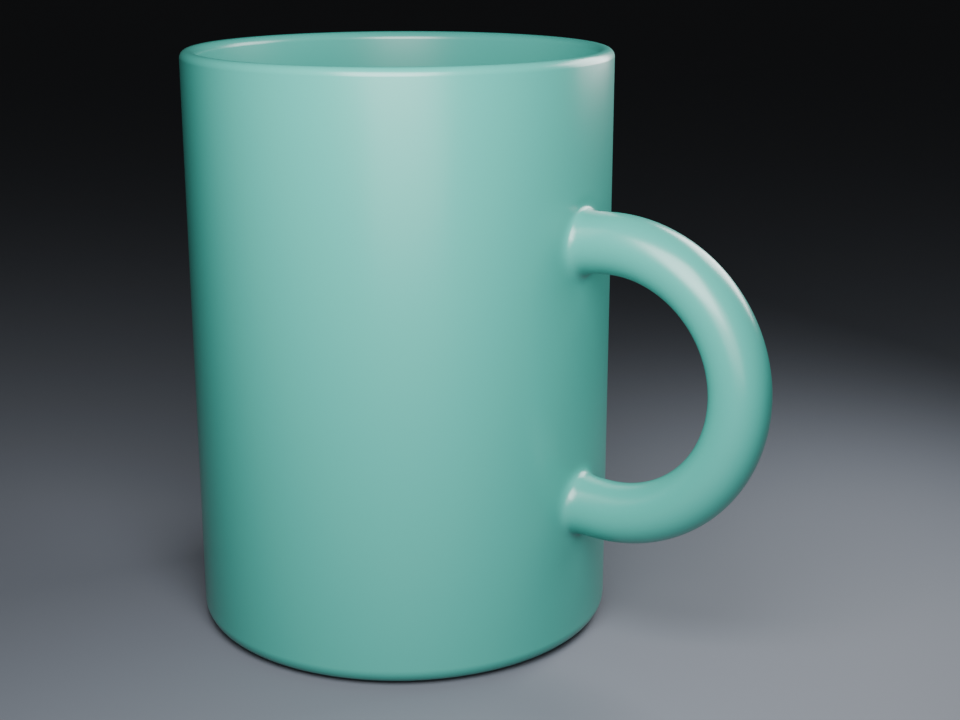 上图未经后期修改;杯柄根部仍有可见凸起,教程也保留了这一问题。 该配方没有动画轨道,增加帧数不会自动生成转台运动。 **0.3.0 新增:** 作品配方与对象编辑、素材库与浏览器资源包导入、摄影编辑、固定视角检查历史、渲染恢复与帧来源,以及公共作者 SDK。 [版本说明](https://github.com/pearjelly/deep-blend/releases/tag/v0.3.0) · [内容创作指南](https://github.com/pearjelly/deep-blend/blob/main/deepblend/docs/recipes.md) · [公共 SDK](https://github.com/pearjelly/deep-blend/blob/main/deepblend/docs/public-api.md) · [完整中文文档](https://github.com/pearjelly/deep-blend/blob/main/README.zh.md) ## 0.3.2:更清楚的 Blender 工作台 可选择浅色、深色或跟随系统,外观会在当前浏览器中记住。场景内容与对象编辑并排显示, 创建和应用操作保持可见;未保存修改与无效数值都有明确提示。DSH 面板和独立工作台会适应窄屏布局。 ## 0.3.1:更容易开始 统一品牌素材、重新组织首页、新增快速开始和按任务浏览的文档入口,安装包也同步更新介绍。 场景工具与运行行为沿用 0.3.0。[变更记录](https://github.com/pearjelly/deep-blend/blob/main/CHANGELOG.md)。 [导入素材](https://github.com/pearjelly/deep-blend/blob/main/deepblend/docs/assets.md) · [修改造型](https://github.com/pearjelly/deep-blend/blob/main/deepblend/docs/modeling.md) · [调整摄影](https://github.com/pearjelly/deep-blend/blob/main/deepblend/docs/photography-editor.md) · [文档导航](https://github.com/pearjelly/deep-blend/blob/main/deepblend/docs/README.md) · [反馈问题或需求](https://github.com/pearjelly/deep-blend/issues) 预览读取绑定所选作品,失败后可明确刷新并保留编辑;见[预览恢复](../../../deepblend/docs/preview-recovery.md)。
Install
dsh plugin --profile web add @deepblend/dsh-blender-bundle@0.9.0
Profile: web
With the hub plugin installed, ask your agent to install it by name — it resolves the same plan shown here.
dsh plugin --profile web add github:stvlynn/dsh.fish#path:packages/dsh-plugin-hub
install deepblend-dsh-blender-bundle from the hub