Bundle
@chance722/dsh-inbox
Personal paste inbox for DeepSeek Harness (dsh): capture, classify, browse and retrieve.
- Source
- Chance722
- stars
- 1 stars
- License
- MIT
- Updated
- Updated 6 days ago
Readme
# dsh-inbox
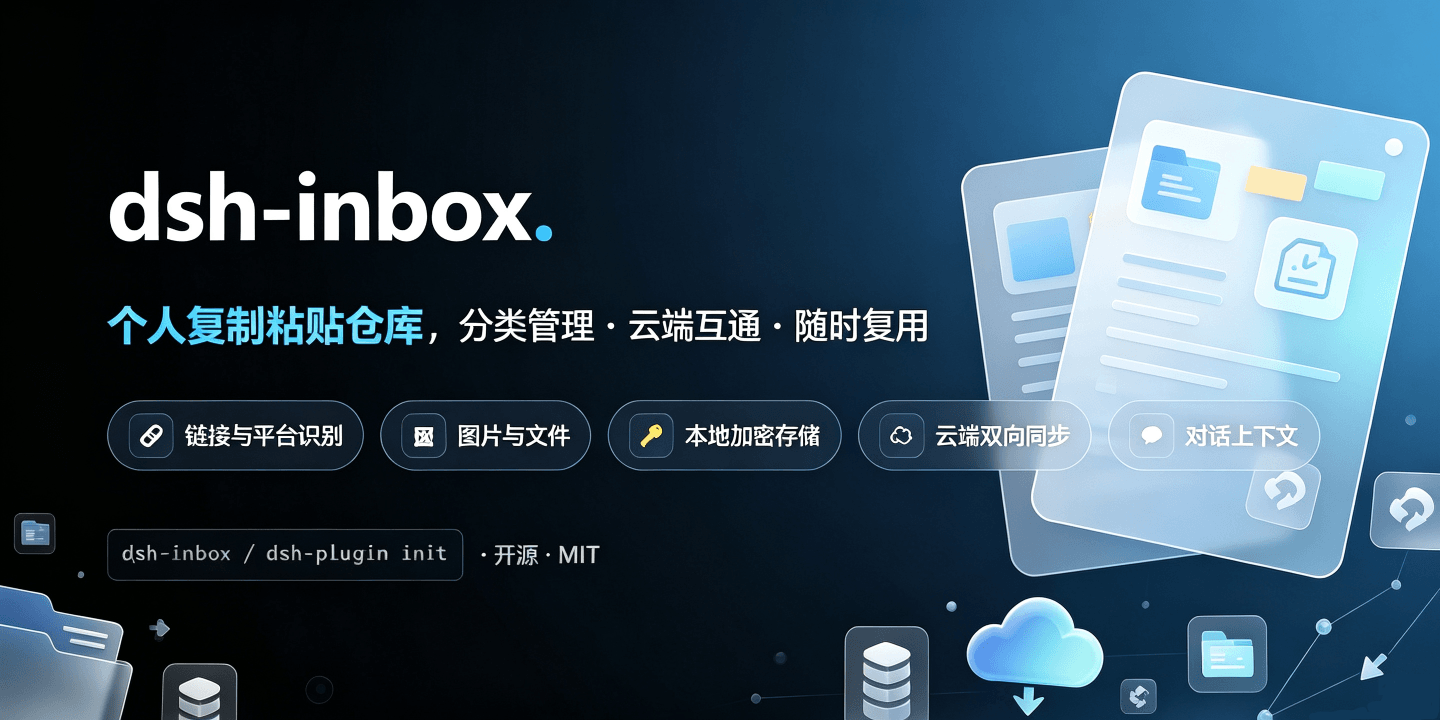
A **local inbox plugin for [DeepSeek Harness](https://github.com/deepseek-ai/deepseek-harness)** (`dsh`): file whatever you copy into one vault, get it back when you need it — including **by asking your assistant in conversation**.
English | [中文](README.zh.md)
## What it is
The things you copy in a day — a link to read later, a screenshot, a config snippet, an account and password — end up scattered across clipboard history, bookmarks and temp files. dsh-inbox keeps them in one local vault: paste to file, automatic classification, browse and search from the sidebar — and instead of digging through it yourself, ask your assistant "what was that article about caching I saved last month?".
Everything lands on your machine, and the model only sees a record when you ask it to look.
## Features
| Feature | What it does |
|---|---|
| **Two ways in** | `/inbox <text or link>` in the composer (attach images to carry them along), or paste / drop / pick a file in the panel |
| **Automatic classification** | Links by platform and media type (60-odd sites: Bilibili, YouTube, WeChat, 掘金, Zhihu…), text by credential shape, images get a 疑似证件 tag at card proportions; the rest goes to the model, with a daily cap |
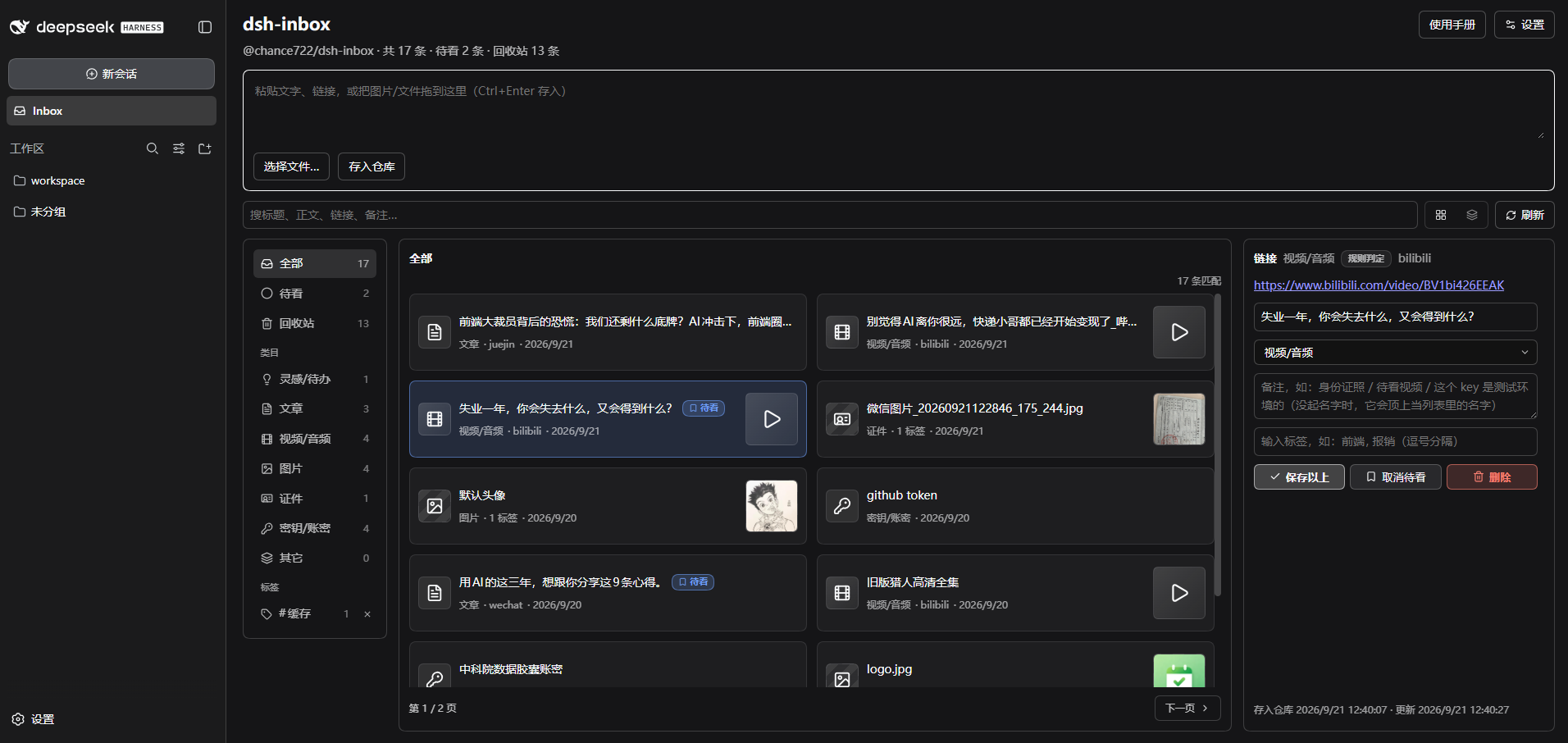
| **Panel** | Filter by watch-later / category / tag, search title, text, link and note, two list densities; the detail pane edits name, category, note and tags, flags watch-later, deletes and restores — and it follows dsh's theme **and language** |
| **Every record has a name** | A link takes the page's own headline (no model tokens), a photo or file its file name, and the name you type always wins. A page that will not be read — an anti-bot page, a dead link — leaves the address as the name rather than a guess |
| **Who judged the category** | A coloured badge: 规则判定 (local rules) / 模型判定 (the capped model pass) / 手动判定 (yours — nothing overwrites it later) |
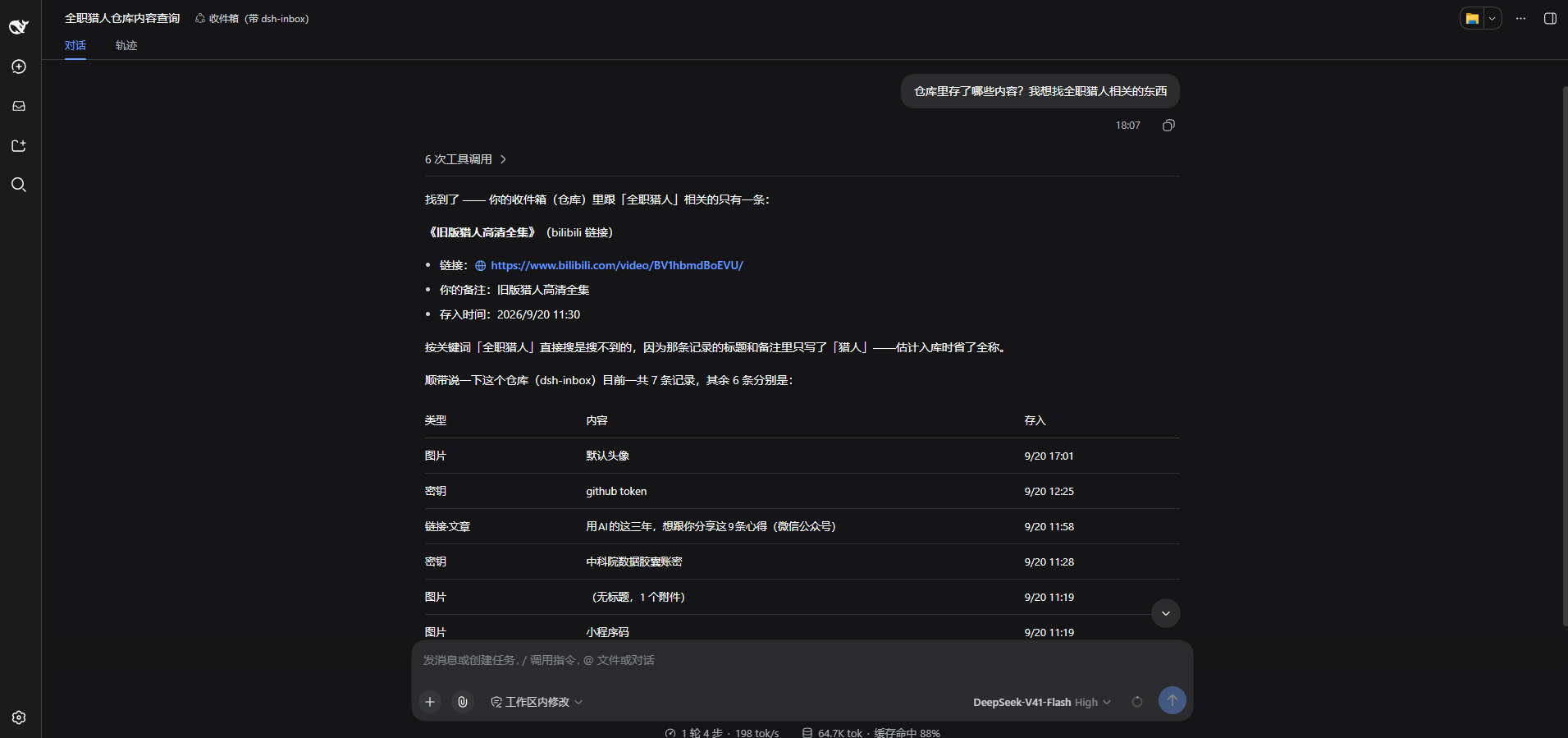
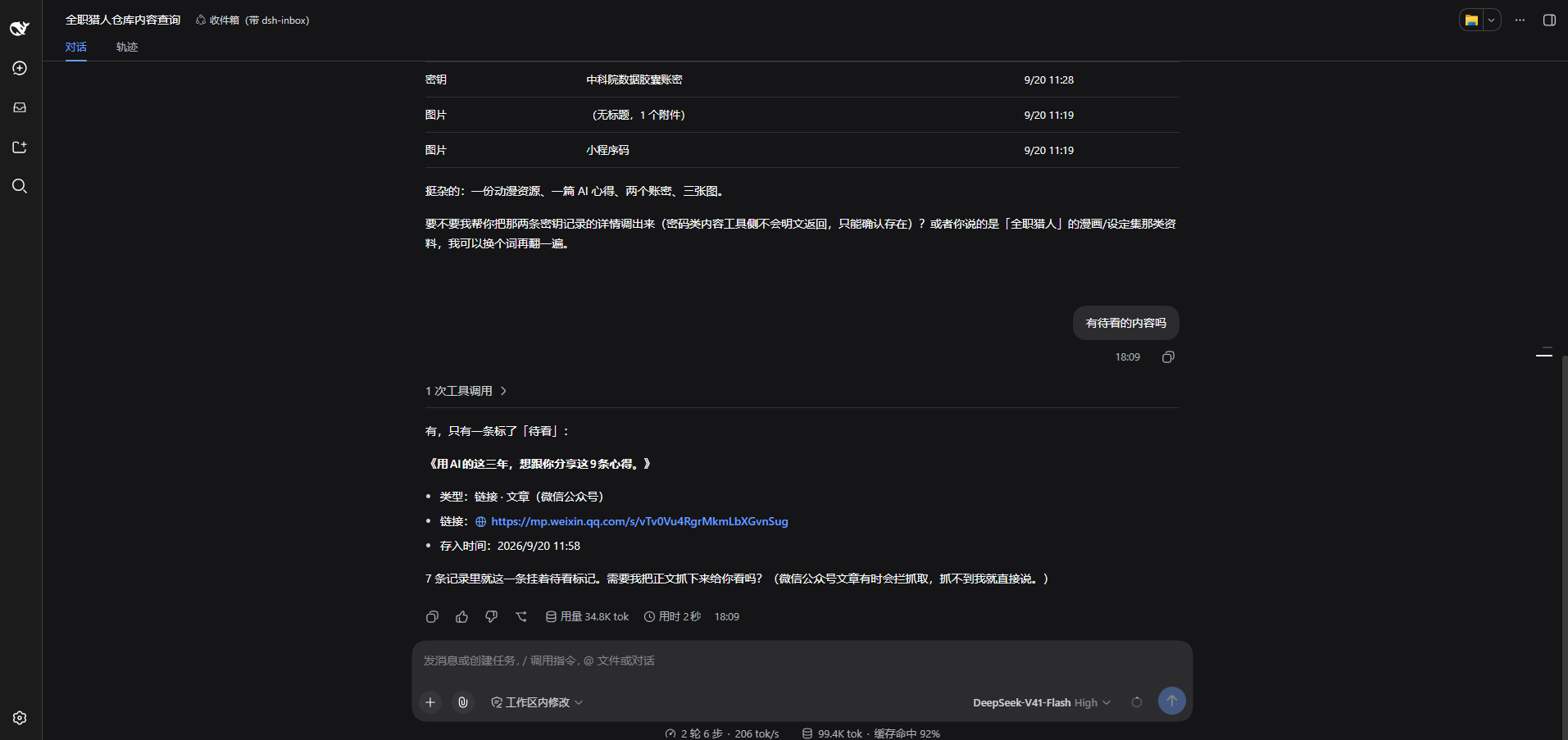
| **Ask in conversation** | Ask for 收件箱 / 仓库 / inbox and the assistant searches by words, category, tag, watch-later flag or kind (ten at a time plus a count, thumbnails inline) and opens one by id (text up to 1000 characters, link, note, tags, attachments). 「打开 ↗」 under an answer jumps to that record in the 仓库 tab |
| **Looking at a picture** | Image bytes stay out of the conversation; ask the assistant to look at one and that single image is sent — explicitly, per call |
| **Credentials are safe** | The body is encrypted at rest, with a key derived from your master password — neither is ever written down. The list shows only the name you gave it, and plain text never reaches a conversation or a model |
| **Two-way sync** | Point it at a WebDAV folder or an S3 bucket: changes push a few seconds later, 刷新 runs a full push-then-pull merged per record by `id` + timestamp, and emptying the recycle bin deletes the cloud copies too. Two machines see each other when they share one 「目录」 |
| **Conversation cards** | Tool results render as dsh-inbox cards — links clickable, image markers drawn as thumbnails on your machine |
| **Gateway quirks** | Some object-storage gateways bind each AccessKey to an "application" and identify clients by a header — so the plugin keeps **one client identity per protocol** |
## Screenshots
## Two ways to use it
**① File something from the conversation**
`/inbox` in the composer, followed by text or a link, with images attached right there — **this never reaches the model**, it only goes into the vault. That is the way to file credentials and throwaway links.
**② Ask for it later**
No command, just talk:
> which of my saved images is the mini-program code?
>
> show me that article about caching I saved last week
>
> list the links in my inbox I haven't read yet
Two questions in the same conversation, on a real machine:
## Install
Needs Node ≥ 22 and a working `dsh`; the installer brings pnpm along when your machine does not have it. **Windows only so far** — macOS and Linux are unverified.
```powershell
# install (`dsh web` is `dsh --profile web`, so this is the profile you already start)
npx @chance722/dsh-inbox init --profile web --install-pnpm
# never run dsh on this machine? create the profile in the same command
npx @chance722/dsh-inbox init --profile web --create-profile --install-pnpm
# update (init only installs and wires things up — re-running it never upgrades;
# minutes after a release, write the exact version instead: @0.2.8)
dsh plugin --profile web add @chance722/dsh-inbox@latest
```
**Restart dsh** afterwards, then start it as usual. **Inbox** is in the left rail, and a new session's assistant can look things up ("what links in my inbox haven't I read yet?").
`init` also copies dsh's shipped `standard` preset to `~/.dsh/.agent-presets/inbox/` with this plugin added, and points your default preset at it — that is what lets the assistant see the inbox tools. It becomes a snapshot that will not follow later dsh upgrades; both it and the profile are reversible (see Uninstall).
To keep your daily dsh untouched, give the plugin its own profile and port: `npx @chance722/dsh-inbox init --create-profile`, then `dsh --profile inbox --no-open --port 3102`.
Other flags: `--profile <name>`, `--install-pnpm`, `--no-default`, `--help`.
### From a local checkout
```powershell
git clone <this repo> dsh-inbox ; cd dsh-inbox
pnpm install ; pnpm build
node lib/cli.js init --package <absolute path to this repo>
```
### Uninstall
```powershell
# 1. remove the package from the profile you installed it into
# (also drops it from dsh.profile.bundles)
dsh plugin --profile <that profile> remove @chance722/dsh-inbox
# 2. delete what init created
rm -r ~/.dsh/.agent-presets/inbox # the preset copy
# default preset: delete agent-presets.default in ~/.dsh/settings.yaml (falls back to the
# deployment default) or set it to standard; every init left a settings.yaml.bak-* backup
# 3. and the profile itself, if you made one just for this
rm -r ~/.dsh/profiles/<that profile>
```
**Uninstalling does not delete your vault.** To remove the records too: `rm -r ~/.dsh/storages/dsh_inbox`.
## Where things live
Everything under `%DSH_HOME%` (`C:\Users\<you>\.dsh` on Windows):
| What | Where |
|---|---|
| Records: text, links, category, note, tags, watch-later… | `storages\dsh_inbox\items\*.json`, one file each |
| Attachment index (mime / size / original name) | `storages\dsh_inbox\attachments\*.json` |
| The **bytes** of images, videos and files | `attachments\` — dsh's own content-addressed store, never auto-deleted |
| Remote password / S3 AccessKey Secret | dsh's credential store, `.credentials.yaml` |
| Remote settings (URL, bucket, client identity…) | dsh's own settings |
### What the remote looks like
With a remote configured and `/inbox` as the directory:
| Remote path | What it is |
|---|---|
| `inbox/<whatever you drop>` | The **drop folder**: any device drops files here and this one ingests them |
| `inbox/sync/items/<record id>.json` | One record, **machine-readable** — the source of truth for sync |
| `inbox/sync/items/<record id>.txt` | The same record, **readable** (text, note, which attachments it points at) |
| `inbox/sync/attachments/<attachment id>.<ext>` | Attachment **bytes** (images, video, PDFs open as themselves) |
| `inbox/sync/attachments/<attachment id>.meta.json` | The attachment's metadata (original name, dimensions, size, digest) |
| A 0-byte key ending in `/` | A folder marker the cloud drive made itself, not us |
### How syncing works
- **Automatic**: a push seconds after a capture or edit (debounced — several quick saves are one push); 「刷新」 is a full sync: push → pull → re-read the list.
- **Merging**: per `id` + timestamp, the newer write wins, no conflict copies; needed attachment bytes come down with the record.
- **Two machines**: one shared 「目录」 (blank, `/` and `inbox` are the same). Records a machine left under an older directory come back if you tick **Merge other sync directories too** in the settings.
- **Deleting**: 「删除」 only moves a record to the bin and the other devices are told it is gone; emptying the bin deletes the cloud copy as well, and it stays deleted — a copy sitting in another sync directory cannot file it back in.
## Privacy and security
- **Credential bodies are encrypted at rest** (AES-256-GCM, key derived from your master password). Neither the password nor the key is written down: the vault locks on every restart and you unlock it under 设置 → 账密加密, and a forgotten password means unrecoverable ciphertext. With no master password set, a credential is **refused rather than stored in the clear**.
- **That covers the body only**: notes, categories, tags, timestamps and attachment **bytes** are not encrypted — a key inside a pasted file is still a key inside a file.
- **Masked where it matters**: a credential is listed by the name you gave it, and its plain text never reaches a conversation or a model.
- **Pictures**: classification does send an image to the model, and the conversation gets an `[attachment:id]` marker — that one image is sent only when you explicitly ask the assistant to look at it.
- **The model cannot see your vault** unless you ask it to look, and classification requests are redacted first.
- **Your remote needs access control**: only credential bodies are ciphertext up there — text, links, notes and attachment bytes are in the clear, and the master password and key never sync.
- **One thing the install changes outside the panel**: reading a pasted link's headline is the plugin's only outbound request (one GET, only for links captured on this machine, never for links that came through sync). It goes out with a **browser-shaped** identity, an override of `web-fetch-http.userAgent` shipped in this package's `cordis.patch.yml`. That identity is the whole profile's, the model's own web tools included; **your own `cordis.patch.yml` overrides it**. Details: [docs/help/link-title-fetch.md](docs/help/link-title-fetch.md).
## Development
```powershell
pnpm install
pnpm build # lib/index.js (host) + lib/client.js (panel) + lib/cli.js (init) + lib/types
pnpm typecheck
pnpm test # vitest
```
Client-side changes need `pnpm build` (dsh's client-hmr reloads the page); host-side changes need a restart. Details in [docs/help/dev-setup.md](docs/help/dev-setup.md), milestones in the [development bus](docs/feature/dev-bus.md).
To switch the profile you actually run between the **published package** and **this checkout** (default profile `web`; set `DSH_PROFILE` for another):
```powershell
pnpm dev:status # which one is in use right now
pnpm dev:npm # point it at the published version
pnpm dev:local # point it back here (builds first, then links)
```
## License
MIT
Install
dsh plugin --profile web add github:Chance722/dsh-inbox#a5f7a5229979de50be132ad7202d6483e9cbc526
Profile: web
With the hub plugin installed, ask your agent to install it by name — it resolves the same plan shown here.
dsh plugin --profile web add github:stvlynn/dsh.fish#path:packages/dsh-plugin-hub
install chance722-dsh-inbox from the hub
- This package builds from source on install. pnpm will ask you to allow its build script — that is permission to run the package’s code on your machine, outside the agent sandbox. Only allow sources you trust.